Your personal data is worth more on the dark web than you might think. Email addresses, passwords, phone numbers, Social Security numbers, they’re bought and sold in bulk across underground marketplaces that most people will never see. The problem isn’t that breaches happen. It’s that most people find out months or years too late, if ever.
That’s exactly where dark web scanning comes in.
Over the past few years, major companies, such as Google, Experian, and Norton, have rolled out their own dark web scanning tools, each promising to tell you whether your information has been exposed. Some are genuinely useful. Some are little more than upsell funnels dressed up as a security service. And a few free options quietly outperform the paid ones.
This guide cuts through the noise. You’ll learn how dark web scanning actually works, what separates a real scan from a superficial one, and how the most popular tools compare side by side so you can make an informed decision rather than just trusting a brand name.
If you want to run a free scan right now before reading further, DeXpose’s free dark web report checks your exposed data in seconds with no credit card required.
What Is a Dark Web Scan and How Does It Actually Work?
The dark web is a part of the internet that isn’t indexed by search engines and cannot be accessed through a standard browser. It requires special software like Tor to reach. While it has legitimate uses, it’s also home to a thriving economy built on stolen data, leaked databases, credential dumps, compromised financial records, and more.
A dark web scan is a process that searches known dark web sources, forums, marketplaces, data dump sites, and breach repositories to check whether your personal information appears anywhere it shouldn’t. Instead of you having to venture into that environment yourself, a scanning tool does it for you. It surfaces any matches tied to your email address, phone number, passwords, or other identifying details.
What a Dark Web Scan Actually Searches
No tool has complete visibility into the entire dark web. What reputable scanners do is maintain continuously updated databases of known breach data, billions of records collected from past leaks, and ongoing monitoring of dark web activity. When you submit your email address or other details, the tool checks that information against its database and flags any matches.
The quality of a scan depends almost entirely on the size and freshness of that database. A tool that hasn’t updated its breach data in six months may completely miss recent exposures that put you at real risk today.
What a Scan Can and Cannot Find
A good dark web scan can tell you whether your email address, passwords, phone number, or personal records have appeared in a known breach or data leak. It can identify which breach the data came from, what type of information was exposed, and in some cases, how recently it happened.
What it cannot do is monitor live dark web activity in real time or guarantee complete coverage. The dark web is fragmented by design; there is no single index to search. Even the most sophisticated tools are working from aggregated intelligence, not a live feed. This is why continuous monitoring matters far more than a single one-time scan, which is only ever a snapshot of what’s known at that moment.
Why This Matters More Than Most People Realize
The average data breach goes undetected by the victim for over 200 days. By the time you notice suspicious activity on your accounts, your credentials may have already been sold, reused in credential stuffing attacks, or packaged into a larger identity fraud operation. A dark web scan won’t undo a breach, but it gives you the earliest possible warning so you can act before the damage compounds.
Are Dark Web Scans Actually Worth It?
It’s a fair question, and the honest answer is: it depends entirely on which tool you use and what you do with the results.
The concept itself is sound. If your email address, password, or personal information has appeared in a breach, knowing about it quickly gives you a real window to change your credentials, freeze your credit, and secure your accounts before that data gets weaponized against you. That early warning has genuine value.
The problem is that the market for dark web scanning is cluttered with tools that offer a veneer of security without much substance. Some run a shallow check against a limited database, show you a scary-looking results page, and then push you toward a paid subscription. Others are bundled into credit monitoring services where the dark web scan is an afterthought rather than a core capability.

The Difference Between a One-Time Scan and Continuous Monitoring
A one-time scan is a point-in-time check. It tells you whether your data appears in breaches that have already been discovered and indexed. That’s useful, but breaches are discovered constantly, and new credential dumps surface on dark web forums every week.
Continuous monitoring watches your information around the clock and alerts you when it appears in newly discovered breaches. For most people, this is the more valuable service. A single scan run today tells you nothing about what gets exposed tomorrow.
Think of a one-time scan the way you’d think of a single cholesterol test. Useful to know where you stand right now, but not a substitute for ongoing awareness.
Why Most Free Scans Only Scratch the Surface
Free dark web scans from large consumer brands are almost universally designed with one goal in mind: acquisition. They offer just enough to demonstrate value, then gate the meaningful features behind a paid tier. Google One’s dark web report, for example, was initially restricted to paid subscribers entirely. Experian’s free scan checks a narrow slice of your data and then funnels you toward a credit monitoring plan.
That doesn’t make them worthless, but it does mean the free version of most big-brand tools is a preview, not a complete service.
The better question isn’t whether free dark web scans are worth it. It’s whether the free tool you’re using is actually running a thorough check or just showing you enough to make you pay for the rest.
So Should You Bother?
Yes, with the right tool. If a scanner checks your email address, passwords, phone number, and identity records against a comprehensive and regularly updated breach database, and does so without burying the real results behind a paywall, it’s absolutely worth running. The risk of ignoring your exposure is significantly higher than the two minutes it takes to find out where you stand.
DeXpose’s free dark web report runs a full check across all of those data points at no cost, with no credit card and no upsell wall between you and your results.
The 8 Most Popular Dark Web Scan Tools Reviewed
Not all dark web scanners are built the same. Some are standalone security tools. Others are features bolted onto credit monitoring or password manager subscriptions. A few are genuinely free. Many are not. Here’s an honest look at each of the major players, what they actually check, what they miss, and who they’re really built for.

DeXpose Free Dark Web Report Full Coverage, No Credit Card
DeXpose takes a different approach from the tools above. Rather than bundling dark web scanning into a credit monitoring subscription or gating results behind a paid tier, it offers a comprehensive free dark web report with no account required, and no upsell between you and your results.
It checks your email address, passwords, phone number, and personal identity data against an extensive, continuously updated breach database that covers the types of exposure most free tools from consumer brands deliberately exclude from their free tier. The results are immediate, the interface is straightforward, and there’s no pressure to upgrade to see what was actually found.
For individuals who want to know exactly where their data stands without committing to a subscription, DeXpose’s free dark web report is the most complete no-cost option available.
Google One Dark Web Scan: What It Checks and What It Misses
Google’s dark web report was introduced as part of the Google One subscription and has since been made available to all Google account holders in supported regions. It monitors your Gmail address and any additional personal details you manually provide, such as phone number, name, address, and date of birth, against known breach data.
The coverage is reasonable for a free tool, and the interface is clean and easy to understand. The limitation is that it’s tightly scoped to the information you explicitly register, and it doesn’t extend to other email addresses you might use outside the Google ecosystem. It also lacks the depth of a dedicated security platform. This is a consumer-facing feature, not a professional-grade monitoring service.
Best for users already inside the Google ecosystem who want basic visibility. Not a substitute for comprehensive monitoring.
Experian Dark Web Scan Legit Tool or Upsell Funnel?
Experian is one of the most searched names in this space, and the questions people ask say a lot: Is the Experian dark web scan legit? Is it safe? Is it a scam?
The short answer is that it’s a legitimate service. Experian is a major credit bureau, and the scan itself does check your email and some personal data against breach databases. The longer answer is that the free version is deliberately limited. What Experian offers for free is a one-time snapshot. Continuous monitoring is available only with their paid IdentityWorks subscription, and the entire free scan experience is designed to move you toward that product.
It’s not a scam. It’s a lead-generation tool that also provides real value. Go in with that expectation, and it’s useful. Go in expecting comprehensive protection, and you’ll be disappointed.
Norton and LifeLock Dark Web Monitoring: Is It Worth the Price?
Norton’s dark web monitoring, delivered through its LifeLock identity protection plans, is among the more robust consumer options available. It monitors a broader range of personal data than most free tools, including email addresses, Social Security numbers, phone numbers, bank account details, and driver’s license numbers. It provides real-time alerts when matches are found.
The catch is cost. LifeLock plans start at a meaningful monthly fee, and the full-featured tier that covers all data types is considerably more expensive. For individuals who want comprehensive identity monitoring and are willing to pay for it, Norton LifeLock is a credible option. For someone who simply wants to check whether their email has been compromised, it’s far more than necessary.
Aura Dark Web Scan Features and Limitations
Aura positions itself as an all-in-one digital safety platform, and dark web monitoring is one component of a broader suite that includes identity theft protection, antivirus, VPN, and financial fraud alerts. Its dark web scanning capability is solid; it monitors multiple types of personal information and delivers timely alerts.
Like Norton, Aura is a subscription product. There’s a free trial, but sustained monitoring requires a paid plan. It’s a well-designed service for users who want a single platform covering multiple threat vectors. If dark web scanning is your only concern, the additional features may feel like overhead you’re paying for without using.
Credit Karma and CreditWise Dark Web Alerts: How Useful Are They?
Both Credit Karma and Capital One’s CreditWise offer dark web monitoring as a free feature. They check your email address against known breach databases and send alerts when new exposures are detected. For what they are, free add-ons to financial services platforms, they’re genuinely useful.
The limitation is scope. These tools monitor your email address and not much else. They won’t catch phone number exposures, credential leaks tied to usernames, or identity data beyond what’s linked to your primary email. They’re a reasonable first layer of awareness, not a complete solution.
Firefox Monitor: Good Free Option or Too Basic?
Firefox Monitor, Mozilla’s free dark web scanning tool, is powered by the Have I Been Pwned database, one of the most well-known and widely respected sources of breach intelligence. It checks your email address against a large repository of known breaches and alerts you when new ones are discovered.
It’s genuinely free, requires no subscription, and is backed by a trustworthy source. The limitation is that it’s email-only and entirely dependent on the Have I Been Pwned dataset. It won’t check passwords, phone numbers, or identity documents, and it doesn’t offer the kind of expanded personal data monitoring that dedicated platforms provide. For a free, lightweight check on a single email address, it’s a solid option. For anything beyond that, you’ll need more.
Dashlane, LastPass, and Keeper Password Manager Scans Compared
Several popular password managers have built dark web scanning directly into their platforms, scanning your saved credentials against breach databases and alerting you when a stored password appears in a known leak.
Dashlane’s dark web monitoring is one of the more proactive among password managers. It scans automatically and sends alerts without requiring you to initiate a check. LastPass and Keeper offer similar functionality, though the depth of monitoring varies by plan tier.
These tools are valuable in a specific context: if you’re already using a password manager and want breach alerts tied directly to your saved credentials. They are not designed as standalone dark web scanners, and they won’t surface exposure of personal data beyond what’s stored in your vault.
What Should a Dark Web Scan Actually Check?
Most people assume that entering an email address is all a dark web scan needs to do its job. In reality, your digital footprint is far broader than a single email, and a scan that checks only one data point leaves significant exposure undetected. Here’s what a thorough dark web scan should cover and why each one matters.

Email Address Exposure
Your email address is the most commonly leaked piece of personal data on the dark web, and for good reason, it’s the key to almost everything else. It unlocks password reset flows, serves as a username on hundreds of platforms, and, when paired with a breached password, gives an attacker a ready-made credential to test across the web.
A proper scan doesn’t just confirm that your email appeared somewhere. It should tell you which breach it came from, what other data was exposed alongside it, and how recently the leak occurred. An exposure from 2019 that you’ve already addressed is very different from one discovered last month.
Passwords and Credentials
Leaked passwords are among the most actionable pieces of data on the dark web. When a platform is breached, user credentials are often dumped in bulk and traded or sold within hours. If you reuse passwords across multiple accounts, and most people do, a single breach can cascade into account takeovers across your entire digital life.
A dark web scan should check whether any of your known passwords have appeared in breach data. If they have, those passwords need to be changed immediately, not just on the breached platform, but everywhere they were reused.
Phone Number Leaks
Phone number exposure is increasingly serious and consistently underestimated. A leaked phone number enables SIM-swapping attacks, in which a criminal convinces your carrier to transfer your number to a device they control, bypassing SMS-based two-factor authentication entirely. It also opens the door to targeted phishing, smishing, and social engineering.
Many free scanning tools don’t check phone numbers at all. It’s one of the clearest differentiators between a surface-level scan and one that takes your full exposure seriously.
Identity Documents and Personal Data
Name, date of birth, home address, Social Security number, passport details. When this category of data appears on the dark web, the consequences extend well beyond compromised accounts. It enables full-scale identity fraud: fraudulent credit applications, tax return theft, and synthetic identity creation, which can take years to untangle.
Not every scan checks for this level of exposure, and, understandably, it requires a more sophisticated monitoring infrastructure. But if identity theft protection is your goal, a scan that only checks your email is giving you incomplete information.
Domain and Business Credential Exposure
For business owners and organizations, the risk extends beyond personal data. Corporate email credentials, internal login details, employee records, and domain-associated data are frequently found in breach databases. A single compromised employee credential can serve as an entry point for a much larger network intrusion.
If you run a business, your dark web scan strategy should cover your domain and associated email addresses, not just your personal accounts. Tools that offer domain-level scanning provide a meaningfully different level of visibility than consumer-grade options.
Running a scan that covers all of these areas doesn’t require paying for multiple subscriptions. DeXpose’s free dark web report checks across all of these data types in a single scan, giving you a complete picture of your exposure rather than a partial one.
Free Dark Web Scan vs. Paid Monitoring: What’s the Difference?
The distinction between a free dark web scan and a paid monitoring service is one of the most misunderstood aspects of this space, largely because companies have a financial interest in blurring the line. Here’s what the difference actually looks like in practice.

What Free Tools Typically Cover
A free dark web scan is a one-time check. You submit your email address or other details, the tool searches its breach database, and you get a report of what it found at that moment in time. Done well, this is genuinely valuable. It tells you whether your data has appeared in any known breaches to date and provides a clear starting point for securing your accounts.
The quality varies significantly between tools. Some free scans check only your email address against a limited dataset. Others, like DeXpose’s free dark web report, run a comprehensive check across email addresses, passwords, phone numbers, and personal identity data without requiring a subscription to see the full results.
The honest limitation of any free one-time scan isn’t the depth of what it checks. It’s the fact that the dark web keeps producing new breach data even after you close the results page.
What Continuous Monitoring Adds
Paid dark web monitoring services don’t necessarily check more data types than a good free scan. The real difference is that they keep checking, automatically, on an ongoing basis.
New breaches are discovered constantly. Credential dumps surface regularly on dark web forums. A company you did business with three years ago might suffer a breach today, and your records from that relationship could appear in a dark web marketplace within hours. A one-time scan will never catch that. Continuous monitoring will alert you while you still have time to act.
For most individuals, the practical value of continuous monitoring comes down to timing. The faster you know, the more control you have over the outcome.
Who Actually Needs a Paid Plan
The answer depends less on budget and more on your personal risk profile and how much of your life is tied to digital accounts and services.
If you handle sensitive financial transactions, run a business, manage other people’s data, or have previously been the victim of identity theft, continuous monitoring is a worthwhile investment. The cost of a monitoring subscription is trivial compared to the time, legal effort, and financial damage involved in recovering from full identity fraud.
If you’re an individual with a standard digital footprint, a few email accounts, common online services, and no particular reason to believe you’re a high-value target, a thorough free scan run periodically is a reasonable baseline. Run one now, act on anything it surfaces, change the relevant passwords, and repeat every few months or after any major platform breach makes the news.
The worst position to be in is doing nothing. Whether you start with a free scan or move straight to continuous monitoring, the first step is simply knowing where your data currently stands.
DeXpose’s free dark web report is the most complete starting point available at no cost, and for many users, it’s all they need to get a full, actionable picture of their exposure.
How to Run a Dark Web Scan Step by Step
Most people put off running a dark web scan because they assume it’s complicated or requires creating yet another account with yet another service. With DeXpose, it isn’t. The entire process takes less than two minutes, requires no subscription, and gives you a complete picture of your exposure the moment the scan completes.
Here’s exactly how it works.
Step 1: Go to the DeXpose Free Dark Web Report Page
Head to dexpose.io/free-darkweb-report. No account creation, no credit card form, no lengthy signup process. You land directly on the scan tool because the point is to give you answers, not to collect your information before you’ve seen any value.
Step 2: Enter the Information You Want to Check
Submit the details you want DeXpose to scan against its breach database. At minimum, start with your primary email address; it’s the most commonly exposed data point and the one most likely to surface results quickly.
If you want a fuller picture of your exposure, you can also check your phone number and other personal details. The more you check, the more complete your results will be. Most people are surprised by how many data points have appeared in breaches they were never notified about.
Step 3: Let DeXpose Search Its Breach Database
DeXpose runs your submitted details against an extensive, continuously updated database of dark web breach data, including leaked credential dumps, compromised databases, and identity records traded across dark web marketplaces. This isn’t a surface-level check against a single public dataset. It’s a comprehensive search across the kind of breach intelligence that most free consumer tools keep behind a paywall.
The scan itself takes seconds.
Step 4: Review Your Results
Your report surfaces everything DeXpose found tied to the information you submitted, including the breaches your data appeared in, the types of information exposed in each case, and how recently the breaches occurred. The results are presented clearly, without burying the important findings in vague language or saving the real detail for a paid upgrade.
If your data appears in multiple breaches, the report breaks them down individually so you know exactly what was exposed, not just a generic warning that something was found.
Step 5: Act on What You Find
A scan is only as valuable as what you do with the results. Here’s how to prioritize your response:
If exposed passwords are flagged, change them immediately on the breached platform and on every other account where you reused that password. This is the single most impactful action you can take after a credential exposure.
If your email address is involved in a breach, check whether the associated account is still active, and secure it with a strong, unique password and two-factor authentication if you haven’t already.
If personal identity data has been exposed, name, phone number, address, or more sensitive details, consider placing a credit freeze with the major bureaus. It’s free to do and prevents anyone from opening new credit in your name without your authorization.
If your results come back clean, that’s genuinely good news, but it’s a snapshot, not a permanent status. Breaches are discovered continuously, and data that isn’t exposed today could surface tomorrow. Running periodic scans or keeping an eye on major breach announcements keeps you ahead of the risk rather than reacting after the damage is done.
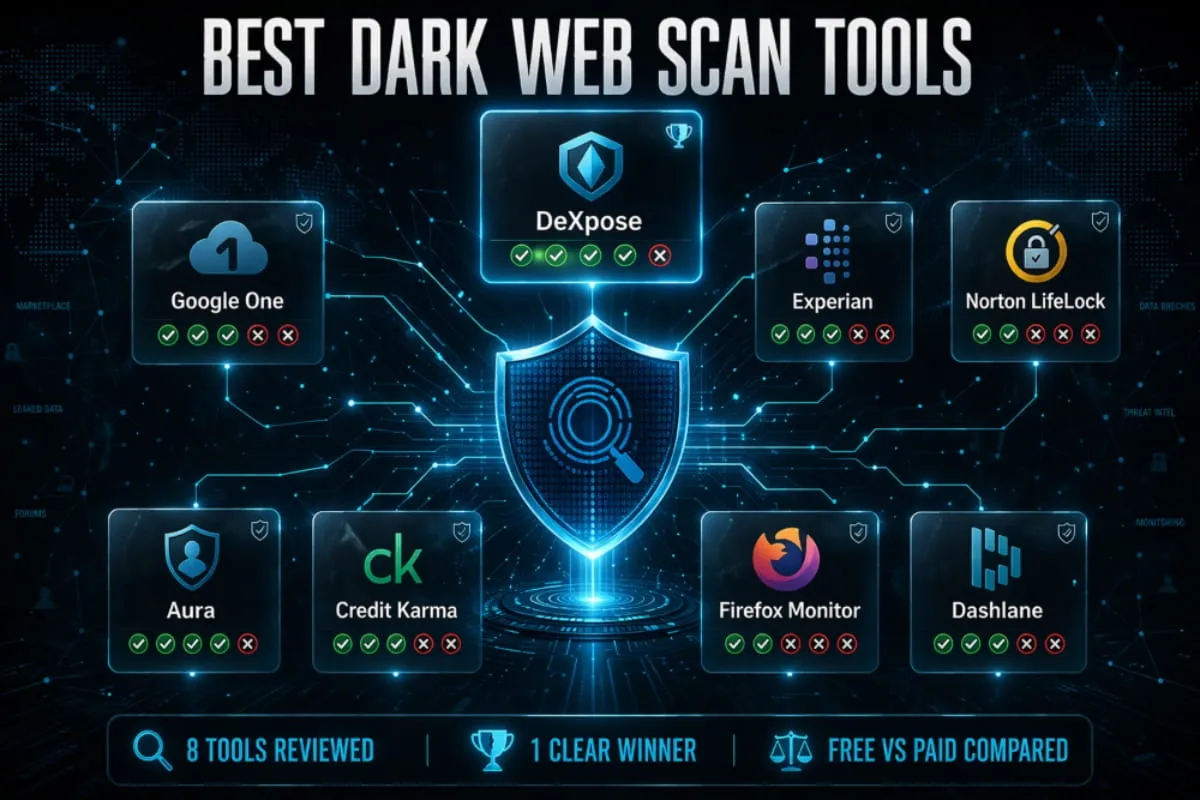
How the Top Dark Web Scan Tools Compare
The reviews above give you the full picture of each tool. This table condenses it into a side-by-side view so you can see at a glance where each scanner stands across the factors that actually matter.
Let me build this as a clean, standalone HTML table, properly formatted for the page and easy to drop into your CMS. And here’s the copy that sits above and below the table on the page:
The reviews above give you the full picture of each tool. This table condenses it into a side-by-side view so you can see at a glance where each scanner stands across the factors that actually matter, not just whether it exists, but whether it’s genuinely useful without pulling out your credit card.
Dark Web Scan Tools — Side by Side
How the most popular scanners stack up across the factors that actually matter.
| Tool | Fully Free | No Signup | Email Scan | Password Scan | Phone Scan | Identity Data | Continuous Alerts | No Upsell Wall |
|---|---|---|---|---|---|---|---|---|
| DeXpose Dedicated Scanner ★ Recommended | ✓ | ✓ | ✓ | ✓ | ✓ | ✓ | ✓ | ✓ |
| Google One Ecosystem Feature | ✓ | ✗ | ✓ | ✗ | ~ | ~ | ✓ | ✓ |
| Experian Credit Bureau Add-on | ~ | ✗ | ✓ | ✗ | ~ | ~ | ✗ | ✗ |
| Norton LifeLock Paid Identity Protection | ✗ | ✗ | ✓ | ✓ | ✓ | ✓ | ✓ | ✗ |
| Aura All-in-One Platform | ✗ | ✗ | ✓ | ✓ | ✓ | ✓ | ✓ | ✗ |
| Credit Karma Financial Service Add-on | ✓ | ✗ | ✓ | ✗ | ✗ | ✗ | ✓ | ✓ |
| Firefox Monitor Browser Feature | ✓ | ✗ | ✓ | ✗ | ✗ | ✗ | ✓ | ✓ |
| Dashlane Password Manager | ~ | ✗ | ✓ | ✓ | ✗ | ✗ | ✓ | ✗ |
ⓘ Ratings reflect capabilities of each tool's free tier where applicable. Paid plan features may differ. Data accurate as of 2026.
The pattern is hard to miss. Most tools either charge for meaningful coverage or restrict what the free tier actually shows you. DeXpose is the only option in this comparison that checks all eight criteria at no cost, with no account wall between you and your results. Run your free dark web report here.
Conclusion
Your personal data doesn’t disappear once it’s been exposed; it circulates, gets repackaged, and resurfaces in new attacks for months or years after the original breach. The tools reviewed in this guide range from genuinely useful to little more than marketing funnels, and knowing the difference matters.
Running a dark web scan costs nothing and takes less than two minutes. The only question is whether the tool you use actually shows you the full picture.
DeXpose’s free dark web report does exactly that: no subscription, no hidden results, no upsell, just a clear, complete view of where your data stands today.
Frequently Asked Questions (FAQ’s)
Is the Experian dark web scan legit or a scam?
Experian’s dark web scan is a legitimate service. Experian is one of the three major credit bureaus and a well-established company. The scan itself checks your data against breach databases and surfaces real results. The frustration most people encounter is that the free version is intentionally limited, designed to introduce you to their paid IdentityWorks subscription rather than give you a complete picture of your exposure. It’s not a scam, but it is a lead generation tool. If you want a free scan that doesn’t gate meaningful results behind a paywall, DeXpose’s free dark web report gives you full coverage at no cost.
Is Google’s dark web scan actually free?
Yes, Google’s dark web report is now available to all Google account holders in supported regions, not just paid Google One subscribers as it was when it launched. It monitors your Gmail address and any personal details you manually add to your account. The limitation is that it only covers information within the Google ecosystem and doesn’t extend to other email addresses, passwords stored outside Google, or broader identity data. It’s a useful starting point if Gmail is your primary account, but it’s not a comprehensive scan.
Can you scan the dark web yourself?
Technically, yes, the dark web is accessible via the Tor browser, and some breached data is publicly visible on certain forums and paste sites. In practice, manually searching the dark web for your own data is neither practical nor safe. The dark web is vast, fragmented, and constantly changing. What a dedicated scanning platform can check in seconds against billions of records would take an individual an unrealistic amount of time, with far less coverage. The smarter approach is to useto use a tool that already has the infrastructure to do this at scale.
How often should I run a dark web scan?
At a minimum, run a full scan whenever a major breach involving a platform you use makes the news. Beyond that, running a scan every two to three months is a reasonable baseline for most individuals. If you’ve previously had data exposed or handled sensitive information professionally, more frequent checks are worthwhile. The most effective approach is continuous monitoring, which alerts you automatically when new exposure is detected rather than relying on you to remember to check.
What’s the most accurate free dark web scan available?
Accuracy in dark web scanning comes down to two things: the size of the breach database being searched and how frequently it’s updated. Tools that rely on a single public dataset, like Have I Been Pwned, are useful but limited in scope. DeXpose’s free dark web report searches across a comprehensive, continuously updated database that includes breach data most free consumer tools don’t cover, making it the most complete free option currently available without requiring a subscription to see your full results.
Does a dark web scan work for businesses?
Yes, and for businesses the stakes are considerably higher. A single compromised employee credential can serve as an entry point for a network intrusion, ransomware attack, or data theft that affects the entire organization. Dark web scanning for businesses should cover corporate email domains, employee credentials, and any other identifiers tied to the organization, not just individual personal accounts. DeXpose supports domain-level scanning, making it a practical option for small to mid-sized businesses that need visibility into their credential exposure without investing in an enterprise-grade security stack.
What’s the difference between a dark web scan and dark web monitoring?
A dark web scan is a one-time check that shows what has been exposed to date. Dark web monitoring is an ongoing service that continuously watches for new exposure and alerts you when your data appears in newly discovered breaches. Think of a scan as a single test and monitoring as a continuous health check. Both have value, but monitoring is more effective as a long-term protective measure because it catches new exposures as they occur rather than after you’ve thought to check.
What should I do immediately if my data is found on the dark web?
Start with your passwords. Change any exposed credentials immediately, and if you reused that password across other accounts, change it everywhere. Enable two-factor authentication on any account where it isn’t already active, preferably using an authenticator app rather than SMS. If personal identity data was exposed, Social Security number, address, date of birth, place a credit freeze with Equifax, Experian, and TransUnion. It’s free, takes a few minutes, and prevents anyone from opening new credit in your name. Then run a broader scan to make sure you have a full picture of everything that’s been exposed, not just the single breach that triggered the alert.