You trusted Google with your email, passwords, files, and payments. Most people do. With over 3 billion users worldwide, Google isn’t just a search engine; it’s the backbone of how billions of people manage their digital lives.
That’s exactly what makes a Google data breach so dangerous.
In 2026, Google made headlines after a major cyberattack targeting its Salesforce CRM database exposed sensitive advertiser and user data. The threat group ShinyHunters, responsible for some of the largest data breaches in history, claimed responsibility. It wasn’t the first time Google has been at the center of a breach, and the fallout is still unfolding.
If you’ve landed here because of a Chrome password warning, a news alert, or a gut feeling that something isn’t right, you’re right to be concerned. Google’s own tools only show you part of the picture. What ends up on dark web markets, hacker forums, and credential dumps is often invisible to the platforms that lost your data in the first place.
This guide breaks down every major Google data breach, what was exposed, who’s at risk in 2025, and, most importantly, how to check whether your information is already circulating on the dark web right now.
What Is the Google Data Breach? (2026 Update)
A Google data breach occurs when unauthorized parties gain access to systems connected to Google’s infrastructure, exposing user credentials, account data, advertiser records, or internal databases to cybercriminals. While Google invests heavily in security, no platform at its scale is immune. And when a breach happens at Google, the blast radius is enormous.
Google has faced multiple security incidents over the years, but 2025 marked one of the most significant in its history.
What Happened: The Salesforce/ShinyHunters Incident Explained
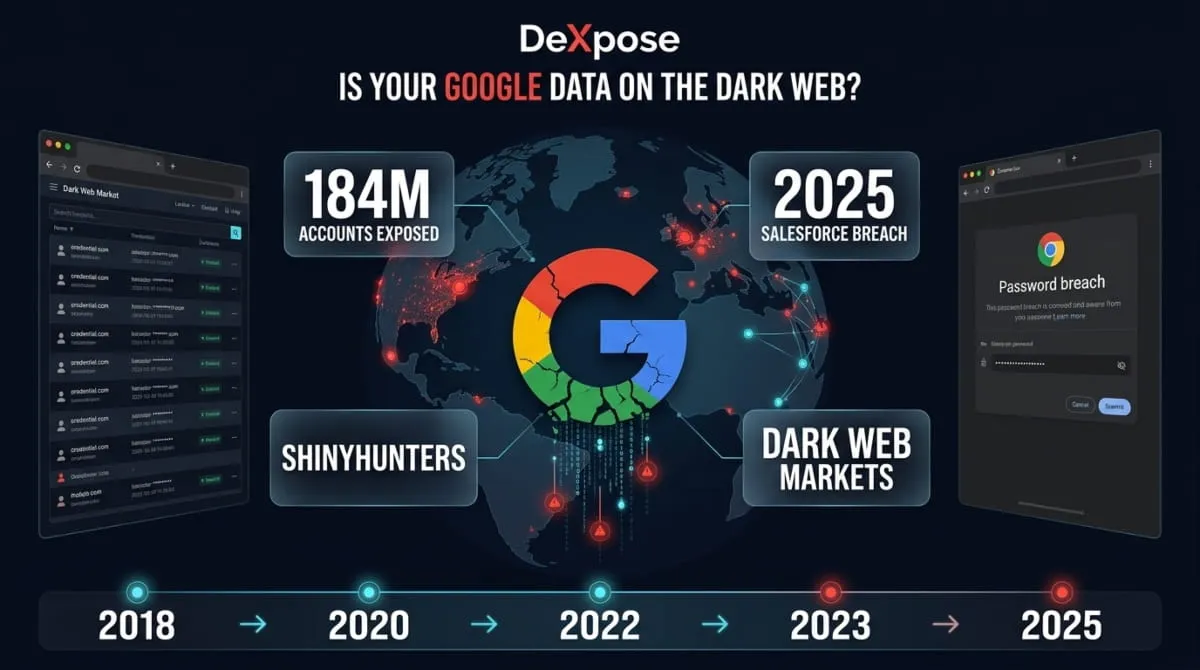
In August 2025, reports emerged that Google had suffered a data breach tied to its Salesforce CRM platform, the system Google uses to manage advertiser relationships and business communications. The attack was attributed to ShinyHunters, a notorious cybercriminal group with a track record of breaching major platforms, including Ticketmaster, AT&T, and Santander Bank.
ShinyHunters exploited vulnerabilities in the Salesforce environment to exfiltrate a significant volume of data before the breach was contained. The attack didn’t stop at theft; the group reportedly used the stolen data to launch targeted vishing (voice phishing) campaigns against Google’s advertising clients, impersonating Google representatives to extract further credentials and payments.
By September 2025, the breach had been confirmed, making it one of the most damaging third-party data breach incidents Google has publicly acknowledged.

What Data Was Exposed
The breach primarily affected data stored within Google’s Salesforce CRM system. Based on confirmed and reported details, the exposed information included advertiser account details, business contact information, internal communication records, and customer data linked to Google’s advertising and workspace operations.
For everyday users, the broader risk lies in what happens downstream. Stolen business credentials and email data from a breach of this scale often migrate quickly to dark web markets, where they’re packaged into combolists and sold to other threat actors, long before most victims are notified.
How Many Users Were Affected
The full scope of the Google–Salesforce breach is still being assessed as of 2026. Early reports indicated that millions of advertiser records were compromised, with some cybersecurity researchers pointing to a dataset of 184 million credentials spanning Google accounts and Apple and other major platforms, which circulated in breach forums around the same period.
Google has not disclosed a precise count of affected users, which is consistent with how major platforms typically handle breach disclosures. That silence, however, is not reassurance.
Google’s Official Statement on the Breach
Google confirmed the incident and acknowledged that unauthorized access had occurred through a third-party system. The company stated it had taken steps to contain the breach, notified affected parties where required, and was cooperating with relevant authorities. Google also reinforced guidance for users to review saved passwords, enable two-factor authentication, and monitor accounts for suspicious activity.
What Google’s statement didn’t address is what happened to that data after it left their environment. Once credentials and personal information reach the dark web, no corporate statement can retrieve them.
Google’s Full Data Breach History (2016–2026)
Most people assume Google’s security is impenetrable. The reality is more complicated. Google has experienced a series of security incidents spanning nearly a decade, some disclosed voluntarily, others only after regulatory pressure or investigative reporting forced the issue. Understanding this history matters because each breach left data circulating that may still be active on the dark web today.

Google+ Data Breach (2018), The First Major Exposure
The most consequential early breach in Google’s history involved Google+, the company’s now-defunct social network. In 2018, Google disclosed that a software bug had exposed the private profile data of up to 500,000 Google+ users to third-party developers, without user consent and without detection for over three years.
The exposed data included names, email addresses, birthdates, gender, profile photos, and occupation details. What made this breach particularly damaging wasn’t just the scale; it was the timing of the disclosure. Google reportedly discovered the vulnerability in March 2018 but chose not to inform users or regulators, only going public in October 2018 after The Wall Street Journal broke the story.
A second Google+ breach followed in November 2018, this time affecting 52.5 million users after another API bug was discovered. Google accelerated the platform’s shutdown as a direct result. The incidents eventually led to a class-action lawsuit and a settlement over the Google+ data breach, with affected users eligible for compensation.
Google Fi, Google Ads, and Cloud Breach Timeline
Google’s breach history didn’t end with Google+. Several significant incidents followed across different product lines.
In 2023, Google Fi, the company’s mobile virtual network operator, notified customers that their data had been compromised due to a breach at T-Mobile, a primary network partner. Exposed information included phone numbers, SIM card details, and account activity data. While Google Fi itself wasn’t directly breached, the incident highlighted the supply chain risk that third-party partnerships create.
Google Ads customers were exposed in the 2025 Salesforce breach, in which ShinyHunters exfiltrated advertiser data stored in Google’s CRM. This represented the first time Google’s advertising infrastructure was directly implicated in a confirmed breach, a significant escalation given the volume of business-sensitive data that flows through that system.
Google Cloud has also been the subject of security breach reports and customer warnings over the years, particularly around misconfigured storage buckets and credential theft via malware logs. This attack vector has grown sharply since 2021.
The 184 Million Account Breach, Apple, Google & Beyond
In 2025, a dataset containing approximately 184 million credentials surfaced on breach forums, spanning Google, Apple, Facebook, PayPal, and dozens of other major platforms. The database included usernames, plaintext passwords, and associated URLs, the hallmark of infostealer malware logs rather than a single-platform breach.
This type of multi-platform credential dump is increasingly common and represents a different threat model than a traditional data breach. The data isn’t stolen directly from Google’s servers; it’s harvested from infected devices where users were logged into their Google accounts. The result is the same: live credentials, exposed accounts, and real risk of account takeover.
For users who rely on Google to store and autofill passwords, this is a particularly urgent threat. A compromised device can silently harvest every saved credential before any breach notification is ever sent.
How Google Breaches Compare to Industry Incidents
Google’s breach history is serious, but it exists within a broader landscape of catastrophic industry failures. Yahoo lost data on 3 billion accounts. Facebook exposed 533 million user records in a single scraping incident. Equifax compromised the financial identities of 147 million Americans.
What distinguishes Google breaches is the depth of access they represent. A Google account isn’t just an email address; it’s often the master key to a person’s entire digital identity, connected to their password manager, cloud storage, financial accounts, work tools, and mobile device. When Google account credentials are compromised in a data breach, the downstream exposure potential is far greater than that of a breach of any single-purpose platform.
That’s why checking your Google account exposure isn’t optional; it’s essential.
Google Chrome Password Breach Warnings: What They Mean
If you’ve ever opened Chrome and seen a warning telling you a saved password was found in a data breach, you’ve likely felt that jolt of alarm, and then wondered what actually to do about it. These alerts are real, they matter, and ignoring them is a risk you shouldn’t take.

Here’s exactly what those warnings mean and how seriously you should treat them.
What Is a “Non-Google Data Breach” Warning?
When Chrome displays a message saying your password was found in a non-Google data breach, it means the credentials you’ve saved in Chrome’s password manager were detected in a breach that originated somewhere other than Google, a third-party website, app, or service where you used that same email and password combination.
Google’s Password Checkup tool runs your saved credentials against a continuously updated database of known breached passwords. When there’s a match, Chrome surfaces a warning. The “non-Google” label simply clarifies where the original breach occurred, not that Google is off the hook for the exposure. If you reused that password across your Google account or other services, the risk is just as serious.
Why Chrome Flags Your Saved Passwords
Chrome flags compromised passwords because credential reuse is one of the most exploited vulnerabilities in cybersecurity. When a breach happens anywhere, a retail site, a forum, a subscription service, the stolen credentials get packaged and sold on dark web markets. Threat actors then run those credentials against high-value targets like Google, banking apps, and email accounts in automated attacks known as credential stuffing.
Google’s system uses a privacy-preserving protocol to check your saved passwords against billions of known breached credentials without ever exposing your actual passwords to Google’s servers in readable form. When a match is found, the alert is legitimate, and the risk is real. Chrome’s data breach notifications have become one of the few proactive security tools available to everyday users. Still, they only cover passwords already saved in Chrome, and only breaches already in Google’s database.
That’s a significant gap.
Google Password Manager Data Breach Alerts, Real or Fake?
This is where it gets complicated. Legitimate Google password breach notifications appear directly within Chrome’s settings or as in-browser alerts tied to your Google account. They will never ask you to click an external link, call a phone number, or download anything.
A surge of phishing campaigns in 2025 began impersonating Google security breach alerts, fake pop-ups, spoofed emails, and even phone calls claiming your Google account had been compromised. These are not real Google notifications. They are social engineering attacks designed to steal the credentials they’re pretending to protect.
The rule is simple: if a Google breach alert asks you to do anything other than review your saved passwords in Chrome or your Google account settings, treat it as a threat, not a warning.
What to Do When Google Says Your Password Was Found in a Data Breach
When Chrome or Google Password Manager flags a compromised password, the immediate steps are straightforward, but most people stop short of what’s actually necessary.
Start by changing the flagged password on the affected site, and make the new password unique, not a variation of the old one, and not reused anywhere else. If you used the same password on your Google account or any other critical service, change those too. Enable two-factor authentication on every account where it’s available.
Then go further. Google’s warning tells you that a password has been found in a known breach database. It doesn’t tell you whether your full credentials, personal details, or account data are already circulating on dark web markets, paste sites, or hacker forums. For that, you need a dark web scan that goes beyond what Chrome can see.
A Google breach alert is a warning sign. A dark web scan tells you how far the damage has already spread.
Was Your Google Account Exposed? How to Check
Knowing a breach happened is one thing. Knowing whether you were affected is another. Most people assume that if Google hasn’t notified them, they’re safe. That assumption is wrong, and it’s exactly the gap that cybercriminals exploit.

Here’s how to actually check your exposure, and why the tools most people rely on aren’t enough.
How to Use Google’s Built-In Breach Check Tools
Google offers two native tools for checking credential exposure. The first is Password Checkup, accessible through your Google Account under Security → Password Manager → Check Passwords. It scans your saved Chrome passwords against known breach databases and flags any credentials that have been compromised, are reused across multiple sites, or are weak enough to pose a risk.
The second is Google One Dark Web Report, available to Google One subscribers. It monitors a limited set of personal information, your Gmail address, phone number, name, and a few other identifiers, against known dark web data sets and alerts you if a match is found.
Both tools are legitimate, genuinely useful, and better than doing nothing. For a quick first check, start there.
Why Google’s Own Scan Has Blind Spots
Google’s tools have real limitations that most users don’t realize until it’s too late.
Password Checkup only covers passwords saved inside Chrome. If you’ve ever logged into an account on a different browser, a mobile app, or a device where you weren’t signed into Chrome, those credentials are invisible to it. It also only catches breaches already indexed in Google’s database, newly leaked data, private dark web sales, and stealer malware logs often circulate for weeks or months before they’re catalogued.
Google One’s dark web report is similarly narrow. It monitors a handful of data points tied to your Google account, but your digital footprint extends far beyond your Gmail address. Work email addresses, old accounts, domain names, associated phone numbers, and credentials from third-party services you connected to Google do not fall within its default scope.
Perhaps most critically, Google’s tools are reactive. They tell you about exposure after it’s been confirmed and indexed. The dark web doesn’t wait for confirmation.
How Dark Web Monitoring Catches What Google Misses
Dedicated dark web monitoring works differently from anything Google offers natively. Instead of scanning a curated database of known public breaches, it actively crawls dark web markets, hacker forums, Telegram channels, paste sites, and stealer malware logs, the places where stolen data actually lives before it makes the news.
When your email address, credentials, or business domain appear in any of these sources, a real-time alert is triggered. This means you find out about exposure while there’s still time to act, before accounts are taken over, before data is weaponized, and before the breach becomes a headline.
For businesses, the stakes are even higher. A single exposed employee credential on a dark web forum can serve as the entry point for a ransomware attack, a BEC scam, or a full network compromise. Google’s tools won’t catch that. Purpose-built threat intelligence will.
Check If Your Google Data Is on the Dark Web Right Now
DeXpose scans dark web markets, breach databases, malware logs, and hacker forums in real time, covering the sources Google’s own tools never reach.
If your email address, Google account credentials, or associated data have been exposed in the Google–Salesforce breach or any other incident, DeXpose will find it.
Run Your Free Dark Web Scan
It takes seconds. And if your data is out there, you need to know now, not after your account has already been compromised.
What Gets Stolen in a Google Data Breach
Not all data breaches are equal. When a breach involves a platform like Google, where a single account connects your email, documents, payments, passwords, and business tools, the exposure isn’t just one data point. It’s a master key to your entire digital life. Understanding exactly what gets stolen helps explain why Google account breaches are treated as high-severity incidents by cybersecurity professionals, not routine credential leaks.

Email Addresses and Login Credentials
The most commonly exposed data in any Google-related breach is the combination of email addresses and passwords. On its own, an email address seems harmless. Paired with a reused or weak password, it becomes an entry point to every account tied to that email, banking, healthcare, work systems, and more.
In breaches involving stealer malware and combolists, stolen Google credentials are often stored in plaintext, ready for immediate use in credential-stuffing attacks. Threat actors don’t manually test these credentials; they run them through automated tools against hundreds of platforms simultaneously. By the time a victim notices unusual activity, the damage is frequently already done.
Google Workspace and Business Account Data
For organizations running on Google Workspace, a breach carries consequences that go far beyond a compromise of a personal account. Workspace accounts hold internal emails, shared drives, calendar data, meeting recordings, HR documents, client communications, and administrative access to connected third-party applications.
The 2025 Salesforce breach exposed exactly this category of data, business-level information managed through Google’s CRM infrastructure. When Workspace credentials are stolen, attackers don’t just read emails. They impersonate executives, intercept financial transactions, and pivot into connected systems. Business email compromise attacks originating from legitimate Google Workspace accounts are among the hardest to detect because they come from trusted, verified senders.
Google Pay and Financial Exposure
Google Pay stores payment methods, transaction history, and, in some cases, billing addresses linked to a user’s Google account. While Google Pay’s core payment infrastructure has not been directly breached, compromised Google account credentials provide attackers with visibility into financial data and, in some cases, the ability to authorize transactions or harvest enough information for targeted fraud.
When account credentials are combined with personal identifiers, name, phone number, and billing address, the resulting profile is sufficient for identity theft, fraudulent account openings, and social engineering attacks targeting financial institutions. This is why a Google data breach isn’t just a technology problem. It’s a financial risk.
Google Drive and Cloud Document Leaks
Google Drive is where people store some of their most sensitive information, tax returns, contracts, medical records, identification documents, business proposals, and personal photographs. In a breach scenario where Google account credentials are compromised, everything stored in Drive becomes accessible.
Beyond direct access, misconfigured sharing settings have historically exposed Google Drive documents to unintended audiences without any breach. When a full account compromise is involved, the scope expands to everything the user has ever stored or had shared access to, including documents owned by employers, clients, and collaborators.
Google Ads Advertiser Data Exposure
The 2025 Salesforce breach introduced a threat vector that had previously received little public attention: Google’s advertiser data. Businesses running Google Ads campaigns store significant amounts of sensitive information within their accounts, billing details, campaign strategies, target audience data, business contact records, and revenue figures.
When ShinyHunters exfiltrated data from Google’s Salesforce CRM, it was this layer of business intelligence that was most directly at risk. The stolen data was subsequently used to run vishing campaigns against Google’s advertising clients, attackers calling businesses directly, armed with enough accurate account details to sound entirely convincing. For small and mid-sized businesses in particular, this type of targeted fraud is exceptionally difficult to detect in real time.
The Google Salesforce Breach Explained (ShinyHunters, 2025)
Of all the security incidents in Google’s history, the 2025 Salesforce breach stands apart not just for its scale but also for the sophistication of the attack and the specific type of data it targeted. This wasn’t a breach of consumer passwords or a misconfigured database. It was a precision strike against Google’s business infrastructure, executed by one of the most capable threat groups operating today.

Who Are ShinyHunters?
ShinyHunters is a cybercriminal group that first emerged in 2020 and has since become one of the most prolific data theft operations in the world. Their targets have included Ticketmaster, AT&T, Santander Bank, Microsoft’s GitHub repositories, and dozens of other high-profile organizations. Their method is consistent: they infiltrate through third-party vendors or cloud misconfigurations, exfiltrate at scale, then monetize through dark web sales, extortion, or both.
What makes ShinyHunters particularly dangerous is their patience and precision. They don’t smash and grab. They map environments, identify the highest-value data sets, and extract quietly, often remaining undetected for weeks. By the time a breach is confirmed, the data has already moved through multiple layers of the criminal ecosystem.
Their attack on Google’s Salesforce environment followed the same playbook, and the consequences are still unfolding as of 2026.
What the Salesforce CRM Breach Means for Google Users
Salesforce is the CRM platform Google uses to manage its relationships with advertisers, enterprise clients, and business partners. It holds a layer of data that most Google users don’t think about, not personal consumer accounts, but the business infrastructure that sits behind Google’s advertising and workspace products.
When ShinyHunters breached this environment, they didn’t just steal data. They stole context, names, business email addresses, account managers, campaign details, billing records, and internal communication threads. This kind of structured business intelligence is far more valuable to a sophisticated threat actor than a raw list of passwords, because it enables targeted, believable attacks that are exponentially harder to defend against.
For Google users connected to advertising accounts or enterprise Workspace deployments, the breach created a direct line of exposure, not through their own devices, but through the business systems Google manages on their behalf.
Phishing and Vishing Risks from the Leaked Advertiser Data
The most immediate and documented threat to emerge from the Google–Salesforce breach wasn’t account takeover. It was social engineering at scale.
Armed with accurate advertiser data, including business names, account spend levels, contact details, and campaign information, ShinyHunters and associated actors launched a wave of vishing attacks targeting Google Ads customers. These were phone calls from people who knew exactly which campaigns you were running, what you were spending, and who your account manager was. The calls impersonated Google support, requested verification details or payment updates, and succeeded in numerous cases.
Phishing emails followed the same pattern, highly personalized, using legitimate-sounding Google domains and referencing real account details that only an insider or someone with access to CRM data could know. The combination of accurate data and authoritative impersonation made these attacks unusually effective, even against security-aware business owners.
This is the threat that raw credential breaches don’t create, but data-rich CRM breaches do.
Is Your Business at Risk?
If your business runs Google Ads campaigns, operates on Google Workspace, or has any account relationship managed through Google’s sales or support infrastructure, your data was potentially within the scope of the Salesforce breach.
The risk doesn’t expire. Data exfiltrated in a breach doesn’t disappear after the initial wave of attacks; it gets resold, repackaged, and reused by successive threat actors for months or years. A business that wasn’t targeted in the initial vishing campaign in late 2025 may still find its data surfacing in a new attack vector in 2026.
The question isn’t whether the breach happened. It’s whether your business data is still in circulation, and whether you have visibility into where it’s appeared.
Google Data Breach Settlements and Legal Action
When a company the size of Google experiences a data breach or privacy violation, the legal consequences rarely keep pace with the damage. But they do move. Over the past decade, Google has faced class action lawsuits, regulatory fines, and government investigations across multiple jurisdictions. In several cases, settlements have resulted in real compensation for affected users. Understanding this legal history matters, both for what you may already be owed and for what it reveals about Google’s pattern of handling user data.

Google+ Class Action Settlement: What You Were Owed
The 2018 Google+ data breach resulted in one of the most significant class-action settlements in Google’s history. Following the exposure of up to 52.5 million user profiles across two incidents, a class action lawsuit was filed, alleging that Google failed to protect user data adequately and deliberately delayed public disclosure to avoid regulatory scrutiny.
Google agreed to a $7.5 million settlement fund. Eligible class members, U.S. users who had a Google+ account during the breach period, could file claims for a share of the settlement. In practice, individual payouts were modest, as is typical in large class actions. Still, the settlement established an important precedent: Google could be held financially accountable for negligence related to breaches, not just regulatory censure.
The Google+ data breach settlement claims period has closed, but the case remains a reference point in ongoing litigation against Google for privacy and security failures.
Google Incognito Mode Lawsuit and Privacy Breach
In 2024, Google reached a landmark settlement in a class-action lawsuit alleging that its Chrome browser’s Incognito mode systematically misled users about the privacy of their browsing activity. The lawsuit claimed that Google continued to collect user data, including browsing history, device information, and IP addresses, even when users believed they were browsing privately.
The settlement, valued at approximately $5 billion in potential damages, did not result in direct cash payments to most users but required Google to delete billions of records of browsing data collected without informed consent and to update its disclosures about what Incognito mode actually does and doesn’t protect.
For users who had operated under the assumption that Incognito provided genuine anonymity, the case was a sharp reminder that product branding and actual data practices are not always aligned.
GDPR Fines and Google’s Regulatory History
Outside the United States, Google has faced significant regulatory action under the European Union’s General Data Protection Regulation. France’s data protection authority, the CNIL, fined Google €150 million in 2022 for making it harder for users to refuse cookies than to accept them, a violation of GDPR’s requirement for freely given, informed consent.
Google has also faced investigations in Ireland, where its European headquarters is based, concerning data transfer practices and the legal basis for processing user data across its advertising infrastructure. These cases are ongoing and represent a sustained pattern of regulatory scrutiny that predates the 2025 Salesforce breach and will likely intensify in its aftermath.
The cumulative picture of Google’s regulatory history is not that of a company found guilty of malicious data theft, but rather of one that has repeatedly prioritized data utility over transparency and has faced consistent legal consequences as a result.
Can You Still Claim Compensation?
For most historical Google breach settlements, the claims windows have closed. The Google+ settlement, in particular, is no longer accepting new claims. However, the legal landscape around the 2025 Salesforce breach and related incidents is still developing. Several law firms have opened class action investigations, and affected advertisers and business users may have standing to join future litigation, depending on how those cases proceed.
If you believe your data was exposed in a Google breach and you experienced demonstrable harm, account takeover, financial fraud, identity theft, or targeted phishing, documenting that harm now is important. Screenshots, fraud reports, and records of suspicious communications all strengthen a potential claim.
What legal action cannot do, however, is remove your data from the dark web. Settlements compensate for past harm. They don’t prevent future exploitation of data that’s already in circulation. That requires a different kind of action entirely.
What to Do If Your Information Was in a Google Data Breach
Finding out your data may have been exposed is alarming. But the window between exposure and exploitation is where you have the most power to act. Most victims don’t lose accounts because of the breach; they lose them because they waited too long to respond. These five steps, taken in order, give you the best chance of getting ahead of the damage before it compounds.

Step 1: Run a Dark Web Scan Immediately
Before you change anything, you need to know what’s actually been exposed. Changing a password that wasn’t compromised wastes time. Missing a credential that was exposed leaves the real door open.
A dark web scan searches breach databases, stealer malware logs, hacker forums, and dark web markets for your email address and associated credentials, giving you a clear picture of what’s out there before you take action. This is your baseline. Everything else you do should be informed by what the scan reveals.
Run Your Free Dark Web Scan →
Step 2: Change Your Passwords and Enable 2FA.
Once you know which credentials were exposed, change them, starting with your Google account, then any other account that shares the same password. Don’t modify the compromised password. Replace it entirely with something unique, long, and not used anywhere else.
Then enable two-factor authentication on every critical account. Even if an attacker has your password, 2FA blocks the login until the second verification step is completed. For your Google account specifically, consider upgrading to a hardware security key or using an authenticator app rather than SMS-based 2FA, which is vulnerable to SIM-swapping attacks.
This step stops the most immediate threat, unauthorized account access using stolen credentials.
Step 3: Monitor Your Google Account for Suspicious Activity
Go directly to your Google Account security settings and review recent activity. Check which devices are currently signed in, which third-party apps have access to your account, and whether any account recovery information, phone number, or backup email has been changed without your knowledge.
If anything looks unfamiliar, revoke access immediately and sign out all devices. Also, review your Gmail sent folder and Google Drive activity for anything you didn’t initiate. Attackers who gain access to a Google account often move quietly, forwarding emails, harvesting documents, or using the account as a launch point for further attacks, without triggering obvious alarms.
Step 4: Watch for Phishing Emails Impersonating Google
In the aftermath of the 2025 Salesforce breach, a wave of highly targeted phishing campaigns hit Google users and advertisers, emails and phone calls that referenced real account details, used convincing Google branding, and created urgent scenarios designed to bypass rational judgment.
Be skeptical of any communication claiming to be from Google that asks you to verify credentials, confirm payment details, or click a link to secure your account. Legitimate Google security alerts direct you to your account settings; they don’t ask for passwords, threaten immediate suspension, or come from unfamiliar domains.
When in doubt, navigate directly to myaccount.google.com rather than clicking any link in an email or notification.
Step 5: Set Up Ongoing Dark Web Monitoring
A one-time scan tells you where you stand today. It doesn’t protect you tomorrow. Data from breaches continues to circulate, get resold, and resurface in new attack campaigns for months and sometimes years after the original incident. The Google–Salesforce breach data, for example, will remain in active circulation long after the initial headlines fade.
Ongoing dark web monitoring means you’re alerted the moment your email address, credentials, or business domain appear in a new breach, a fresh stealer log, or a dark web forum post, giving you the same real-time awareness that threat actors already have about your data.
For individuals, this closes the gap between exposure and response. For businesses, it’s the difference between catching a breach early and discovering it after an attacker has already been inside your network.
DeXpose monitors dark web markets, paste sites, ransomware group leak pages, and malware logs around the clock, so you find out first.
Start Monitoring Your Exposure →
conclusion
A Google data breach isn’t an abstract threat. It’s your email, your passwords, your business data, and your financial information, potentially in the hands of people who know exactly how to use it.
Google’s own tools will tell you some of what’s been exposed. They won’t tell you everything. The dark web doesn’t wait for official breach notifications, and neither should you.
If there’s one action worth taking after reading this page, it’s running a scan. Not tomorrow. Now, while the window to get ahead of the damage is still open.
DeXpose searches the places Google can’t, dark web markets, stealer logs, hacker forums, and breach databases, and tells you exactly where your data has surfaced.
Frequently Asked Questions (FAQ’s)
Did Google have a data breach in 2025?
Yes. In August 2025, Google confirmed a data breach involving its Salesforce CRM platform, in which the threat group ShinyHunters exfiltrated advertiser and business account data. The breach affected millions of records and triggered a wave of targeted phishing and vishing attacks against Google’s advertising clients.
What is a non-Google data breach?
A non-Google data breach is a security incident involving a third-party website or service where you used your Google credentials. Chrome flags these warnings when your saved passwords match credentials exposed in external breaches, meaning Google itself wasn’t hacked, but your reused password was.
How do I check if my Google account was breached?
Go to your Google Account security settings and run Password Checkup to scan saved credentials. For deeper visibility, run a free dark web scan with DeXpose. It checks breach databases, stealer logs, and dark web markets that Google’s tools don’t reach.
Is the Google data breach Chrome warning real?
Yes, legitimate Chrome password breach warnings appear inside your browser or Google Account settings and never ask for your password or payment details. If a pop-up, email, or phone call claims your account is breached and asks you to click a link or call a number, it’s a phishing attack.
What is the Google Salesforce & Shiny Hunters breach?
It was a 2025 cyberattack in which ShinyHunters, a prolific cybercriminal group, breached Google’s Salesforce CRM database and stole sensitive advertiser and business data. The stolen data was subsequently used to run sophisticated vishing campaigns impersonating Google support against advertising clients.
How is DeXpose different from Google One dark web monitoring?
Google One monitors a limited set of identifiers tied to your Google account across a curated breach database. DeXpose actively crawls dark web markets, hacker forums, ransomware leak pages, stealer malware logs, and paste sites in real time, covering the full scope of where stolen data actually lives, not just what’s been publicly indexed.