
Password Data Breach | What It Means, How to Check, and What to Do Next
You open your phone and see a notification: “A password you saved was found in a data breach.” Or maybe Google Chrome flashed a warning, Apple flagged it in your settings, or your password manager suddenly lit up red. It’s alarming, and it’s becoming increasingly common.
A password data breach happens when login credentials, usernames, email addresses, and passwords are stolen from a platform or service and exposed online, often on the dark web. Once those credentials are out, they don’t disappear. They get compiled into massive databases, traded between cybercriminals, and used in automated attacks against your other accounts.
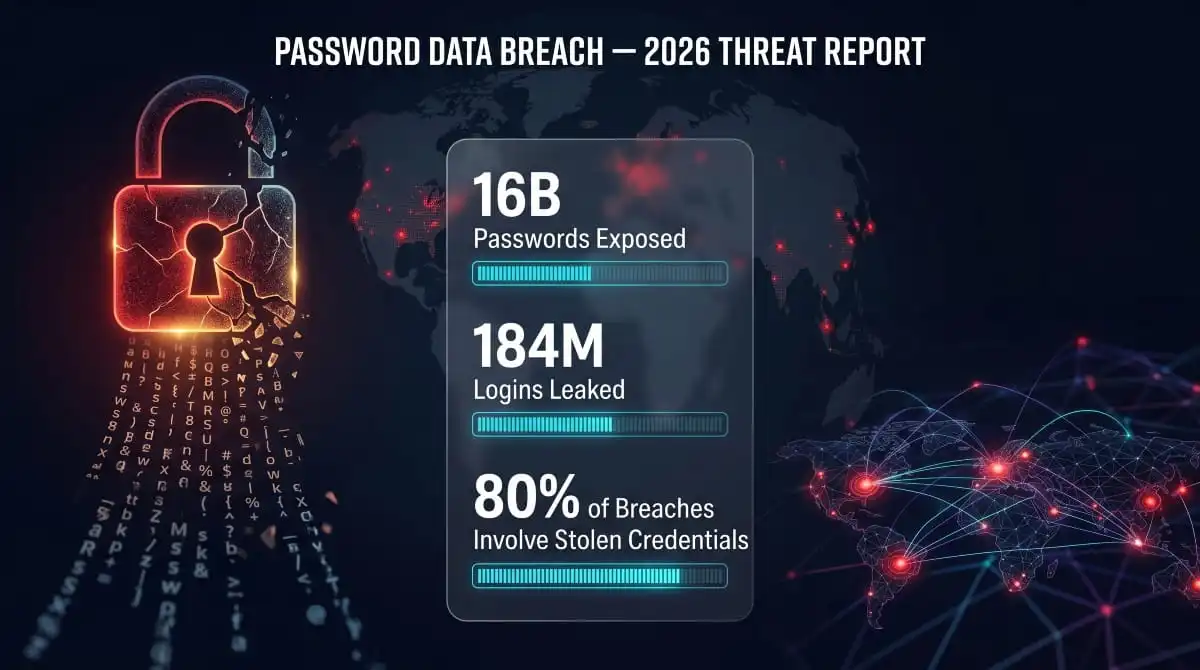
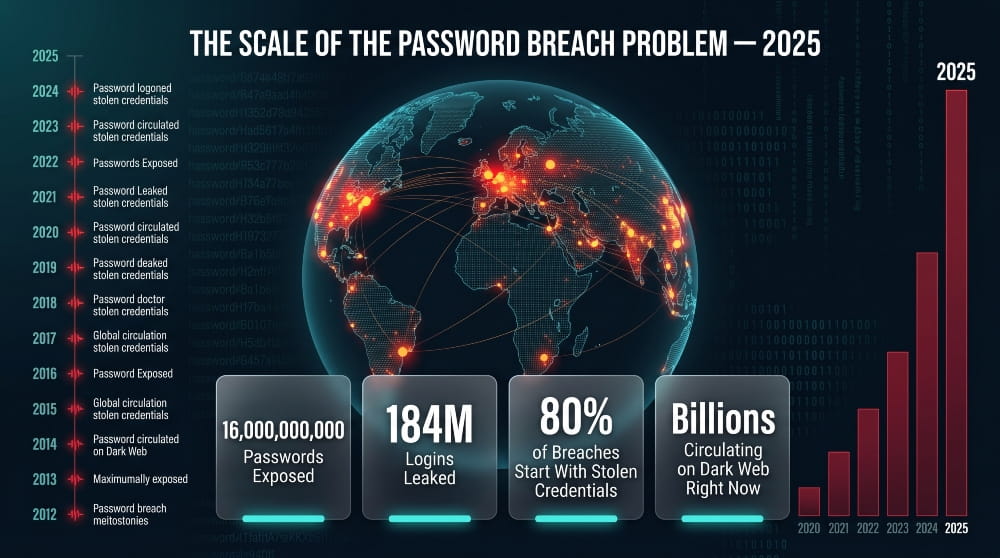
The scale of the problem is hard to overstate. In 2025 alone, researchers uncovered a single breach containing over 16 billion passwords, a compilation spanning thousands of platforms and years of leaked data. Another incident exposed 184 million logins in one database dump. Behind every one of those records is a real account, a real person, and a real risk.
If you’ve received a breach warning from Google, Chrome, Apple, or any password manager, it means your credentials appeared in one of these exposed datasets, and that’s not something to dismiss or deal with later.
This guide covers everything you need to know: what a password data breach actually is, which platforms are most commonly affected, how to check whether your passwords have been compromised, and exactly what steps to take to protect yourself before the damage is done.
What Is a Password Data Breach?
A password data breach occurs when an attacker gains unauthorized access to a system and extracts stored login credentials, typically email addresses paired with passwords. Those credentials are then leaked, sold, or published, making them available to anyone with access to the right corners of the internet.
Unlike a general data breach, which might expose names, addresses, or payment information, a password breach is uniquely dangerous because it gives attackers the keys to your accounts directly. No guessing required.
How Passwords End Up in Breach Databases
It usually starts with a vulnerability, a misconfigured server, an unpatched system, or a successful phishing attack against an employee with admin access. Once inside, attackers extract the credential database and exfiltrate it before the company even knows there’s been an intrusion.
From there, the stolen data moves fast. It gets posted to dark web forums, packaged into combo lists with credentials from other breaches, and eventually absorbed into massive compilations that criminals use for automated login attacks. By the time a breach is publicly disclosed, which often takes months, your credentials may have already been circulating underground for weeks.
The Difference Between a Password Breach and a Data Breach
The two terms are related but not identical. A data breach is the broader event, an unauthorized exposure of any type of sensitive information. A password breach is a specific outcome of that event, where login credentials are among the data stolen.
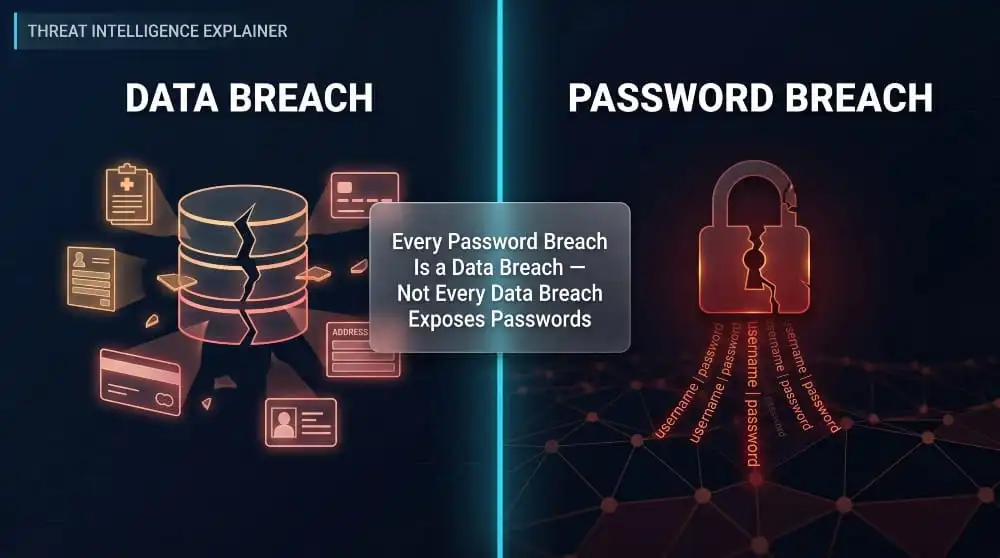
Not every data breach involves passwords. A breach at a healthcare provider might expose medical records without touching login credentials. But when a platform that stores user accounts is compromised, passwords are almost always the primary target. That’s what makes password breaches particularly high-stakes, and why they require a different, more urgent response than other types of data exposure.
What Your Password Was Found in a Data Breach Actually Means
When Google, Apple, or your password manager tells you a password was found in a data breach, it means that exact password, or the email and password combination tied to one of your accounts, has appeared in a known breach dataset.
These tools cross-reference your saved credentials against databases of exposed passwords, including publicly available breach compilations and datasets from services like Have I Been Pwned. A match doesn’t necessarily mean your specific account was hacked. It means the credentials you’re using are now public knowledge in the threat actor community, which carries the same practical risk.
The warning is real. It shouldn’t be dismissed as a false alarm or a glitch.
Why Google, Chrome, Apple, and Safari Alert You About Breached Passwords
Google, Chrome, Apple, and Safari all run built-in credential monitoring in the background. When you save a password, these platforms quietly hash it and compare it against continuously updated breach databases. If a match is found, they surface the alert, whether that’s a pop-up in Chrome, a notification in your iPhone’s password settings, or a flag inside Google Password Manager.
The reason these alerts have become more frequent isn’t that your behavior has changed; it’s that the volume of exposed credentials has exploded. More breaches mean more matches. Seeing one of these warnings indicates that the system is working. What matters most is what you do next.
How Big Is the Password Breach Problem? (2024–2026 Statistics)
The scale of exposed credentials has reached a point where the question is no longer if your passwords have been part of a breach; it’s how many times. The numbers from 2024 and 2025 aren’t just alarming in isolation. They reflect a sustained, accelerating pattern of credential exposure that has been building for over a decade.
The 16 Billion Password Breach: What Happened and Is It Real?
In 2025, cybersecurity researchers uncovered a dataset containing over 16 billion password records, one of the largest credential compilations ever documented. Covered widely by Forbes and confirmed by multiple security outlets, the leak wasn’t a single incident tied to one company. It was an aggregation: a massive compiled database drawing from thousands of individual breaches accumulated over years, combined into one searchable repository.
So is it real? Yes, though the number reflects cumulative exposure across many breaches rather than a single catastrophic hack of one platform. That distinction matters less than the practical implication: billions of valid username and password combinations are actively circulating in criminal ecosystems right now, used in credential-stuffing attacks against live accounts.
The 184 Million Passwords Breach, Logins, Credentials, and Scope
Separate from the 16 billion compilation, researchers also identified a database containing 184 million unique login credentials, email addresses, usernames, and plaintext passwords spanning services across banking, social media, email, and government platforms. Unlike aggregated dumps, this dataset appears to have originated from infostealer malware: software designed to silently harvest credentials directly from infected devices.
The scope was global and cross-platform, with records tied to accounts at Google, Apple, Microsoft, Facebook, and dozens of other major services. This breach was notable not just for its size, but for the quality of the data, recent, active credentials rather than years-old recycled records.
What Percentage of Data Breaches Are Caused by Stolen or Weak Passwords?
Credential compromise is consistently the leading cause of data breaches across every major industry report. Stolen or weak passwords are responsible for the majority of hacking-related incidents, figures that have held steady across multiple years of breach analysis from Verizon’s Data Breach Investigations Report and IBM’s Cost of a Data Breach research.
Weak passwords make initial access trivial. Reused passwords turn a single breach into a multi-account compromise. And stolen credentials, harvested through phishing, infostealer malware, or prior breaches, give attackers authenticated access that bypasses most perimeter defenses entirely. The Colonial Pipeline attack, one of the most disruptive infrastructure incidents in recent US history, was traced back to a single compromised password.
Most Hacking-Related Breaches Involve Stolen Credentials, The Data
The reason credential theft dominates breach statistics is structural: it’s the path of least resistance. Attackers don’t need to find a zero-day vulnerability or develop custom malware if they can simply log in with a valid username and password. Credential stuffing, the automated testing of breached logins against other platforms, is cheap, scalable, and effective precisely because so many people reuse passwords across accounts.
Once inside with legitimate credentials, attackers can move laterally, escalate privileges, and operate undetected for extended periods. The average time to identify a breach caused by stolen credentials is significantly longer than for breaches triggered by other attack vectors, resulting in greater damage, greater exposure, and higher remediation costs.
Timeline of the Biggest Password Breaches in History
The modern era of massive credential exposure didn’t start in 2025. It’s been building for over a decade:
In 2012, LinkedIn: 117 million email and password combinations stolen, though the full scope wasn’t confirmed until 2016, when the data appeared for sale online.
2013, Adobe: 153 million user records exposed, including encrypted passwords and password hints, many of which were weak enough to reverse-engineer.
2013, Yahoo: What began as a reported breach of 1 billion accounts was later revised to 3 billion, every Yahoo account in existence at the time.
2019, Collection #1: A compilation of 773 million unique email addresses and 21 million unique passwords, aggregated from thousands of smaller breaches.
2021, RockYou2021: A 100GB text file containing 8.4 billion password entries posted to a hacking forum, at the time, the largest password list ever made public.
In 2022, LastPass: Attackers accessed encrypted password vaults belonging to millions of users, a breach that raised serious questions about the security architecture of password managers themselves.
2024–2025, The 16 Billion and 184 Million compilations: The most recent chapter in an ongoing pattern, confirming that credential exposure has become a permanent feature of the threat landscape rather than a series of isolated incidents.
Each entry on this timeline isn’t just a statistic. It’s a wave of credentials that entered criminal circulation, and in many cases, those passwords are still being tested against live accounts today.
Major Password Breaches by Platform
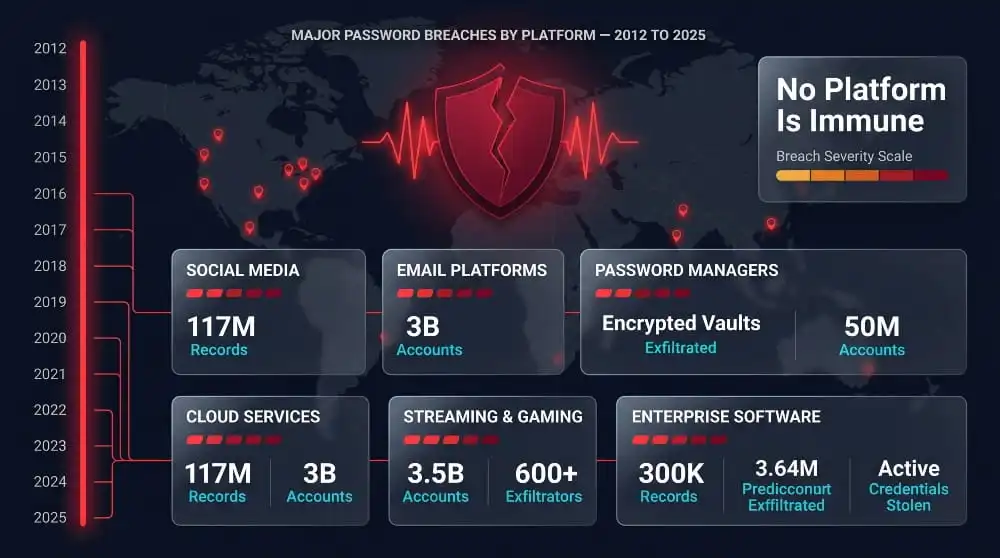
No platform is immune. From consumer tech giants to enterprise software, credential breaches have affected virtually every online service. What follows is a platform-by-platform breakdown of the most significant password breaches, what happened, what was actually exposed, and what it means for anyone who used those services.
Google Password Breach, Warnings, What Was Exposed, What to Do
Google itself has not suffered a direct breach of its password database, but that hasn’t stopped millions of users from receiving breach warnings through Google Password Manager and Google Chrome. These alerts appear when credentials you’ve saved in your Google account match records in known breach databases, regardless of which platform the breach originated from.
The warning message, “A password you saved was found in a data breach”, is Google’s way of telling you that the specific username and password combination is now publicly known. This is particularly common with passwords that were reused across multiple platforms, where a breach at a smaller service exposed credentials that also unlock a Google account.
If you receive this warning, the immediate step is to change the flagged password and any other accounts that use it. Do not dismiss the alert as a false positive; Google’s credential monitoring is cross-referenced against continuously updated breach datasets and is reliable.
Apple Password Breach, iCloud, Apple ID, and Keychain Alerts Explained.
Like Google, Apple has not experienced a confirmed breach of its core password infrastructure. The password breach warnings that appear on iPhones, iPads, and Macs come from Apple’s built-in Password Monitor feature, which runs silently in the background and checks saved Keychain passwords against known breach datasets using a privacy-preserving hashing method.
When Apple flags a password as appearing in a data breach, it will surface in Settings under Passwords, marked with a warning icon. These alerts cover any credentials stored in iCloud Keychain, not just Apple ID credentials, meaning a breach at an unrelated third-party service can trigger a warning in your Apple password settings.
Apple ID itself carries an elevated risk because it serves as the gateway to iCloud storage, payment methods, and device management. If your Apple ID credentials appear in any breach dataset, even one unrelated to Apple, treat that as a critical alert.
Chrome “Change Your Password” Warnings, What Triggers Them, and How to Disable
Chrome’s password breach warnings are generated by Google’s Password Checkup feature, which is an integrated part of Chrome’s built-in password manager. Every time you log into a site using a saved credential, Chrome checks that username and password combination against a database of over four billion known compromised credentials. If there’s a match, Chrome surfaces the warning immediately.
The trigger is a match in the breach database, not evidence that your specific account was accessed. The warning means the credential combination is known, not necessarily that someone has already used it against you.
Some users want to turn off these warnings, particularly in managed enterprise environments. In Chrome settings, this can be done under Privacy and Security → Security, where the “Warn you if passwords are exposed in a data breach” toggle can be switched off. However, for personal use, turning off this feature removes a genuinely useful layer of protection and is not recommended.
LastPass Breach: What Was Stolen and What It Means for Password Managers
The 2022 LastPass breach remains one of the most consequential password security incidents in recent history, not because of its scale alone, but because of what was taken and what it implied.
Attackers gained access to LastPass’s cloud storage environment and exfiltrated encrypted password vaults containing the passwords of millions of users. The vaults were protected by each user’s master password, which LastPass never stores. However, the risk was significant: anyone with a weak or reused master password was potentially exposed, as attackers could attempt to brute-force the encryption offline at their own pace, without any rate limiting or lockout mechanism.
What made the LastPass breach uniquely damaging was the exposure of metadata alongside the encrypted vaults, including website URLs, usernames, and billing information, which were stored unencrypted. Even users with strong master passwords had their account structures mapped by attackers.
The strategic implication for password managers broadly: encryption architecture matters, but so does what surrounds the encrypted data. The breach accelerated the adoption of zero-knowledge alternatives and prompted users to audit the strength of their master passwords across all credential managers they use.
LinkedIn, Adobe, Yahoo, and Other Major Credential Leaks
Several of the largest credential leaks in internet history originated from platforms used by billions of people daily. In many cases, those credentials are still in active circulation years after the initial breach.
LinkedIn’s 2012 breach exposed 117 million email and password combinations, but the data didn’t surface publicly until 2016, giving attackers a four-year window of undetected use. Because LinkedIn credentials are often tied to professional email addresses, the breach had significant downstream consequences for corporate account security.
Adobe’s 2013 breach compromised 153 million records, including encrypted passwords stored with a weak encryption method and unencrypted password hints. The hints alone were sufficient to reverse-engineer passwords for a large portion of affected accounts, a stark example of how poor security architecture amplifies the impact of a breach.
Yahoo’s breach, originally disclosed as affecting one billion accounts, was later revised to encompass all three billion Yahoo accounts in existence at the time of the 2013 incident. It remains the largest single-platform credential breach ever confirmed. The delayed disclosure, years after the fact, meant users had no opportunity to respond while the data was actively exploited.
These aren’t historical footnotes. Credentials from all three breaches continue to appear in combo lists and credential stuffing tools used in attacks today.
Recent Password Breaches (2024–2025): Full List
The pace of major credential exposure accelerated significantly through 2024 into 2025. Below is a reference list of notable password breaches from this period:
- 16 Billion Passwords Compilation (2025), Multi-source aggregation covering thousands of platforms; confirmed by cybersecurity researchers and reported by Forbes
- 184 Million Passwords Database (2025), Infostealer-sourced credential dump spanning Google, Apple, Microsoft, Facebook, and government platforms globally
- Ticketmaster (2024), 560 million customer records exposed, including partial payment data and account credentials
- Snowflake customer breach wave (2024): Attackers used stolen credentials to access cloud environments at AT&T, Santander, and others through a shared cloud provider.
- Oracle password breach (2025), Alleged breach of Oracle Cloud login credentials affecting thousands of enterprise tenants, disputed by Oracle but confirmed by independent researchers.
- Password Manager Breach Reports (January 2026), Multiple reports of credential manager infrastructure targeted, with investigations ongoing
The consistent thread across all of these: compromised passwords were either the entry point, the primary payload, or both. Exotic attack techniques don’t characterize the breach landscape in 2024–2025; it’s characterized by industrial-scale credential theft.
Is My Password in a Data Breach? How to Check
Knowing whether your passwords have been compromised is no longer a technical exercise reserved for security professionals. The tools exist, they’re accessible, and in many cases, they’re already running in the background on your devices. The question is whether you know how to read what they’re telling you and when to go beyond the built-in options.
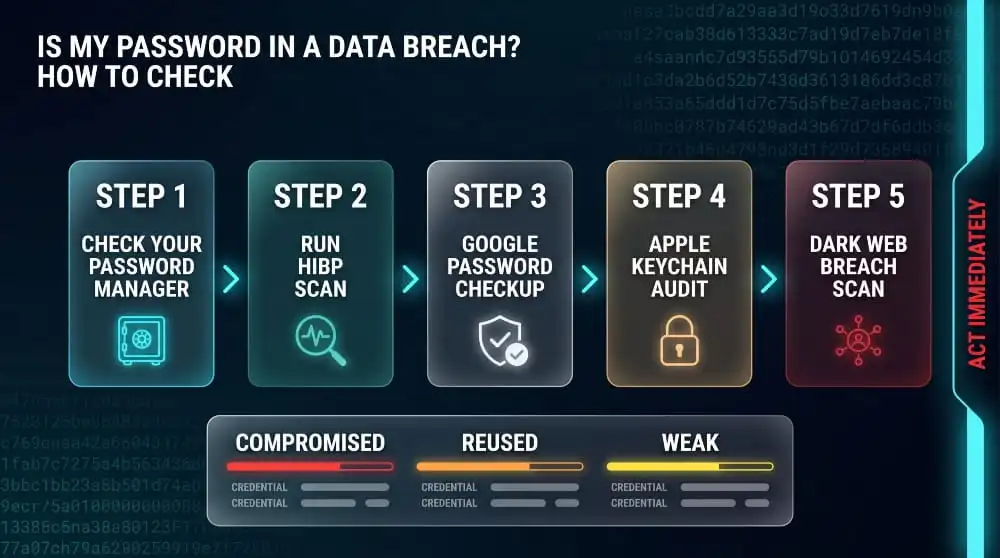
How to Check If Your Password Has Been Breached (Step-by-Step)
Start with what you already have. If you use Chrome, Safari, Firefox, or any major password manager, breach monitoring is likely already enabled. Here’s a straightforward process to run a complete check:
Step 1: Check your password manager’s security dashboard. Most major password managers have a dedicated section that flags breached, weak, and reused passwords. Open it and review every flagged credential, not just the most recently alerted ones.
Step 2: Run a check through Have I Been Pwned. Go to haveibeenpwned.com and enter your email address. The results will show every known breach your email address has been involved in, along with the data exposed in each incident.
Step 3: Use Google Password Checkup if your passwords are saved in Chrome or your Google account. Navigate to passwords.google.com and run a checkup to see all flagged credentials in one view.
Step 4: Check Apple’s Password Monitor if you use iCloud Keychain. Go to Settings → Passwords on iPhone or iPad, or System Settings → Passwords on Mac. Any password flagged with a warning icon has appeared in a known breach dataset.
Step 5: Change every flagged password immediately, starting with email accounts and any financial or healthcare platforms, as these carry the highest downstream risk if compromised.
Have I Been Pwned (HIBP): How to Use It
Have I Been Pwned, created by security researcher Troy Hunt, is the most widely trusted public tool for checking password breaches. It aggregates data from hundreds of confirmed breach datasets and allows anyone to check whether their email address or phone number has appeared in known leaks.
Enter your email address on the homepage, and HIBP returns a full breach history: which platforms were breached, when the breach occurred, and what categories of data were exposed, passwords, usernames, IP addresses, payment data, and more. The results are clear and non-technical, making it accessible regardless of your security background.
HIBP also offers a separate password checker at haveibeenpwned.com/passwords, where you can check whether a specific password has appeared in breach databases. The tool uses a k-anonymity model; only a partial hash of your password is ever transmitted, so the plaintext password never leaves your device. It’s safe to use and worth running on any password you’re uncertain about.
For ongoing protection, HIBP offers free breach notification alerts sent to your email address, so you’re automatically notified when your credentials appear in a newly discovered dataset.
Google Password Checkup, How It Works and What It Flags
Google Password Checkup is built directly into Chrome and Google accounts, making it the most frictionless breach-detection option for most users. It operates by comparing your saved credentials against a database of over four billion known compromised username and password combinations using encrypted, privacy-preserving matching. Google cannot see your actual passwords in the process.
To run a manual checkup, go to passwords.google.com and click “Check passwords.” The results are organized into three categories: compromised passwords that require immediate attention, reused passwords that create cross-account risk, and weak passwords that are vulnerable to brute-force attacks. The compromised category matters most; these are credentials confirmed in known breach data.
Google Password Checkup also flags passwords that appeared in breaches unconnected to Google. If you used the same password on a third-party platform that was later breached, Google will surface it, which is why many users receive warnings even when they believe their Google account itself is secure.
Firefox Monitor and Safari Breach Warnings Explained
Firefox Monitor, powered by Have I Been Pwned data, provides breach monitoring tied to your email address. Available at monitor.firefox.com, it shows a full breach history for any email you register and sends alerts when new breaches are detected. Mozilla has expanded this into Firefox’s broader privacy suite, making it accessible directly within the browser for signed-in users.
Safari’s Password Monitor works similarly to Chrome’s system but operates within Apple’s ecosystem. It checks credentials saved in iCloud Keychain against a database of known breached passwords, surfacing alerts in Settings → Passwords. Apple’s implementation uses strong on-device processing and cryptographic techniques to ensure the actual password is never exposed during the comparison; the check happens locally, with only anonymized data used for matching.
Both tools are effective for email-level and saved-password monitoring. Their primary limitation is coverage: they flag credentials based on publicly available breach datasets, so freshly stolen credentials not yet in any public database won’t be detected.
Bitwarden, 1Password, Keeper, Built-In Breach Detection Compared
The major third-party password managers have each integrated breach detection into their platforms, though the implementation and depth vary.
Bitwarden offers a built-in breach report that cross-references your saved passwords against Have I Been Pwned’s database. It’s available to all users, including those on the free tier, and clearly flags which saved credentials have appeared in known breaches. Bitwarden also offers a data breach report tied to email addresses stored in your vault.
1Password integrates with Have I Been Pwned through its Watchtower feature, which continuously monitors saved credentials and flags breached, weak, reused, and expiring passwords in a unified dashboard. Watchtower also monitors for vulnerable websites and compromised payment cards, making it one of the more comprehensive passive monitoring systems available in a consumer password manager.
Keeper provides breach watch functionality as part of its security audit suite, scanning saved passwords against known breach databases and assigning a risk score to your overall vault health. Keeper’s implementation is particularly thorough in enterprise environments, where it can surface credential risk across an entire organization’s saved accounts.
All three are reliable tools. The key differentiator isn’t detection accuracy; it’s how quickly they update their breach data and how clearly they surface actionable alerts.
How to Check All Your Passwords for Breaches at Once
The most efficient approach is to consolidate your passwords into a single password manager with built-in breach detection, then run a full vault audit. If your passwords are scattered across Chrome, Safari, and a standalone manager, export them into one tool, run the breach check, and work through the flagged results systematically.
For users with large numbers of saved credentials, prioritize by risk category: email accounts first, then financial and healthcare platforms, then social media, then everything else. A single compromised email password carries more downstream risk than a dozen breached accounts on lower-stakes platforms, because email is typically the recovery mechanism for everything else.
If you want to check passwords without importing them into a new tool, Have I Been Pwned’s password checker lets you check individual passwords without account creation or data retention. It’s slower for large volumes but effective for spot-checking specific credentials you’re uncertain about.
Dark Web Password Breach Check, Going Deeper Than Standard Tools
Standard breach-detection tools, such as HIBP, Google Password Checkup, and password manager audits, are built on publicly available breach datasets. They’re valuable, but they have a structural blind spot: credentials that have been stolen and are actively circulating on dark web forums, private marketplaces, and infostealer logs may not yet have been indexed in any public database.
A dark web password breach check goes further by actively monitoring criminal infrastructure, paste sites, dark web markets, private Telegram channels, and infostealer log repositories, for credentials tied to your email addresses, domains, or organization. This is where recently stolen credentials surface first, often weeks or months before they appear in public breach databases.
For individuals, this level of monitoring catches exposure earlier and gives you a narrower window between theft and response. For organizations, it’s the difference between reacting to a breach after it’s publicly disclosed and catching credential exposure while it’s still contained.
Run a free dark web exposure check with DeXpose →
How to Prevent Your Passwords From Being Breached
Checking whether your passwords have been exposed is reactive. Prevention is about reducing your risk. The good news is that the most effective protective measures aren’t complicated; they’re just consistently underused. Understanding why breaches happen at the credential level makes it easier to close the gaps that attackers rely on most.
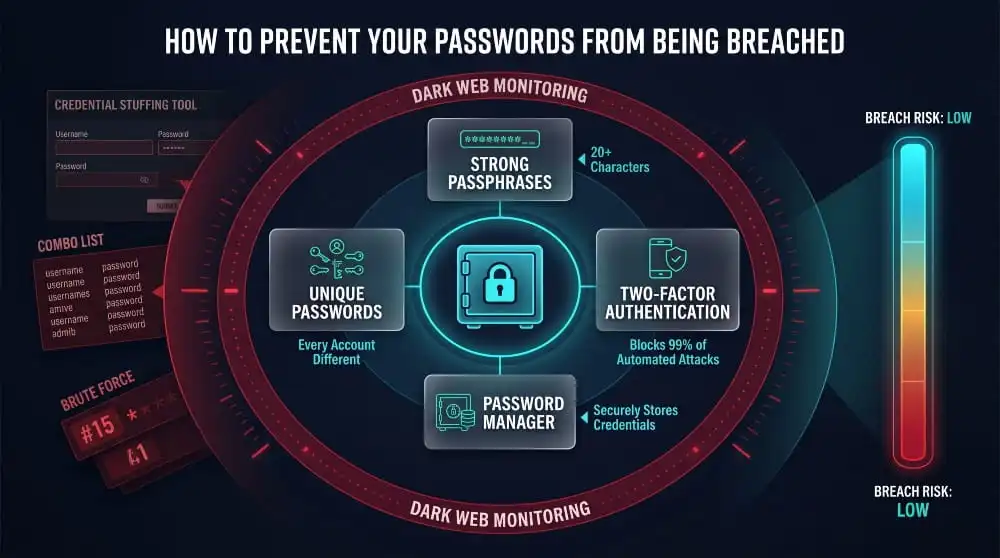
Why Weak and Reused Passwords Are the #1 Breach Vector
The majority of hacking-related breaches don’t involve sophisticated exploits or novel attack techniques. They involve attackers using credentials that were already compromised, either guessed through brute force or harvested from a prior breach, to log into accounts on other platforms.
Weak passwords are cracked quickly. Modern password-cracking tools can test billions of combinations per second, meaning anything based on dictionary words, predictable patterns, or personal information can be cracked within minutes. But reused passwords are a more pervasive problem. When you use the same password across multiple accounts, a single breach anywhere in that chain compromises everything connected to it. Attackers know this, which is why credential stuffing, the automated testing of breached username and password pairs against hundreds of platforms simultaneously, has become one of the most common and cost-effective attack methods in use today.
The math is simple: one reused password, one breach at any platform where you used it, and every account sharing that credential is now at risk. It doesn’t matter how strong the password was at the point of creation.
How to Create Breach-Resistant Passwords
A breach-resistant password has two core properties: it’s unique to a single account, and it’s long and random enough that it can’t be cracked or guessed in any practical timeframe.
Length matters more than complexity. A 20-character password composed of random words, sometimes called a passphrase, is significantly harder to crack than a shorter password with symbols and numbers, because the attack surface scales exponentially with length. A password like marble-thunder-circuit-49 is both memorable and far more resistant to brute force than P@ssw0rd! ever will be.
Uniqueness is non-negotiable. Every account needs its own password. This is the single most impactful change most people can make, and the reason password managers exist, because remembering dozens of unique, random credentials without one is genuinely unrealistic.
Two-factor authentication adds a second layer of protection that remains effective even if a password is compromised. With 2FA enabled, a stolen credential alone is insufficient; the attacker also needs access to your authentication device or app. Enable it on every platform that offers it, starting with email, financial accounts, and any platform where your password manager credentials are stored.
Password Managers, Which Ones Have Been Breached Themselves?
The irony of password managers is that they’re simultaneously the best tool for preventing credential compromise and an attractive target for attackers. Concentrating credentials in a single place makes it a high-value target, so the security architecture of the manager you choose matters significantly.
LastPass suffered the most consequential password manager breach in recent history. In 2022, attackers exfiltrated encrypted password vaults along with unencrypted metadata, URLs, usernames, and billing details. Users with weak master passwords faced a real risk of having their vaults decrypted. The breach raised fundamental questions about LastPass’s security architecture and prompted widespread migration to alternatives.
Norton Password Manager was affected in early 2023 when credential stuffing attacks, using passwords breached elsewhere, successfully accessed an unknown number of Norton accounts. Norton’s own infrastructure wasn’t breached, but accounts where users had reused their Norton password were compromised.
Keeper and Bitwarden have not suffered confirmed breaches of their core vault infrastructure. Both use zero-knowledge architecture, meaning the service provider has no access to decrypted vault contents, a structural protection that limits breach impact even in the event of a server compromise.
1Password also maintains a zero-knowledge model and has not experienced a confirmed credential breach. Following the LastPass incident, 1Password published detailed architectural documentation to differentiate its approach.
The takeaway isn’t that password managers are unsafe; they remain far more secure than reusing passwords across accounts. The takeaway is that master password strength, a zero-knowledge architecture, and two-factor authentication on the manager itself are non-negotiable when choosing one.
How Continuous Dark Web Monitoring Catches Breaches Before You Do
Every standard breach-detection tool, HIBP, Google Password Checkup, and password manager audits operate on publicly disclosed breach data. By the time a breach appears in those databases, it has already been through a full cycle: stolen, traded on private forums, packaged into combo lists, and eventually leaked publicly. That process can take weeks, months, or in some cases, years.
Continuous dark web monitoring operates at the source. Rather than waiting for breach data to surface in public repositories, it actively monitors criminal infrastructure, dark web marketplaces, private paste sites, infostealer log channels, and threat actor forums for credentials tied to your email addresses, domains, or organization. When your data appears there, you’re alerted immediately, before it migrates into the public breach ecosystem that standard tools index.
For individuals, this early warning means the window between credential theft and account takeover narrows dramatically. For organizations, it means the difference between catching an exposure while it’s still contained and discovering a breach through a public disclosure or, worse, through the damage it caused.
No prevention strategy eliminates breach risk; the platforms you use can still be compromised, regardless of how strong your security hygiene is. What monitoring does is compress the time between exposure and response, during which most of the real damage either occurs or is prevented.
Start continuous dark web monitoring with DeXpose →
Password Breach Alerts, Platform-by-Platform Guide
Every major platform now has some form of built-in credential monitoring. The alerts look different, live in different places, and carry slightly different implications, but they all mean the same thing at the core: a password you’re using has been identified in a known breach dataset. Here’s exactly what each alert means and what to do when you see one.
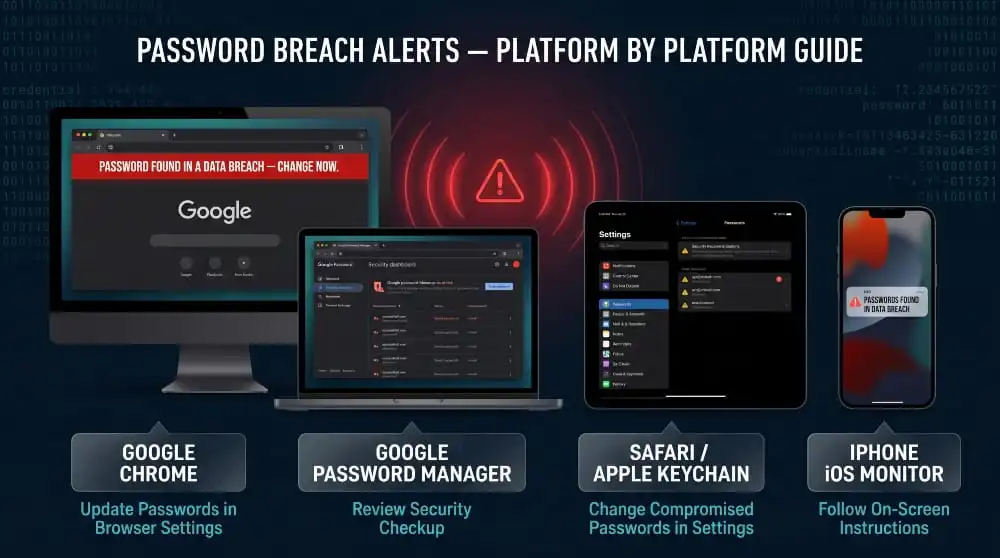
Google Chrome Password Breach Warning, What It Means and How to Respond
Chrome’s breach warning appears as a banner or notification when you log in to a site with credentials that match records in Google’s compromised password database. The message typically reads: “This password was found in a data breach. Change your password to keep your account secure.”
This warning is generated by Chrome’s Password Checkup feature, which runs in the background whenever you use a saved credential. It doesn’t mean Chrome was compromised, nor does it mean someone has already accessed your account. It means the specific username and password combination you just used is known; it exists in a breach database that attackers also have access to.
How to respond: change the flagged password on that platform immediately, then check whether you’ve used the same password anywhere else and change it there too. To review all flagged credentials at once rather than waiting for individual login warnings, go to passwords.google.com → Check passwords. This surfaces every compromised, reused, and weak credential saved to your Google account in a single view.
If you’re seeing this warning repeatedly across multiple accounts, the underlying issue is almost always password reuse. The fix isn’t dismissing the alerts; it’s eliminating the need for a password manager.
Apple/iOS Password Security Breach Notifications
Apple surfaces breach notifications through its Password Monitor feature, which is built into iOS, iPadOS, and macOS. The notifications appear in Settings and, depending on your notification preferences, may also surface as system alerts.
When Apple flags a password, it means the credential stored in your iCloud Keychain has been matched against a database of known compromised passwords. Apple’s matching process uses strong cryptographic techniques; the actual password is never transmitted to Apple’s servers in readable form. The comparison happens using hashed representations, preserving privacy while still producing accurate results.
These notifications cover all credentials saved in Keychain, not just Apple ID passwords. A breach warning might relate to a streaming service, a retail account, or any other platform where you’ve saved a password through Safari or the iOS autofill system. The platform referenced in the warning is where the credential risk exists, and that’s where the password needs to be changed first.
To manage these alerts and review all flagged passwords in one place, go to Settings → Passwords on iPhone or iPad, or System Settings → Passwords on Mac. Passwords flagged with a warning triangle are the priority.
Safari Password Breach, How Apple’s Built-In Monitoring Works
Safari’s breach detection is powered by the same underlying system as iOS Password Monitor, iCloud Keychain, and Apple’s Password Monitoring framework. When you save a password in Safari’s autofill, that credential is added to iCloud Keychain and automatically enrolled in ongoing breach monitoring.
Safari periodically checks saved credentials against an updated dataset of known breached passwords. The check uses a privacy-preserving protocol that compares only a cryptographic representation of the password, never the plaintext. When a match is found, Safari flags the credential and surfaces the alert in the Passwords section of settings.
One distinction worth understanding: Safari’s monitoring flags passwords that match known breached credentials regardless of where the breach originated. A password you created for a forum account that later leaked will be flagged even if you’re using it on an entirely different platform. The flag is on the credential itself, not on any specific account or platform.
This makes Safari’s monitoring particularly useful for catching password reuse risk, but it also means the alert requires some interpretation. When Safari flags a password, the first question to ask is: where else am I using this?
iPhone Passwords Found in Data Breach, Settings, and What to Do
The “Passwords Found in Data Breach” notification on iPhone is one of the clearest breach alerts any platform delivers. It appears as a system notification and, when tapped, takes you directly to Settings → Passwords, where affected credentials are listed individually with context about the breach.
Each flagged password shows which saved account is affected and prompts you to change the password. For accounts where the platform offers a direct change link, iOS will often surface it directly, tap through, update the password, and save the new credential back to Keychain.
If you’re seeing multiple flagged passwords at once, work through them in order of account sensitivity. Email accounts carry the greatest downstream risk because they serve as the recovery mechanism for everything else. Financial platforms, healthcare accounts, and work-related credentials come next. Lower-stakes accounts, entertainment, retail, and forums can follow once the high-risk items are addressed.
One important step that’s easy to overlook: after changing a flagged password, verify that the new password is unique. If you update a breached password with another password you’ve used elsewhere, you haven’t solved the problem; you’ve just moved it.
Android and Google Account Breach Alerts
On Android, password breach alerts are delivered through Google Password Manager, which is integrated into Chrome and the Google account ecosystem across Android devices. The alerts function identically to the desktop Chrome experience; credentials saved to your Google account are continuously monitored against Google’s compromised password database, and warnings surface when a match is found.
To access a full breach report on Android, open Chrome and navigate to Settings → Password Manager → Check passwords, or visit passwords.google.com from any browser signed into your Google account. The results are the same regardless of which device you use; the monitoring is account-level, not device-level.
Android also surfaces breach alerts through Google’s broader account security notifications, which may appear as emails or in-app alerts within the Google app. If you receive a message from Google indicating that a saved password was found in a data breach, it’s sourced from the same Password Checkup system; treat it with the same urgency as an in-browser warning.
For Android users who store passwords outside Google Password Manager, in a third-party app or browser, breach monitoring for those credentials depends entirely on the tool being used. If your password manager of choice has built-in breach detection, ensure it’s enabled. If it doesn’t, supplementing with periodic HIBP checks on your primary email addresses covers the gap.
Conclusion
Password breaches aren’t rare events that happen to other people; they’re a persistent, accelerating threat that affects billions of credentials every year. If you’ve received a breach warning from Google, Chrome, Apple, or your password manager, treat it seriously. If you haven’t received one yet, that doesn’t mean your passwords are clean.
The steps are straightforward: check your exposure, change compromised credentials, eliminate reuse, and put monitoring in place that doesn’t wait for public disclosure to tell you something is wrong.
Standard tools cover the surface. Dark web monitoring covers the rest, catching stolen credentials where they first appear, before the damage is done.
Run a free dark web exposure check with DeXpose →
Frequently Asked Questions (FAQ’s)
What Does Password Found in a Data Breach Mean?
“Password found in a data breach” means the exact username and password combination you’re using has been identified in a known breach dataset, making it accessible to cybercriminals. It doesn’t necessarily mean your account has already been accessed, but it does mean the credential is compromised and must be changed immediately.
Is the 16 Billion Password Breach Real?
Yes, the 16 billion password breach is real. However, it’s a compiled aggregation of credentials harvested from thousands of individual breaches over many years, rather than a single hack of a single platform. Confirmed by multiple cybersecurity researchers and reported by Forbes in 2025, the dataset represents one of the largest credential compilations ever documented and contains a significant volume of active, valid logins.
How Do Hackers Use Breached Passwords?
Hackers primarily use breached passwords in credential stuffing attacks. These automated tools test stolen username and password combinations across hundreds of platforms simultaneously, exploiting the fact that most people reuse passwords. Breached credentials are also sold on dark web marketplaces, used for targeted account takeovers, and packaged into combo lists for large-scale phishing and fraud campaigns.
Can I See the List of Breached Passwords?
You can check whether your specific credentials appear in breach databases through tools like Have I Been Pwned or Google Password Checkup, but accessing the raw breach lists themselves is not something legitimate security tools provide. Those databases are primarily circulated within criminal ecosystems; consumer tools, by contrast, offer a safe, privacy-preserving way to check your exposure without revealing your actual password.
How Often Do Password Breaches Happen?
Password breaches occur daily. Thousands of credential leaks, ranging from small forum databases to massive platform-wide exposures, are documented each year, with billions of records entering criminal circulation. The frequency has increased consistently year over year, driven by the growing volume of stored credentials, the profitability of credential theft, and the widespread use of infostealer malware.
What Is the Most Common Type of Password Breach?
The most common type of password breach is a third-party platform breach, where attackers compromise a service that stores user credentials and exfiltrate the database. Infostealer malware, which silently harvests passwords directly from infected devices, is the second-most-prevalent method and is responsible for an increasing share of recent high-quality credential leaks.
Is My Password Manager Safe from Breaches?
Password managers are significantly safer than reusing passwords across accounts, but they are not immune to breaches, as the 2022 LastPass incident demonstrated. The safest options use zero-knowledge architecture, meaning the provider never has access to your decrypted vault. Bitwarden, 1Password, and Keeper all operate on this model. Regardless of which manager you use, a strong, unique master password and two-factor authentication on the manager itself are essential.
What’s the Fastest Way to Check If My Password Was Breached?
The fastest way to check whether your password has been breached is to visit passwords.google.com and run a Password Checkup if your credentials are saved in Chrome, or go to haveibeenpwned.com and enter your email address to see your breach history. For deeper exposure that goes beyond public breach databases, including dark web sources, a dedicated dark web scan catches what standard tools miss.
Cybercrime Laws Around the World | A Complete Investigator’s Reference Guide
Cybercrime laws are the country-specific and international legal frameworks that define which online acts- unauthorized access, data theft, fraud, harassment- count as crimes and what penalties…
Read more
Lesser-Known Ransomware Groups Still Targeting Businesses in 2026
Groups like Monti, Vice Society, Royal (now rebranded as BlackSuit), Cuba, Nokoyawa, Yanluowang, and Lorenz rarely make national headlines like LockBit or Qilin, but they’re still…
Read more
New & Emerging Ransomware Groups 2025-2026 | How to Respond
Newer/emerging ransomware groups are ransomware-as-a-service operations that surfaced in 2025 and 2026; among them are Interlock, BlackSuit, SafePay, Fog, Cactus, Lynx, 8Base, El Dorado, and Cicada3301,…
Read more