A dark web alert is a notification telling you that your personal information, an email, password, card number, or Social Security number, has appeared somewhere on the dark web, usually because it was exposed in a data breach or stolen by malware. It’s a warning sign, not a diagnosis: it means your data is out there, not that you’ve definitely been defrauded yet.
What Is a Dark Web Alert?
A dark web alert is an automated notification generated when a monitoring system detects your personal data, such as an email address, password, or account number, listed on a dark web marketplace, hacker forum, or breach dump. The alert itself doesn’t fix anything; it’s a trigger meant to get you to act before that exposed data is used against you.
How dark web alerts actually work
Behind every alert is a monitoring engine that continuously scans dark web marketplaces, paste sites, hacker forums, Telegram channels, and known breach databases for specific identifiers tied to you, your email, phone number, card numbers, or SSN. When your data appears in one of those sources, the system compares it to what you’ve registered and sends an alert, typically via email, push notification, or app banner. The sophistication varies widely: some services perform a one-time historical scan, while others run continuous, real-time crawls that catch new leaks within hours of their surfacing.
Who sends them (banks, credit apps, antivirus, dedicated monitoring services)
Dark web alerts come from four broad categories of providers, each with varying levels of coverage. Banks and card issuers (Capital One, Chase, Discover) bundle basic dark web monitoring into their existing apps as a free perk. Credit bureaus and credit-monitoring apps (Experian, TransUnion, CreditWise) tie alerts to your credit file and SSN. Antivirus and security suites (Norton, McAfee, LifeLock) fold dark web scanning into broader device-protection subscriptions. And dedicated dark web monitoring platforms exist purely to continuously track exposure across breaches, marketplaces, and criminal forums, usually with far deeper and more frequent scanning than a bank’s bolt-on feature can provide.
Why Did I Get a Dark Web Alert? (By Provider)
You got a dark web alert because one of the services you use, a bank, credit app, or security suite, found a piece of your personal information in a breach dump or on a dark web listing it monitors for. Which provider sent it tells you roughly what data was matched and how seriously to treat it.

Capital One / CreditWise dark web alerts
Capital One’s dark web alerts, delivered through its CreditWise tool, notify you when your SSN, email, or other personal details are found in a known dark web data source. These are usually legitimate first-party notifications sent directly through the CreditWise app or Capital One’s official site, not through unsolicited text links, so if you got one inside the app after logging in normally, it’s almost certainly real.
Chase dark web alerts
Chase offers dark web monitoring through its Credit Journey feature, which scans for your personal information across dark web sources and alerts you inside the app or via secure email when a match is found. As with Capital One, the safest way to confirm that a Chase alert is legitimate is to log in to the Chase app directly rather than clicking any link in the notification itself.
Experian & TransUnion dark web alerts
Experian and TransUnion tie dark web monitoring to your credit file, scanning for your SSN, email addresses, and financial account numbers and alerting you when they turn up in breach data. Because these bureaus already hold your full credit profile, an alert from either one is worth taking seriously; it often means the exposed data is detailed enough to support new-account fraud, not just a stray email leak.
Discover dark web alerts.
Discover’s free dark web monitoring, built into its account dashboard, checks for your Social Security number and other personal details across dark web sources at no cost, even to non-Discover cardholders in some cases. It’s a lighter-weight, single-provider scan rather than continuous multi-source monitoring, so a “no alerts” result from Discover shouldn’t be read as a clean bill of health elsewhere.
Norton, LifeLock & McAfee dark web alerts
Norton, LifeLock, and McAfee bundle dark web monitoring into their broader security and identity-protection subscriptions, scanning breach data for emails, passwords, and, in LifeLock’s case, SSNs and financial accounts tied to identity-theft insurance. These are typically the most feature-rich consumer alerts, often pairing notifications with credit monitoring and identity restoration support.
NordVPN, Dashlane & Google dark web alerts
NordVPN, Dashlane, and Google all run dark web or “dark web report” scans as an add-on to their core products, a VPN, a password manager, and an email/account ecosystem, respectively, checking whether your email or saved passwords appear in known breach data. These are useful early-warning signals but generally check a narrower set of sources than dedicated identity-monitoring services.
H&R Block dark web alerts
H&R Block’s dark web alert, tied to its tax-related identity protection offerings, flags when your SSN or tax-related identifiers appear in dark web data, relevant specifically because tax-season identity theft (fraudulent returns filed in your name) is one of the more damaging uses of a stolen SSN.
Is a Dark Web Alert Real or a Scam?
Most dark web alerts from your bank, credit bureau, or security app are legitimate, but the format is also a favorite disguise for phishing scams. The difference almost always comes down to how you received it and where it asks you to click.

How to verify an alert is legitimate.
The safest way to verify a dark web alert is to ignore any links in the message and instead log in to the provider’s app or website directly, either by typing the URL yourself or using the official app. Legitimate alerts from Capital One, Chase, Experian, and similar providers will show the same notification in your account dashboard once you log in independently. If it’s not there, treat the original message as suspicious.
Red flags of a phishing message disguised as a dark web alert
Scam messages mimicking dark web alerts tend to share a few tells: they create urgency (“act within 24 hours”), ask you to click a link or call a number to “verify your identity,” and request sensitive details like a full SSN, card number, or one-time passcode directly. A genuine alert will never ask you to provide your full SSN or card number by replying, texting, or following an unfamiliar link; it will direct you to log in to your existing account.
What Data Triggers a Dark Web Alert?
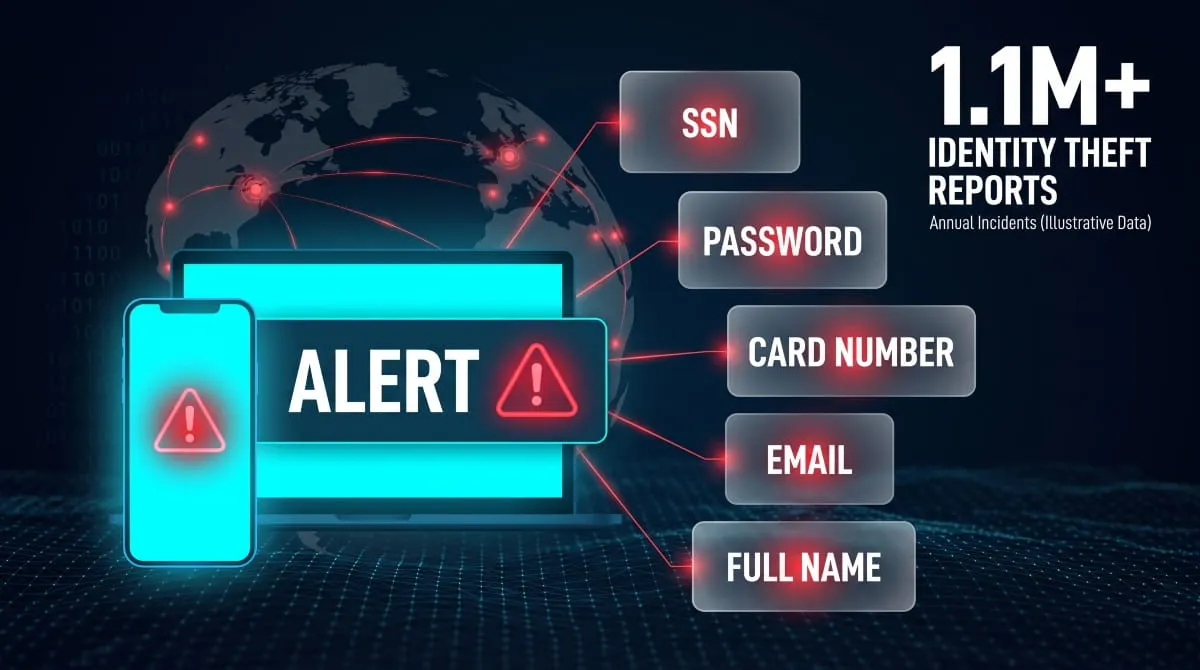
A dark web alert fires when a specific piece of your personal data, most often an SSN, password, email, or card number, is matched against something newly listed on a dark web marketplace, forum, or breach dump. Different data types carry very different levels of risk.
Social Security numbers on the dark web
An SSN found on the dark web is the highest-severity trigger, since it’s the single identifier most useful for opening new credit accounts, filing fraudulent tax returns, or committing synthetic identity fraud in your name. Credit bureau and identity-theft-focused monitoring services (Experian, TransUnion, LifeLock, H&R Block) are built specifically to watch for this.
Passwords, card numbers, and login credentials
Stolen login credentials are now one of the fastest-growing categories of dark web data. Credential theft surged 160% in 2025, with roughly 1.8 billion logins stolen from infected devices, according to Recorded Future. A password or card number alert is serious but more containable than an SSN leak: changing the password or canceling the card generally neutralizes the specific exposure.
Email addresses and personal identity data
An email address alone showing up on the dark web is the lowest-severity trigger, since email addresses circulate constantly in breach data and, by themselves, don’t reveal much. But they become dangerous when paired with a reused password, making them the most common entry point for account-takeover attempts.
How Effective Are Dark Web Alerts at Preventing Identity Theft?
Dark web alerts are a genuinely useful early-warning tool, but they don’t prevent identity theft on their own; they only shorten the window between exposure and your response. The FTC received over 1.1 million identity theft reports in 2024, a 9.5% jump from the year before, so the exposure these alerts flag is not hypothetical.

What alerts catch, and what they miss
Alerts are good at catching data that’s been posted to known, indexed dark web sources, marketplaces, forums, and breach databases that monitoring tools actively crawl. They’re far less reliable at catching data traded privately, sold in closed criminal channels, or used immediately without ever being publicly listed, which means a clean alert history is reassuring but not proof your information is safe.
Real-time vs. historical/delayed alerts
A real-time monitoring service flags new exposure within hours of its appearance. At the same time, a historical or one-time scan only tells you what was already out there at the moment you checked and says nothing about tomorrow. Given that only about 21% of consumers currently use any form of paid identity protection service, most people relying on free bank or app alerts are getting historical, lower-frequency coverage without realizing it.
What to Do When You Get a Dark Web Alert
The right response to a dark web alert depends on what data was exposed. Still, a few steps apply almost universally: change the affected password immediately, monitor the related account closely, and consider a credit freeze if an SSN was involved.
Immediate steps (passwords, freezes, monitoring)
- Change the password on the affected account and on any other account where you reused it
- If a card number was exposed, contact the issuer to reissue the card
- If your SSN was exposed, place a free credit freeze with Equifax, Experian, and TransUnion
- Turn on two-factor authentication wherever it’s available
- Check recent account statements and credit reports for unfamiliar activity
Long-term protection habits
Beyond the immediate response, the habits that actually reduce future exposure are using a password manager with unique logins per site, periodically checking your credit report (free weekly through annualcreditreport.com), and treating every unsolicited “verify your account” message as suspicious by default rather than the exception.
Choosing a Reliable Dark Web Monitoring Service
The right dark web monitoring service depends on how much of your exposure a free bank alert actually covers versus what a dedicated, continuously updated monitoring platform can catch. For most people juggling several accounts, one consolidated service beats piecing together alerts from five different apps.
Free bank/app alerts vs. dedicated monitoring
Free alerts bundled into a bank, credit app, or antivirus subscription are a reasonable baseline. Still, they typically scan a narrower slice of dark web sources and update less frequently than a dedicated monitoring service built specifically for continuous, real-time exposure tracking. If you’re only relying on one bank’s built-in alert, you’re seeing a fraction of the picture.
Family and multi-user monitoring plans
Because identity exposure isn’t limited to one person in a household, multi-user and family monitoring plans that cover a spouse, kids, or aging parents under one dashboard close a real gap; a single account holder’s alert tells you nothing about whether a family member’s SSN or email has also surfaced.
What continuous, business-grade dark web monitoring looks like
At the business level, dark web monitoring extends past individual credentials to track exposed employee accounts, leaked corporate credentials, and mentions of the company itself across breach forums and ransomware leak sites, the same continuous-scanning approach as consumer monitoring, applied to an entire organization’s attack surface rather than one person’s identity.
Stay Ahead of Exposure Before It Becomes Fraud
A single bank alert only tells you about one slice of your exposure, and only after the fact. DeXpose continuously monitors dark web marketplaces, breach dumps, and criminal forums for your data (and your family’s or business’s), surfacing new exposures in real time rather than waiting for a quarterly scan to catch up.
Run a free Dark Web Report → and see what’s already out there, no card required.
Already know your email’s been in a breach? Check it against known breach data →
For ongoing, continuous protection instead of one-off checks, explore DeXpose Dark Web Monitoring, built to catch exposure the moment it surfaces, not months later.
Frequently Asked Questions (FAQ’s)
What is a dark web alert?
A dark web alert is a notification that your personal data, an email, password, SSN, or card number, was found on the dark web, typically through a breach or stolen-data listing.
What does a dark web alert mean?
It means a piece of your personal information has been exposed and may be accessible to people who buy and trade stolen data, not that fraud has already occurred.
Are dark web alerts real?
Yes, when they come directly through your bank, credit bureau, or security app’s official login, not through a link in an unsolicited text or email.
What should I do about a dark web alert?
Log into the source account directly to confirm the alert, then change any affected passwords, freeze your credit if your SSN was involved, and monitor your accounts for unusual activity.