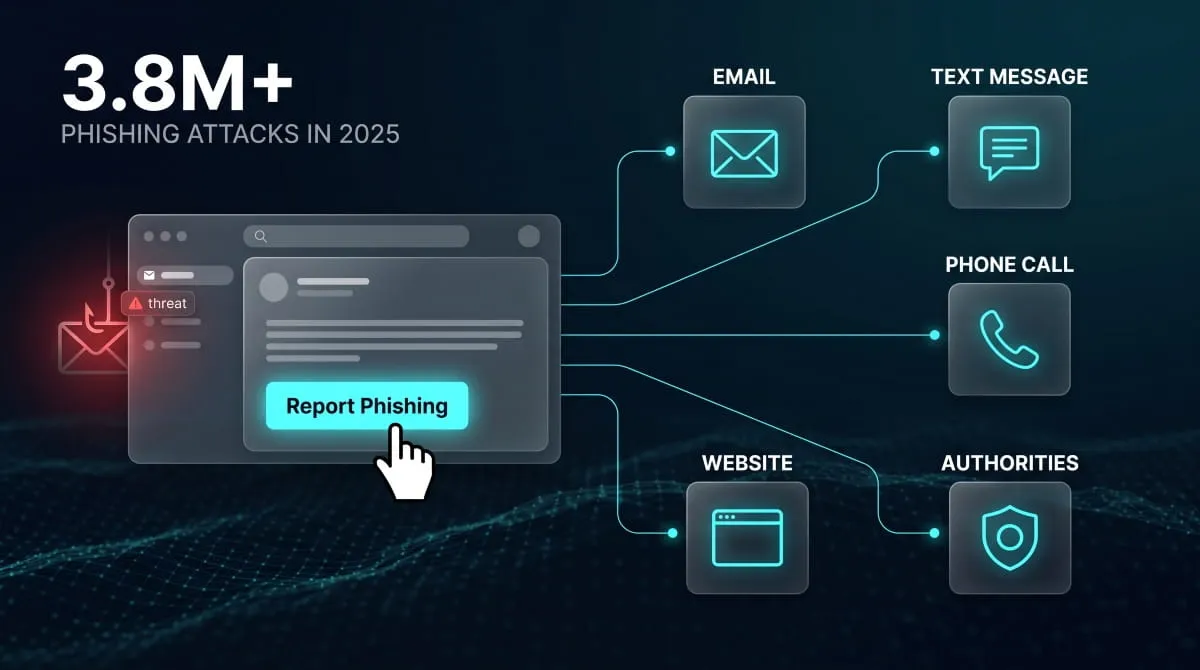
To report phishing, use the built-in “Report Phishing” or “Report Spam” button in your email client, forward suspicious text messages to 7726 (SPAM), and flag suspicious calls or websites directly to the platform or company being impersonated. The exact steps differ slightly by app, but every major provider gives you a one- or two-click way to do it. Phishing isn’t a niche threat anymore: the Anti-Phishing Working Group recorded 3.8 million phishing attacks in 2025 alone, and that figure only counts the ones that got reported, meaning the real number is almost certainly higher. Because so many attacks now impersonate specific companies- your bank, your email provider, a shipping carrier, a streaming service- where and how you report a phishing attempt depends on where you found it. This guide walks through the exact reporting process for Outlook, Gmail, and every other major inbox, plus texts, phone calls, fake websites, and the specific companies scammers most often spoof, so you can report what you’re looking at right now instead of hunting for instructions.
What Counts as Phishing (and Why Reporting It Matters)
Phishing is any attempt to trick you into handing over credentials, payment details, or personal information by posing as a trusted source, a bank, a coworker, a delivery company, or a brand you already use. It doesn’t only arrive by email anymore. Attackers now spread the same tactic across text messages, phone calls, and fake websites, which is exactly why “how to report phishing” looks different depending on where the attempt reached you.
Email Phishing vs. Smishing (Text) vs. Vishing (Phone) vs. Fake Websites
Email phishing is still the most familiar version: a message that mimics a real company and pushes you toward a fake login page or infected attachment. Smishing does the same thing over text, often a fake delivery notice or bank alert with a malicious link, and it’s growing fast, with SMS-based fraud detections up nearly 35 percent in a single quarter in 2025, according to fraud-detection firm Crane Authentication. Vishing swaps the message for a phone call, usually someone impersonating your bank’s fraud department or a government agency to get you talking and compliant. Fake phishing websites are the landing pages all three feed into, convincing clones of real login or checkout pages designed purely to capture what you type. The delivery method changes, but the giveaway signs and the reporting instinct stay the same.

Does Reporting Phishing Actually Do Anything?
Yes, reporting a phishing attempt does more than clear it out of your inbox. When you use the “report phishing” button in your email client, that message gets fed into spam filters and threat-intelligence systems that block the same sender or link for other users. When you report a phishing site to the browser or hosting provider, it can get blocklisted or taken down, cutting off the page before more people land on it. And when you report it to the company being impersonated- your bank, PayPal, Amazon- you’re giving them the evidence they need to warn other customers and pursue takedowns of their own. The stakes are real: business email compromise scams alone caused $2.8 billion in reported losses in the U.S. in 2024, per the FBI’s Internet Crime Complaint Center, and that’s just what got reported. Every Report you file makes the next takedown faster.
How to Report Phishing in Your Email Client
Every major email provider gives you a built-in way to report phishing without leaving your inbox; the label is usually “Report Phishing” or “Report Spam,” and using it does more than delete the message: it feeds that sender and link into the provider’s filters so the next person never sees it. The exact click path just depends on which inbox you’re using.

Outlook (Classic, New Outlook, Outlook.com, Outlook 365 / M365 Admin)
In Outlook.com and the new Outlook for Windows, open the suspicious message, click Report in the toolbar (or right-click the email), and choose Report Phishing. Outlook removes it from your inbox. It sends a copy to Microsoft for analysis. Classic Outlook for Windows and Mac uses the same “Report” button when it’s present, though older desktop builds sometimes lack it entirely.
If the Report Phishing button is missing, greyed out, or has disappeared, it’s almost always a configuration issue rather than something broken on your end. In a Microsoft 365 / work account, an admin has to turn on user reporting in the Microsoft Defender portal (Settings → Email & collaboration → User reported settings) and set it to use the built-in Report button before the option appears for anyone in the organization. Personal accounts on an outdated Outlook version can hit the same wall, since the built-in button only ships in reasonably current releases. If you’re on a personal device with no admin to call, or a third-party client that doesn’t support the button at all, forward the email as an attachment (not a regular forward, so the headers survive) to Microsoft’s phishing address and to reportphishing@apwg.org, then delete it.
Gmail (Web, Mobile App, and via the Gmail API for Developers/Admins)
On Gmail’s web interface, open the suspicious email, click the three-dot menu near the top of the message, and select Report phishing. Gmail moves it to Spam and sends the details to Google’s abuse team for review. The mobile app works the same way: open the message, tap the three-dot menu in the top corner, and choose Report phishing. On some Gmail iOS builds, that option briefly isn’t visible; if that happens, Report spam does a similar job, or you can finish the Report from the desktop site instead.
For Google Workspace admins and developers, Gmail also exposes phishing reporting through its API rather than requiring every user to click manually; this is how many security teams route large volumes of user-submitted reports into a centralized queue automatically, instead of relying on individual clicks. Reporting through the built-in tool (versus just deleting or forwarding) matters because it sends Google structured data, sender, links, headers, that trains its spam models directly.
Yahoo Mail, Hotmail/Live, iCloud/Apple Mail, AOL, Fastmail
Yahoo Mail and AOL both handle it the same way: open the message, click the three dots next to Reply, and select Report phishing scam (or Report Abuse, if the message is coming from another Yahoo or AOL address). Hotmail and Outlook.com/Live accounts follow the Outlook steps above, since they now run on the same platform.
Apple Mail is the outlier here; it has no dedicated phishing button. The closest option is marking the message as Junk (right-click the email and select Move to Junk), which trains Apple’s filtering but doesn’t file a phishing report on its own; if the message impersonates Apple specifically, forward it to reportphishing@apple.com, and for iCloud.com/me.com/mac.com abuse, Apple asks you to send it to abuse@icloud.com. Fastmail similarly relies on marking messages as spam/phishing from the message menu rather than a dedicated reporting workflow. Across every one of these providers, the underlying mechanic is the same one Gmail and Outlook use: your Report doesn’t just protect your own inbox; it becomes training data that blocks the same sender for everyone else on that platform.
How to Report a Phishing Phone Call (Vishing)
Vishing, voice phishing, is when a scammer calls pretending to be your bank, the IRS, Apple, or another trusted organization to talk you into handing over a password, a one-time code, or your card details. If you get one of these calls, hang up first, then report it to your phone carrier and to the FTC or FCC, since each of those channels feeds a different enforcement effort.

Reporting to Your Carrier and the FCC/FTC
The fastest step is forwarding the caller’s number as a text to 7726 (SPAM) on most U.S. carriers, which feeds directly into their network-level Spam- and scam-call filters. From there, file with the two federal agencies that actually track and act on these calls: the FTC at reportfraud.ftc.gov, which logs the call into its Consumer Sentinel database used by more than a thousand law enforcement agencies, and the FCC at fcc.gov/complaints (or 1-888-225-5322), which specifically handles spoofed caller ID and illegal robocalls. It’s worth filing with both even though they sound redundant; the FTC pursues the fraud and telemarketing side, while the FCC can penalize the caller-ID spoofing itself, and federal law allows fines of up to $10,000 per spoofed call used to defraud someone. If the call impersonated a real company, it’s also worth reporting directly to that company’s fraud line; most banks and major brands have one, since your Report may be the detail that lets them flag the number for other customers before it reaches them too.
How to Report a Phishing Website or Link
If you land on a site that’s impersonating a real login page, checkout, or bank portal to steal credentials, the fastest way to report a phishing website is through Google Safe Browsing, and then directly to whoever actually hosts or registered the domain, since those are two separate reports that do two different jobs.
Reporting via Google Safe Browsing
Google Safe Browsing’s report form (at google.com/safebrowsing/report_phish) exists specifically to flag URLs so Google can warn other users before they land on the same page. Submitting a report there gets the exact URL, not just the homepage. Still, the specific fake login or checkout page is reviewed and, if confirmed, added to a blocklist that triggers warnings across Chrome, Safari, Firefox, Gmail, and Android. That visibility matters because phishing sites move fast: many live for less than 12 hours before the operators tear them down and stand up a new one elsewhere, so getting a URL flagged quickly is often the only window in which a report does real good. What Safe Browsing doesn’t do is take the site offline; that requires reporting to the infrastructure actually keeping it online.
Reporting to the Hosting Provider / Registrar (GoDaddy, Cloudflare)
Getting a phishing page removed rather than just flagged means reporting it to whoever hosts the site or registered its domain, since a warning label doesn’t stop the page from existing; only the host or registrar can take it down. GoDaddy runs a dedicated abuse-report form for exactly this, and asks for the URL along with a clear description of the malicious content and, where available, evidence like a security scan showing the page’s phishing behavior. Cloudflare is a more common wall to run into, since it sits in front of a huge share of the web as a reverse proxy rather than a traditional host: reporting through its abuse form there won’t necessarily unmask the phishing site directly, but Cloudflare forwards the complaint to the actual hosting provider and site operator behind it, who are the ones positioned to remove it. When a site is proving hard to unmask this way, reporting it to the company being impersonated is often the most effective backup, since they can pursue a legal takedown request that a hosting provider will act on faster than an individual complaint.
How to Report Phishing That Impersonates a Specific Company
Most phishing doesn’t just say “your account has a problem”; it names a specific company you actually use, which is exactly why knowing where to report phishing for that particular brand gets your message removed faster than reporting it generically. Nearly every major company runs a dedicated abuse or phishing inbox, and forwarding the message there, as an attachment where possible. Hence, the headers survive and give their security team what they need to block the sender for everyone else.

Financial Services & Payment Apps (PayPal, Banks, Venmo, Cash App, Coinbase, Robinhood)
Money apps are the single most impersonated category, since a convincing fake login page pays off immediately for scammers. PayPal asks you to forward suspicious emails to phishing@paypal.com, Venmo uses phishing@venmo.com, and Robinhood has a matching reportphishing@robinhood.com. Coinbase asks you to forward the full message with headers through its in-app support or Scam Hub rather than a public inbox, since crypto phishing often needs faster manual review. Cash App handles reports the same way, through in-app support, since money-app scams frequently involve social engineering on top of a fake link and benefit from a human looking at the full context. Banks vary by institution, but most publish a fraud or phishing address on their site; Chase, for instance, uses phishing@chase.com, so it’s worth checking your bank’s security page directly if it isn’t already on your radar.
Tech Platforms (Apple, Amazon, Microsoft, Google, Netflix)
Apple asks you to forward suspicious emails or texts to reportphishing@apple.com, and if the message came as a text, a screenshot works just as well as a forward. Amazon’s dedicated address is stop-spoofing@amazon.com, built specifically for messages that spoof the company’s name or branding. Netflix uses phishing@netflix.com and will simply bounce the email back if that exact scam has already been reported. Microsoft-impersonating phishing is best reported through phish@office365.microsoft.com or, if it landed in your own Outlook or Microsoft 365 inbox, straight through the built-in Report Phishing button, which routes it to the same team. Google doesn’t operate a single public phishing inbox the way these others do; reports about Google-impersonating phishing are best filed through Gmail’s own Report phishing option if it arrived there, or through Safe Browsing if it’s a fake Google-branded website.
Telecom, Shipping & Utilities (AT&T, Verizon, Xfinity, USPS, FedEx, UPS)
Fake delivery texts are one of the fastest-growing phishing categories; smishing detections tied to fraud rose nearly 35 percent in a single quarter in 2025, according to fraud-detection firm Crane Authentication, and delivery-company impersonation is a major driver of that spike. USPS-branded smishing goes to spam@uspis.gov, ideally with a screenshot of the text attached; UPS has a matching fraud@ups.com, and FedEx uses abuse@fedex.com. On the carrier side, Xfinity/Comcast asks that phishing emails be reported to abuse@comcast.net with the full headers pasted in rather than forwarded (forwarding strips the very data they need). AT&T and Verizon don’t require a separate phishing address for text-based scams; forwarding the suspicious message to 7726 (SPAM) reaches your carrier’s fraud filtering regardless of which one you’re on, and works the same way whether the message impersonated the carrier itself or a third party.
Government Agencies (IRS, DMV, Social Security Administration)
Government impersonation carries real weight because these scams lean on fear rather than curiosity, threats of arrest, frozen benefits, or unpaid taxes. The IRS asks that any phishing email, text, or fake website using its name be forwarded to phishing@irs.gov, and it’s explicit that it never initiates contact by email in the first place, which alone is often enough to identify the message as fake. The Social Security Administration works similarly: SSA-impersonating emails go to spoof@ssa.gov, and if the message affected an actual benefit or claim, its Office of the Inspector General handles that separately through oig.ssa.gov. DMV impersonation doesn’t have one national reporting address, since DMVs are state-run; your best options are your specific state DMV’s fraud contact and, as a catch-all for any of these three, the FTC at reportfraud.ftc.gov, which routes government-impersonation complaints to the right agency regardless of which one was named.
How to Report Phishing to Official Authorities
Reporting phishing to an official authority, rather than just the company being impersonated, matters most when money changed hands, personal data was actually compromised, or you want the incident tracked as part of the broader fraud picture. Which agency to use depends mainly on your country, and each one plays a distinct role rather than duplicating the others.
FBI IC3 (United States)
In the U.S., the FBI’s Internet Crime Complaint Center at ic3.gov is the central place to file a phishing report, especially if you lost money, had an account compromised, or want the incident logged for potential investigation. IC3 doesn’t just file the Report away; it aggregates related complaints into referrals for law enforcement and can alert financial institutions quickly enough to help freeze fraudulent transactions in some cases. The scale here is real: IC3’s 2025 annual report logged over 1 million complaints and more than $20.8 billion in reported losses, a 26 percent jump from the year before, with phishing and spoofing consistently among the most-reported categories. If you’re unsure whether an incident is “serious enough” for IC3, the answer is generally yes; it costs a few minutes and helps investigators spot patterns across victims who’d otherwise never connect their cases.
Action Fraud (United Kingdom)
In the UK, phishing emails and texts without a financial loss are reported to the National Cyber Security Center by forwarding the email to report@phishing.gov.uk or the text to 7726, a free short code that flags the number to your mobile provider. Since December 2025, the fraud-reporting service long known as Action Fraud has been formally replaced by Report Fraud (at reportfraud.police.uk), covering England, Wales, and Northern Ireland, so if you’ve actually lost money or had your account compromised as a result of a phishing attempt, that’s the current front door rather than the old Action Fraud name, even though the two are commonly used interchangeably. The reporting habit itself is working at scale: more than 41 million phishing emails have been submitted to the NCSC’s reporting service since it launched in 2020.
CISA Reporting Guidance
For phishing that looks like it’s part of a larger campaign, targeting an organization, a government agency, or infrastructure, CISA (the Cybersecurity and Infrastructure Security Agency) offers its own reporting path through its Incident Reporting System, its 24/7 Operations Center at report@cisa.gov, or by phone at 1-844-Say-CISA. This channel is aimed less at “I got one suspicious email” and more at incidents with broader implications: CISA frequently issues joint advisories with the FBI on active phishing campaigns, and reports submitted through its system feed directly into that threat-tracking and public-warning process rather than an individual consumer-complaint queue.
Troubleshooting: Report Phishing Button Missing or Not Working
If the report phishing button has disappeared from your inbox, it’s rarely a bug on your end; it’s usually a version, permissions, or admin-configuration issue with a specific fix depending on which email client you’re using. Working through the right checklist below typically restores it in a few minutes.
Outlook-Specific Fixes
In a work or school account, the Report button is controlled centrally: an IT admin has to turn on user reporting in the Microsoft Defender portal (Settings → Email & collaboration → User reported settings) and set it to use the built-in Report button before it appears for anyone in that organization, so if it vanished for your whole team at once, that setting is the most likely cause. Version matters too; the built-in button only ships in reasonably current Outlook releases, so an outdated desktop client (particularly classic Outlook for Windows or Mac) may simply not have it yet. At the same time, new Outlook and Outlook on the web tend to get it automatically. If you’re on a personal account, a third-party client, or an IMAP setup where the button was never going to appear at all, the workaround is the same one that’s worked for years: forward the message as an attachment (not a normal forward, so the headers stay intact) to Microsoft’s phishing address, then delete it. And if you’re using a shared or delegated mailbox, the button can silently fail to submit a report, even though it still removes the email from view, unless you have Send As permission on that mailbox, which is worth checking before assuming the feature itself is broken.
Gmail and Mobile-App Specific Fixes
On Gmail’s web interface, “Report phishing” lives in the three-dot menu at the top of an open message, if it’s missing there, you’re most likely looking at “Report spam” instead, which is a real but different option; use Spam for unwanted marketing and reserve phishing for messages trying to steal credentials, since mislabeling one as the other dilutes the signal Google’s filters rely on. The mobile app follows the same three-dot menu pattern, but some older iOS builds have been known to drop the phishing-specific option entirely; if that happens, Report spam still gets the message off your device and flagged, or you can finish the Report from the desktop site instead, where the option is more consistently available. If you’re on a Google Workspace account and don’t see either option, the cause is often the same as Outlook’s: an administrator has disabled user-facing reporting or has a separate phishing-reporting add-on deployed in its place, in which case the fix is on the admin side rather than something you can toggle yourself.
What Happens After You Report Phishing
Reporting phishing sets off a chain of action behind the scenes rather than just clearing a message from your inbox, and what happens next depends on whether you’re only reporting a suspicious message or already interacted with one.

How Companies and Email Providers Use Your Report
When you click “Report Phishing” in Gmail or Outlook, that Report doesn’t just disappear into a queue; it becomes training data. Email providers feed the sender address, links, and headers from your Report into the spam and threat-detection models that filter everyone’s inbox, which is why one person’s Report can quietly block the same campaign from reaching thousands of others before it arrives. Companies being impersonated use reports the same way but for a different purpose: PayPal, Amazon, your bank, and similar brands route forwarded phishing emails to security teams that hunt down the fake domains and login pages behind the message, often pursuing takedowns with hosting providers and registrars directly. The pace matters here: the median time for someone to click a phishing link is about 21 seconds after opening it, and roughly 28 more seconds to actually enter credentials, meaning the entire window from open to compromise is typically under a minute, according to Verizon’s Data Breach Investigations Report. That’s exactly why a fast report, even one that feels minor, genuinely shortens how long a phishing campaign stays effective.
What to Do Next If You Already Clicked a Link or Entered Credentials
If you’ve already clicked a phishing link or typed a password into a fake page, reporting the message is still worth doing, but it’s no longer the first step; securing the account is. Change the password on the affected account immediately, and if you reused that password anywhere else, change it there too, since credential-stuffing attacks rely on exactly that overlap. Turn on two-factor authentication if it isn’t already active, and check the account’s recent activity or login history for anything you don’t recognize. If the phishing page asked for financial information, a card number, a bank login, or a wire transfer, contact that institution directly using the number on your card or its official site, not any number or link from the phishing message itself, since a fast fraud hold or transaction reversal is far more effective in the first few hours than days later. Only after those steps are handled does reporting the original message become the finishing move; it protects the next person, even though your own account is already the priority.
Frequently Asked Questions (FAQ’s)
What Does “Report Phishing” Mean vs. “Report Spam”?
Report phishing flags a message trying to steal credentials or personal data, while report spam just marks unwanted mail like marketing blasts. Using the wrong one dilutes the signal providers rely on to train their filters, so it’s worth picking the option that actually matches the threat.
Is Reporting Phishing Anonymous?
Your identity generally isn’t shared with the scammer. Still, it isn’t fully anonymous either; your email provider or the impersonated company can see who submitted the Report, since that context helps them verify and act on it.
How Do I Undo an Accidental Phishing Report in Outlook?
Check Junk Email or Deleted Items first; most reported messages land there and can be restored by right-clicking and selecting Restore or Not Junk. If it’s gone from both and your account uses Microsoft 365 Defender, an admin may still be able to release it from quarantine.