
What Is a Rootkit? Definition, Types, Examples, Detection and Removal (Complete Guide)
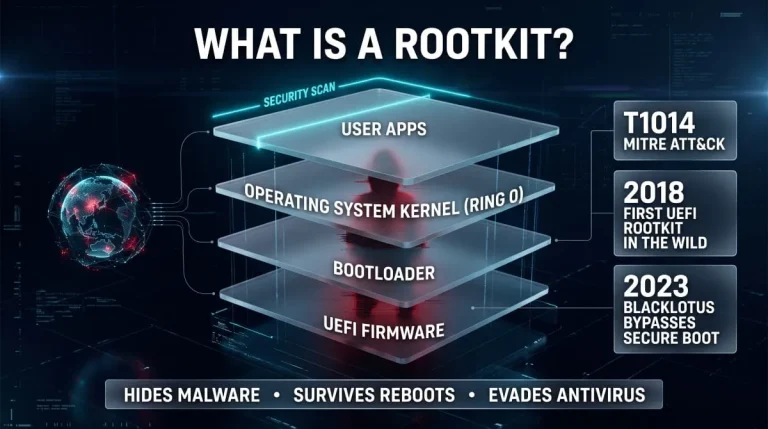
A rootkit is malicious software that hides itself and the malware it protects by running with the highest privileges and tampering with what the operating system reports. That concealment is what makes it dangerous: the machine looks healthy while an attacker keeps persistent, privileged control. This guide explains how rootkits work, the main types, real examples, and how to detect, remove, and prevent them.
What Is a Rootkit? (Definition and Meaning)
A rootkit is a set of tools that gives an attacker privileged access to a computer while hiding that access from the owner, the operating system, and security software. It is rarely the way an attacker gets in. It’s how they stay in without being noticed.
Where the Name Comes From (“Root” + “Kit”)
“Root” is the all-powerful administrator account on Unix-like systems, and “kit” is the bundle of tools used to keep that access. The earliest rootkits of the 1990s were Unix toolkits that replaced system commands such as ls and ps so intruders could hide their files and processes. Modern rootkits apply the same idea to Windows, Linux, firmware, and even hypervisors.
Is a Rootkit a Virus or Malware?
A rootkit is malware, but it is not a virus in the strict sense. A virus replicates itself, while a rootkit does not spread on its own. Its defining trait is concealment, and it usually arrives alongside another payload, such as a backdoor, keylogger, or botnet client. People still say “rootkit virus” informally, and the label is understandable even if technically loose.
What Is the Purpose of a Rootkit?
A rootkit’s purpose is to give an attacker long-term, undetected control of a system. In practice, that means hiding other malware, keeping a backdoor open, capturing credentials, and switching off or blinding security tools. MITRE ATT&CK catalogs the technique as T1014 under defense evasion, which captures the point well: a rootkit rarely does the damage itself; it protects whatever does.
Why Hackers Use Rootkits
Hackers use rootkits because they extend dwell time. A persistent attacker who survives reboots, cleaning attempts, and routine scans can quietly steal data for months. A rootkit also complicates incident response, since the tools defenders rely on to investigate may report false information. Not every rootkit is criminal: in 2005, Sony BMG shipped copy-protection software that used rootkit techniques, showing how the same method can appear in commercial software.
How Rootkits Work
Gaining Privileged Access (Privilege Escalation)
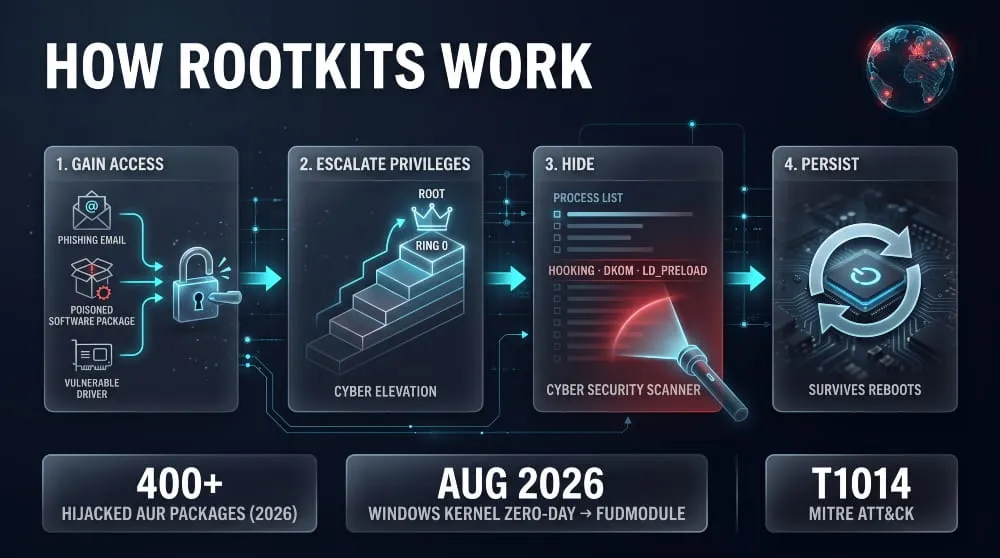
A rootkit needs administrator or root rights to modify the system at a deep level. Attackers get them through a local privilege escalation exploit, stolen administrator credentials, or a malicious or vulnerable signed driver. In August 2026, researchers reported that the Lazarus group used a Windows zero-day in the AFD.sys driver to gain kernel privileges and deploy an updated version of its FudModule rootkit.
How Rootkits Are Installed (Phishing, Trojans, Drive-By, Vulnerable Drivers)
Rootkits are typically installed by a first-stage payload rather than delivered directly. Common routes include phishing attachments, trojanized downloads, drive-by exploits, exposed internet-facing applications, poisoned software packages, and intentionally loaded vulnerable drivers. In June 2026, more than 400 hijacked Arch Linux AUR packages were reported delivering an infostealer together with an eBPF rootkit, a clear example of the supply-chain route.
How Rootkits Hide (Hooking, DKOM, Filtering Files, Processes and Network Traffic)
Rootkits hide by intercepting and altering the answers the operating system gives. API and system-call hooking filters results so that certain files, registry keys, processes, and network connections never appear. Direct kernel object manipulation, known as DKOM, goes further by unlinking a malicious process from the kernel’s own process list. On Linux, rootkits also abuse LD_PRELOAD, loadable kernel modules, and eBPF programs, and many use “magic packets” that wake a dormant backdoor only when a specific network trigger arrives.
What a Rootkit Modifies
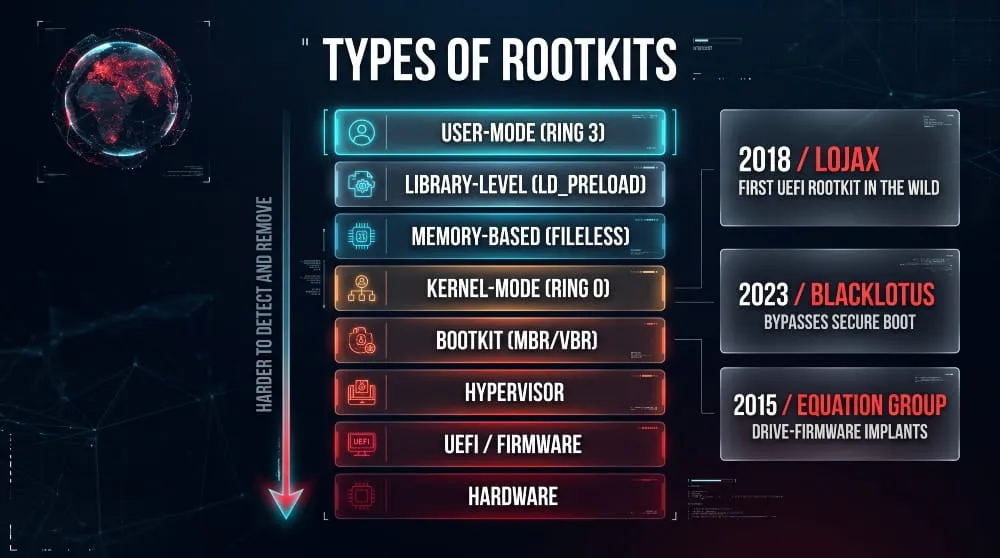
A rootkit modifies whichever layer gives it the best concealment. That can be system calls, kernel data structures, device drivers, shared libraries, configuration files, the boot sector, or UEFI firmware. The lower the layer, the harder the rootkit is to detect and remove.
Persistence: Why Rootkits Survive Reboots
Rootkits survive reboots by loading before or beneath the components that would normally catch them. Boot-level and firmware rootkits start before the operating system, while others reinstall themselves through hidden services, scheduled tasks, or a companion dropper. Some, such as fileless, memory-resident rootkits, forgo persistence and rely on being redeployed instead.
Why Rootkits Are So Hard to Detect
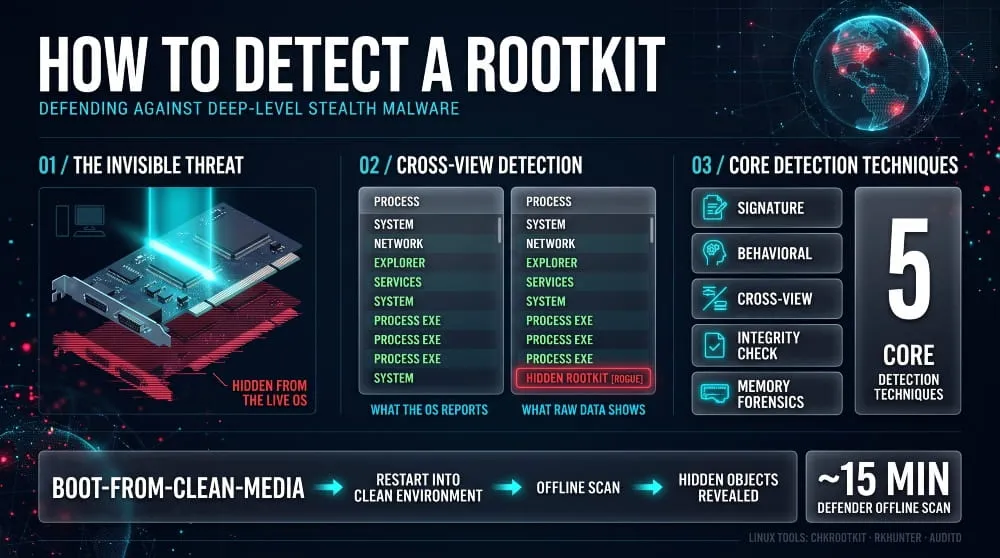
Rootkits are hard to detect because security tools depend on the operating system to tell them what is running, and the rootkit controls that answer. A scanner that runs inside an infected system can be fed a sanitized view of reality. That is why dependable detection usually looks at the system from outside: a clean boot environment, a hypervisor, a memory image, or a trusted baseline.
Types of Rootkits
User-Mode (Ring 3) Rootkits
User-mode rootkits run with the same privilege level as ordinary applications, often called ring 3. They hook the functions programs use to list files, processes, and connections, and they can inject into running processes. They are easier to write and easier to detect than deeper types because they sit within reach of security software.
Kernel-Mode (Ring 0) Rootkits
Kernel-mode rootkits run at ring 0 as drivers or kernel modules, giving them the same privileges as the operating system itself. They can hide almost anything and directly tamper with security tools, but a coding mistake can crash the machine. Because 64-bit Windows requires signed drivers, attackers increasingly abuse stolen certificates or vulnerable signed drivers. Mustang Panda, for example, was reported using a signed kernel-mode rootkit driver to load its TONESHELL backdoor.
Bootkits and MBR Rootkits
A bootkit is a rootkit that infects the master boot record or volume boot record so it executes before the operating system loads. Families such as TDL4 and Mebroot used this approach to survive operating-system reinstalls on the same disk and to evade early antivirus. Secure Boot and UEFI have made classic MBR bootkits rarer on modern hardware.
UEFI, BIOS and Firmware Rootkits
Firmware rootkits live in the UEFI or BIOS stored on the motherboard’s flash chip, so they persist through a disk wipe or even a drive replacement. ESET documented LoJax in 2018 as the first UEFI rootkit found in the wild, attributed to the APT28 group. Later examples include MoonBounce and CosmicStrand, and the BlackLotus bootkit, which in 2023 became the first publicly known malware to bypass Secure Boot on fully patched Windows 11 systems.
Hypervisor and Virtual Machine Rootkits
A hypervisor rootkit installs itself beneath the operating system and runs the original system as a virtual machine. The operating system cannot see it because it runs inside it. Most of these rootkits have been proofs of concept, such as Blue Pill, and are rare in real attacks because they are difficult to build reliably.
Memory-Based and Fileless Rootkits
Memory-based rootkits live only in RAM and leave little or nothing on disk. This makes file scanning ineffective, and the rootkit disappears on reboot, so attackers use it for short, stealthy operations or to reinfect the host automatically. Detecting this type depends on memory forensics and behavioral monitoring.
Application and Library-Level Rootkits (LD_PRELOAD)
Application and library-level rootkits replace or wrap the code that programs rely on. On Linux, the LD_PRELOAD mechanism lets an attacker force every process to load a malicious shared library. In September 2026, Acronis described SIXZUT, a Linux rootkit disguised as a shared library and configured to load through LD_PRELOAD, found in a campaign exploiting Gitea servers.
Hardware Rootkits
Hardware rootkits hide in the firmware of components such as network cards, hard drives, and other devices. They are very rare and associated with well-resourced state actors. Kaspersky’s 2015 report on the Equation Group, which found hard-drive firmware implants, is the best-known example.
Rootkits by Platform: Windows, Linux (LKM, eBPF), macOS, Android and iOS, Routers/IoT/ICS
On Windows, rootkits mostly arrive as kernel drivers. On Linux, they use loadable kernel modules and increasingly eBPF, as in the LinkPro rootkit found on a compromised AWS environment. macOS rootkits are uncommon thanks to System Integrity Protection and signed system extensions. Android rootkits usually come through vulnerable or pre-compromised firmware, and iPhones are rarely affected without a jailbreak or a full exploit chain. Attackers also target routers, IoT devices, and industrial controllers, and MITRE tracks the technique for ICS as T0851.
Famous Rootkit Examples and Real-World Attacks
The Sony BMG XCP Rootkit Scandal (2005)
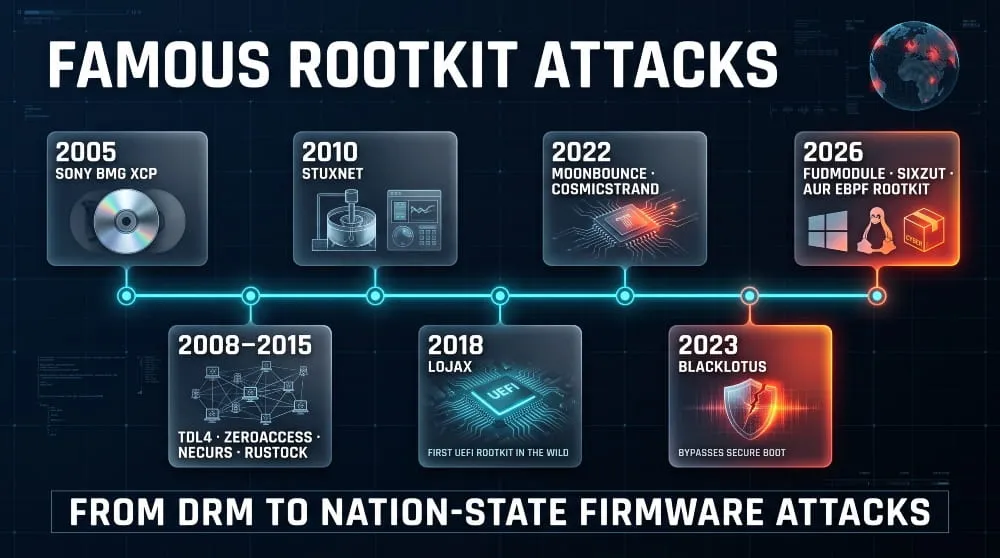
The Sony BMG rootkit was copy-protection software called XCP that installed itself from certain audio CDs and hid its files. Security researcher Mark Russinovich exposed it in October 2005 after finding it on his own machine. The cloaking hid any file whose name started with a particular prefix, and malware authors soon exploited that. Sony recalled the discs and faced lawsuits, and the case remains the textbook example of a rootkit shipped by a legitimate company.
Stuxnet and Flame: Nation-State Rootkits
Stuxnet, discovered in 2010, used a Windows rootkit whose drivers were signed with certificates stolen from Realtek and JMicron, plus a separate rootkit for industrial controllers. It showed that rootkits could be a precision tool for sabotage. Flame, an espionage platform found in 2012, also relied heavily on stealth to stay hidden for years.
TDSS/TDL4, ZeroAccess, Necurs, Alureon and Rustock: Botnet-Era Rootkits
Between roughly 2008 and 2015, rootkits were the armor of large botnets. TDSS and TDL4 used bootkit techniques to hide on infected disks, and ZeroAccess used a kernel-mode rootkit to click fraud and cryptocurrency mining at scale. Necurs protected a spam and malware-delivery botnet, Alureon hijacked search traffic, and Rustock sent spam until Microsoft-led action took it down in 2011.
UEFI Rootkits: LoJax, MoonBounce, CosmicStrand and BlackLotus
UEFI rootkits became real-world threats in 2018 with LoJax and have steadily matured. Kaspersky found MoonBounce and CosmicStrand in 2022, and they implanted code in firmware that loads before Windows. BlackLotus, reported in 2023, exploited a known bootloader flaw to bypass Secure Boot, proving that even a protected boot chain needs ongoing revocation and patching.
Linux Rootkits: Diamorphine, Reptile, Ebury, Syslogk
Linux rootkits are often open source or lightly modified. Diamorphine and Reptile are public loadable-kernel-module rootkits that attackers widely reuse. Ebury is a credential-stealing OpenSSH backdoor with rootkit capabilities, and Syslogk, reported in 2022, uses magic packets to wake a hidden backdoor. These families matter because Linux runs most servers, cloud workloads, and network equipment.
Recent Rootkit Attacks and Trends (2025–2026)
Recent campaigns show three clear trends. State-linked groups keep investing in kernel rootkits, with Lazarus returning to the same Windows driver family in August 2026 to deliver a new FudModule build, and Mustang Panda using a signed kernel driver. Linux rootkits are shifting toward eBPF, as seen in LinkPro and the AUR package compromise. Attackers increasingly combine rootkits with supply-chain and n-day exploitation, as in the Red Heron campaign, which weaponized a Gitea vulnerability within days of its advisory.
Rootkit vs. Virus, Trojan, RAT, Backdoor, Bootkit and Other Malware
Comparison Table (rootkit vs virus / worm / trojan / backdoor / RAT / bootkit / botnet / spyware)
| Threat | Spreads Itself? | Main Job | How It Relates to a Rootkit |
|---|---|---|---|
| Virus | Yes, by infecting files | Replicate and run | A rootkit does not replicate; a virus may carry one |
| Worm | Yes, across networks | Self-propagate | A worm can deliver a rootkit as a payload |
| Trojan | No, relies on the user | Disguise as legitimate software | Often the delivery vehicle for a rootkit |
| Backdoor | No | Provide hidden remote access | A rootkit usually hides the backdoor |
| RAT | No | Full remote control | A RAT is the tool; the rootkit conceals it |
| Bootkit | No | Execute before the OS | A bootkit is a rootkit that infects the boot process |
| Botnet | Sometimes | Control many devices | Bots use rootkits to survive on each host |
| Spyware / keylogger | No | Collect data | A rootkit hides the collection from the user |
A rootkit differs from other malware because its job is to hide, not spread or steal. The table summarizes the differences.
How Rootkits Work Alongside Keyloggers, Botnets and Ransomware
Rootkits rarely work alone. A keylogger or infostealer captures credentials while the rootkit hides it; a botnet client uses a rootkit to stay alive on each infected device; and ransomware operators use rootkit-style drivers to turn off endpoint protection before encrypting files. Think of the rootkit as the stealth layer and the other malware as the payload.
Signs and Symptoms of a Rootkit Infection
System-Level Warning Signs
The most telling signs of a rootkit are system changes you did not make. These include settings that revert after you change them, unexplained crashes or blue screens, files or processes that appear in one tool but not another, and new drivers or services you cannot account for. A well-built rootkit may show none of these, so a clean-looking system is not proof of a clean system.
Network and Performance Red Flags
Rootkit infections often show up in network behavior first. Watch for outbound connections to unfamiliar addresses, traffic at odd hours, heavy CPU or disk activity while the machine is idle, and unusually slow starts. Because rootkits conceal their own activity, network monitoring from a separate device, such as a router or firewall, is more reliable than checking the infected machine itself.
Security Tools Disabled or Failing
Security tools that stop working are a strong warning sign. Antivirus that will not launch or update, a Task Manager that freezes, a disabled firewall, and cleared event logs all point to something actively interfering with defenses. Disabling protection is a standard rootkit goal, so treat it seriously even when nothing else looks wrong.
Rootkit Symptoms on Android and Mac
On Android, unusual battery drain, unexplained data use, apps you never installed, and unexpected device-administrator permissions can signal deep compromise. On a Mac, check whether System Integrity Protection has been disabled, and review any system extensions or profiles you do not recognize. Genuine rootkits are uncommon on both platforms, so rule out ordinary adware and misconfiguration first.
How to Detect a Rootkit
Why Normal Antivirus Can Miss Rootkits
Normal antivirus can miss rootkits because it relies on the operating system’s own reports and on known signatures. A kernel-level rootkit can filter what the scanner sees, and a new or Custom rootkit may have no signature. Antivirus still catches many common families, but it is one layer, not a guarantee.
Rootkit Detection Techniques (Signature, Behavioral, Cross-View, Integrity Checking, Memory Forensics)
Rootkit detection relies on five main techniques. Signature scanning finds known samples, and behavioral analysis flags suspicious actions such as unexpected driver loads. Cross-view detection compares high-level system-call reports with raw, low-level data; discrepancies expose hidden objects. Integrity checking compares system files and boot components against trusted baselines, and memory forensics inspects a RAM image from outside the live system.
How to Scan for Rootkits on Windows 10 and 11
On Windows 10 and 11, the built-in route is Microsoft Defender Offline. Open Windows Security, go to Virus & threat protection, choose Scan options, and select Microsoft Defender Offline scan. The device restarts into a trusted environment, and the scan takes about 15 minutes. Also confirm that Secure Boot is on in System Information and that Memory integrity is enabled under Core isolation.
How to Check for Rootkits on Linux (chkrootkit, rkhunter, auditd)
On Linux, chkrootkit and rkhunter compare system binaries and look for known rootkit indicators, and they are best run from trusted media or after you verify their integrity. Add file-integrity monitoring such as AIDE and auditd rules for module loading. Compare the output of lsmod with what appears under /sys/module, and review loaded eBPF programs with bpftool, since hidden kernel modules and unexpected eBPF programs are common rootkit signs.
Rootkit Detection on macOS and Android
On macOS, run csrutil status to confirm System Integrity Protection is enabled, review system extensions and configuration profiles, and use a reputable endpoint tool for deeper checks. On Android, run Google Play Protect, check that the bootloader is locked and verified Boot is passing, and inspect device-administrator apps. If you suspect deep compromise on a phone, a factory reset or a firmware reflash is more reliable than scanning.
Offline and Bootable Rootkit Scanners
Offline and bootable scanners start the computer from a clean environment, so the rootkit isn’t running and cannot hide anything. This is the most reliable consumer-level way to find a rootkit that would evade a normal scan. Boot from a trusted USB drive or use an offline scan built into the operating system, then scan the disk as passive data.
Do Windows Defender and Antivirus Detect Rootkits?
Yes, Windows Defender and most modern antivirus products detect many known rootkits, and Microsoft Defender Offline is designed specifically for threats that hide while Windows is running. They are less effective against new kernel or firmware rootkits. For high-value systems, combine them with endpoint detection and response, integrity monitoring, and periodic out-of-band checks.
Choosing a Rootkit Scanner (What to Look For, Vendor-Neutral)
A good rootkit scanner can scan outside the running operating system, inspect the kernel and boot sector, use cross-view comparison, update its detection data frequently, and come from a reputable vendor or a well-maintained open-source project. A single free scanner rarely covers everything, and no scanner replaces patching and least privilege. Be wary of unknown “rootkit removal” downloads, since fake tools are a common way to deliver malware.
How Long Does a Rootkit Scan Take?
A rootkit scan takes from about 15 minutes for a Microsoft Defender Offline scan to an hour or more for a deep scan of a large disk. Time depends on drive size, scan depth, and hardware. Run it when the machine is not needed, and avoid interrupting it.
How to Remove a Rootkit
Can Rootkits Be Removed?
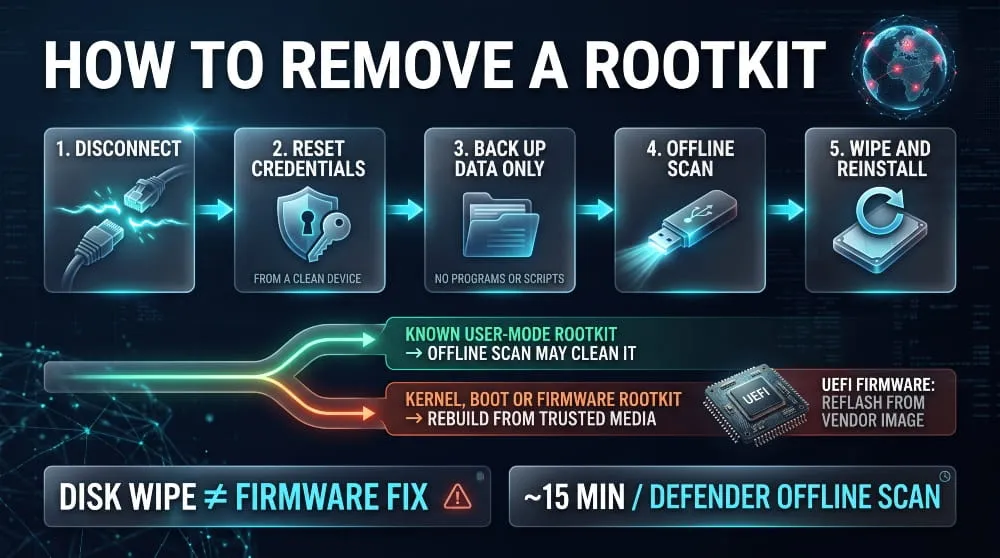
Some rootkits can be removed, but it depends on the type. You can clean user-mode and many well-known kernel rootkits with an offline scan or a dedicated removal tool. For kernel, boot, or firmware rootkits, since you cannot fully trust the system, the safest fix is to rebuild it from known-good media.
Step-by-Step Rootkit Removal (Isolate, Offline Scan, Clean)
Removal works best as an ordered process:
- Disconnect the device from the network to stop data theft and remote control.
- From a clean device, change important passwords and revoke active sessions and tokens, since the infected machine may have already stolen credentials.
- Back up only personal data files, not programs or scripts, and scan them before reuse.
- Run an offline or bootable scan and remove what it finds.
- Confirm the system is clean, and if you still have any doubt, wipe and reinstall.
When to Wipe and Reinstall
Wipe and reinstall when the compromise is deep, when a scan cannot confirm the system is clean, or when the machine holds sensitive data. Format the drive, reinstall from trusted media, patch fully before reconnecting, and restore data only after scanning it. A rebuild is slower than a scan, but it is the only approach that fully answers whether anything is left behind.
Removing BIOS/UEFI and Firmware Rootkits
Removing a firmware rootkit means reflashing the UEFI or BIOS with a clean image from the hardware vendor, then resetting settings and re-enabling Secure Boot. A disk wipe doesn’t affect firmware, so reinstalling the operating system alone will not help. If you can’t reprogram the flash chip or the vendor cannot verify its state, replacing the hardware is the safe choice.
Removing a Rootkit on Windows, Linux and Android
On Windows, run an offline scan, and reinstall if it returns. On Linux, treat the server as fully compromised, rebuild it from a known-good image, and rotate every key, token, and secret it held. On Android, perform a factory reset and, if the rootkit persists, reflash the manufacturer’s stock firmware. On an iPhone, restore the device through recovery mode.
Rootkit Removal Tools: What They Can and Can’t Do
Rootkit removal tools can identify and remove known families and can reveal hidden objects using cross-view checks. They cannot guarantee a clean result against unknown or firmware-level threats, and they cannot restore trust in a system that was compromised at the kernel level. Use them as a first step and a verification layer, not as the final word.
How to Prevent Rootkit Attacks
Patching and Driver Hygiene
Prompt patching is the most effective prevention because many rootkits arrive through privilege escalation and driver vulnerabilities. The Lazarus campaign in August 2026 relied on a Windows zero-day, which shows how quickly attackers turn kernel flaws into rootkit deployments. Remove drivers you don’t need and enable Microsoft’s vulnerable driver blocklist.
Secure Boot, TPM and Measured Boot (Does Secure Boot Prevent Rootkits?)
Secure Boot reduces the risk of boot-level rootkits, but it doesn’t eliminate them. It verifies signatures in the boot chain, and a TPM can record boot measurements for later verification. BlackLotus bypassed Secure Boot in 2023 through a known flaw in a signed bootloader, so keep firmware, bootloaders, and revocation lists up to date.
Least Privilege and Application Allowlisting
Least privilege prevents rootkits because installation needs administrator or root rights. Remove local admin rights for everyday accounts, use application allowlisting such as App Control for Business or AppLocker, and avoid broad sudo access. On Linux, enable kernel module signing and lockdown where possible, and consider disabling module loading after Boot on hardened servers.
EDR and Memory Integrity (HVCI)
Memory integrity, also called HVCI, uses virtualization to prevent unsigned or vulnerable kernel code from running and blocks a large class of rootkit techniques. Endpoint detection and response adds telemetry on driver loads, module loads, and suspicious privileged activity. Together they cover both prevention and detection at the kernel layer.
Firmware Updates and Supply Chain Hardening
Keep UEFI and device firmware updated, buy hardware from reputable sources, and verify software before installing it. The 2026 AUR package compromise shows that a trusted package source can deliver a rootkit. Pin versions, review new maintainers, and check hashes for critical packages.
Rootkit Defense Checklist (Home vs Enterprise)
- Home: keep Windows or macOS and your firmware updated, leave Secure Boot and Memory Integrity on, use a standard (non-admin) account for daily use, and run an offline scan if you notice unexplained behavior.
- Enterprise: deploy EDR with kernel telemetry, enforce driver and application allowlisting, monitor module and eBPF loads on Linux, track firmware versions, and keep a rebuild-from-golden-image process ready.
Rootkits in the Threat Landscape: Who Uses Them and What Happens Next
APT Groups, Ransomware Operators and Botnet Builders
State-linked groups such as Lazarus, Mustang Panda, and APT28 use rootkits; botnet operators use them to keep bots alive; and ransomware crews use signed-driver tricks to turn off endpoint protection. They share a need to stay hidden while they work. For a closer look at the malware that rootkits often protect, see our guides on remote access trojans, botnets, and infostealer malware.
MITRE ATT&CK T1014 (Rootkit)
MITRE ATT&CK lists rootkits as technique T1014 under defense evasion, and it has a related ICS technique, T0851. Defenders can map detections to it by monitoring driver and kernel-module loads, verifying system and boot integrity, and alerting on security-tool tampering. The framework helps connect a rootkit finding to the broader intrusion chain.
Stolen Credentials and Data After a Rootkit Compromise
A rootkit gives an attacker a privileged, hidden foothold, and they often collect credentials first. Attackers can harvest passwords, session tokens, API keys, and SSH keys from the host and reuse them elsewhere. That is why removing a rootkit isn’t enough: treat any credential that touched the machine as exposed.
Dark Web Exposure: How Stolen Access Gets Sold
Stolen credentials and access frequently end up on dark web markets, in malware logs, and in public breach dumps, often long before the victim knows anything is wrong. Checking whether your organization or email appears in those sources is a practical way to see what a hidden compromise may already have leaked.
Check your exposure with DeXpose. The Free Darkweb Report gives an instant exposure report covering dark web markets, malware logs, and public breaches, and the Email Data Breach Scan shows whether an email appears in known breaches and how your organization is exposed in dark web sources. For continuous coverage, explore dark web monitoring.
Frequently Asked Questions (FAQ)
Are rootkits still a threat today?
Yes, rootkits are still an active threat. 2026 reports describe new Windows kernel rootkit builds from Lazarus, a new Linux LD_PRELOAD rootkit called SIXZUT, and eBPF rootkits delivered through hijacked software packages. Attackers have shifted toward targeted, supply-chain attacks rather than mass infection.
Are rootkits common?
Rootkits are less common than ordinary malware such as phishing payloads and infostealers, but they are common in targeted attacks and espionage. Most users won’t encounter one, but organizations that hold valuable data or run exposed servers face a higher risk.
Are rootkits dangerous?
Yes, rootkits are dangerous because they combine deep access with concealment. They can hide other malware, steal credentials, and turn off security tools for long periods without raising alarms.
Can you remove a rootkit without reinstalling Windows?
Sometimes. You can often remove a user-mode or known kernel rootkit with an offline scan, but if the compromise is deep or uncertain, reinstalling Windows is the only way to be confident. Firmware rootkits also require a firmware reflash.
Can antivirus or Windows Defender detect rootkits?
Yes, for many known rootkits, and Microsoft Defender Offline is built to catch ones that hide while Windows runs. They can miss new kernel or firmware rootkits, so high-risk systems should add EDR and integrity monitoring.
Should I scan for rootkits?
Yes, scan for rootkits if you see unexplained behavior, if security tools stop working, or after any confirmed compromise. A periodic offline scan is a reasonable precaution, and many security products include rootkit scanning in their default checks.
Does Secure Boot prevent rootkits?
Secure Boot helps prevent boot-level rootkits but does not stop all of them. BlackLotus bypassed it in 2023, so keep firmware, bootloaders, and revocation lists current.
What is the strongest type of rootkit?
Firmware and UEFI rootkits are generally considered the strongest because they run before the operating system and survive reinstalls and disk replacement. Hypervisor rootkits are theoretically powerful but rare in practice.
Can rootkits infect phones (Android and iPhone)?
Yes, on Android, where rootkits usually arrive through vulnerable or compromised firmware or deep exploit chains. iPhones are rarely affected unless the device is jailbroken or targeted by an advanced exploit chain.
Is a rootkit a virus?
Not strictly. A rootkit is malware that hides itself and other threats, while a virus is defined by self-replication. Rootkits don’t spread on their own, though they are often delivered by a virus, worm, or trojan.
If you suspect a rootkit has already exposed credentials, run a free Darkweb Report from DeXpose to see what is circulating.
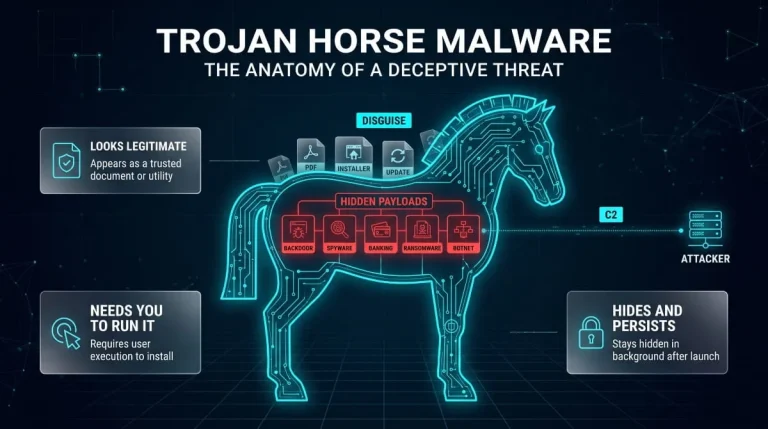
Trojan Horse Malware (Computer Trojan) | What It Is, How It Works, Types, and How to Remove It
A computer trojan is malware that disguises itself as legitimate software to trick you into running it, then quietly steals data, opens a backdoor, or installs…
Read more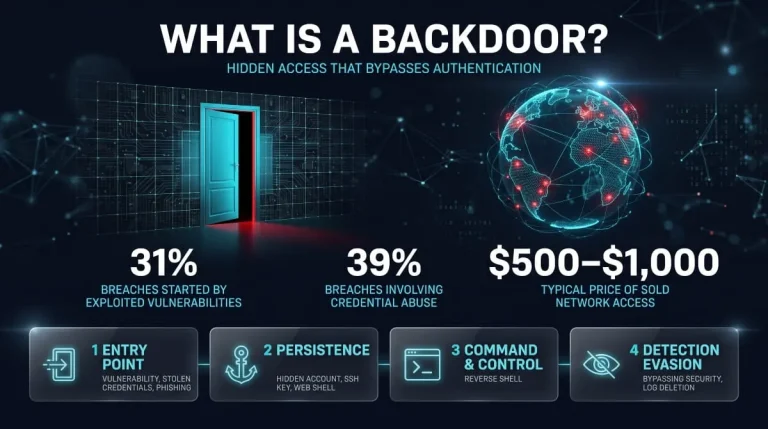
What Is a Backdoor? Meaning, Types, Real Examples, Detection & Removal (2026 Guide)
What Is a Backdoor in Cybersecurity? A backdoor in cybersecurity is a hidden method that bypasses normal authentication or security controls to access a system, network,…
Read more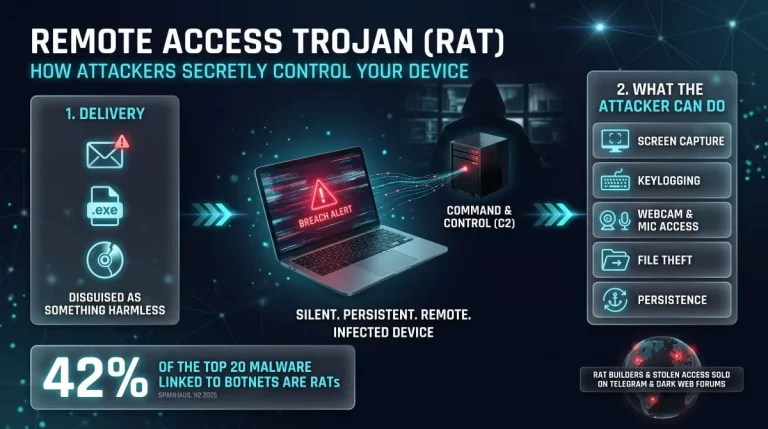
Remote Access Trojans (RATs) | Major RAT Families, How They Work and How to Detect Them
What Is a Remote Access Trojan (RAT)? A remote access trojan (RAT) is malware that gives an attacker hidden, interactive control over someone else’s computer. Once…
Read more