
What Is a Botnet? Definition, How Botnets Work, Types, Examples & How to Stay Protected
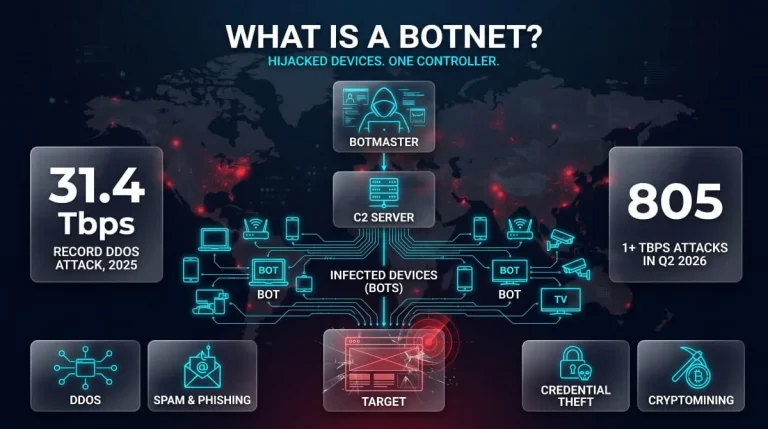
A botnet is a network of internet-connected devices, such as computers, phones, routers, and cameras, infected with malware and secretly controlled by an attacker. The attacker, called a botmaster, uses the combined power of these “bots” to launch DDoS attacks, send spam, steal credentials, or mine cryptocurrency.
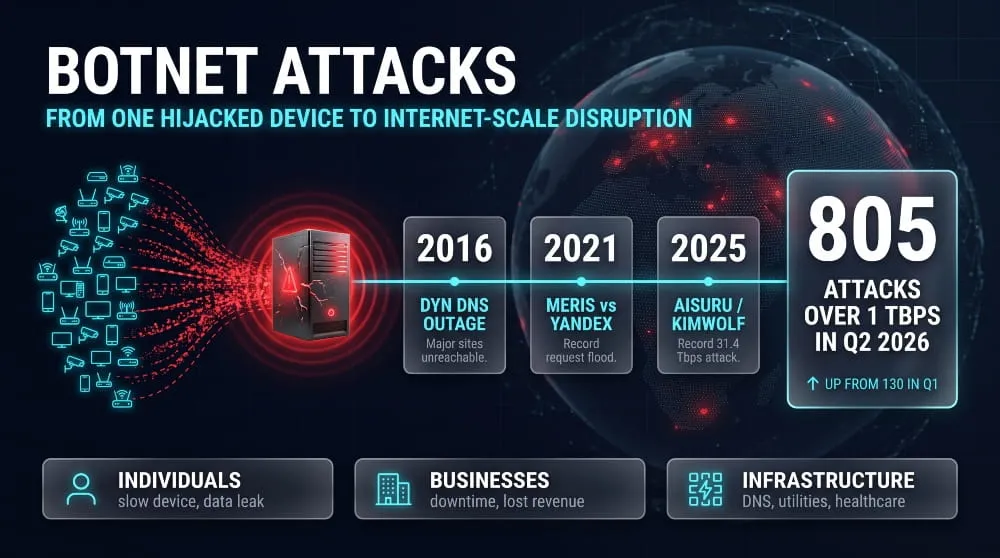
The owner of an infected device rarely notices anything. The device keeps working, while a small part of its bandwidth and processing power quietly serves someone else. That invisibility is what makes botnets dangerous at scale. In 2016, the Mirai botnet grew to an estimated 600,000 compromised devices, mostly poorly secured cameras and home routers. It then knocked major sites offline by attacking the DNS provider Dyn.
This guide explains how botnets work, the main types, real examples, and how to detect, prevent, and remove one.
Key Takeaways
- Definition: A botnet is a group of malware-infected devices that one attacker controls remotely.
- How they spread: Phishing, unpatched software, and weak or default IoT passwords are the most common entry points.
- What they do: They launch DDoS attacks, run spam and phishing campaigns, perform credential stuffing, engage in ad fraud, and mine cryptocurrency.
- Who is affected: Any internet-connected device can be recruited, from laptops to smart cameras.
- How to protect yourself: Patch devices, change default passwords, use security software, and monitor network traffic for unusual outbound connections.
What Is a Botnet? (Definition and Meaning)
A botnet is a group of internet-connected devices infected with malware and controlled remotely by a single attacker. The sections below cover the plain-English definition, the cybersecurity meaning, the word’s origin, and how botnets differ from related terms like bots, zombies, trojans, worms, and viruses.
Botnet Definition in Plain English
A botnet is a collection of hijacked devices that an attacker can command remotely, all at once. Each infected device, whether a laptop, phone, router, or smart camera, becomes a “bot” that follows instructions without its owner knowing. Because the attacker controls thousands or even millions of bots, a botnet can do what a single compromised machine cannot, such as flooding a website with traffic until it goes offline.
Botnet Meaning in Cybersecurity
In cybersecurity, a botnet is attack infrastructure: a network of compromised devices that a botmaster directs through a command-and-control (C2) channel. Security teams treat botnets as a threat in their own right because attackers can reuse the same network for many purposes, including DDoS attacks, spam, credential theft, and cryptocurrency mining. Attackers can also rent access to others, turning a single infection campaign into a service many criminals can use.
Where the Term Comes From (Robot + Network)
“Botnet” is a blend of “robot” and “network.” A bot is short for robot, and the word robot itself comes from the Czech robota, meaning forced labor, popularized by Karel Čapek’s 1920 play R.U.R. That origin fits: an infected device performs labor for the attacker against its owner’s interests. The “net” part reflects that the value of the system lies in the connected group, not in any single device.
Bot vs. Botnet: What’s the Difference?
A bot is a single infected device, while a botnet is a network of bots controlled by one operator. A single bot has limited power and is easy to overlook. The botnet makes the threat serious because the attacker combines the bandwidth, processing power, and IP addresses of every bot. A useful way to remember it is that a bot is a single soldier, and a botnet is the army.
Not every bot is malicious. Search engine crawlers and chatbots are legitimate automated programs, and “bot” becomes a security problem only when a device is infected and controlled without the owner’s consent.
Botnet vs. Zombie Computer
A zombie computer is a single device that has been taken over and controlled remotely without its owner’s knowledge; it is another word for an individual bot. A botnet is the collection of all those zombies under one controller. The two terms describe the same infected devices from different angles: “zombie” emphasizes that an attacker has taken control of a machine, and “botnet” emphasizes the organized network those machines form.
Is a Botnet Malware? Botnets vs. Trojans, Worms and Viruses
A botnet is not malware itself. It is a network built from devices infected with malware. The malware infects a device, and the botnet forms when many infected devices connect to one controller.
The terms overlap in practice because different malware types are used to build botnets:
- Trojans disguise themselves as legitimate software and often serve as the entry point that installs a bot on a device.
- Worms spread automatically from device to device, which lets a botnet grow quickly without further effort from the attacker. The Conficker worm, for example, is widely reported to have infected roughly nine to fifteen million Windows computers at its 2009 peak, forming one of the largest botnets on record.
- Viruses attach themselves to files and require user action to spread, so they are a less common way to build large botnets today.
How Does a Botnet Work?
A botnet works by infecting devices with malware, enrolling them under a central controller, and then sending them coordinated instructions. The attacker never needs to touch the victims’ devices again once they are recruited. The sections below follow the full process, from first infection to the final attack, and explain how botnets stay hidden along the way.
The Botnet Life Cycle (Infection, Recruitment, Control, Attack)
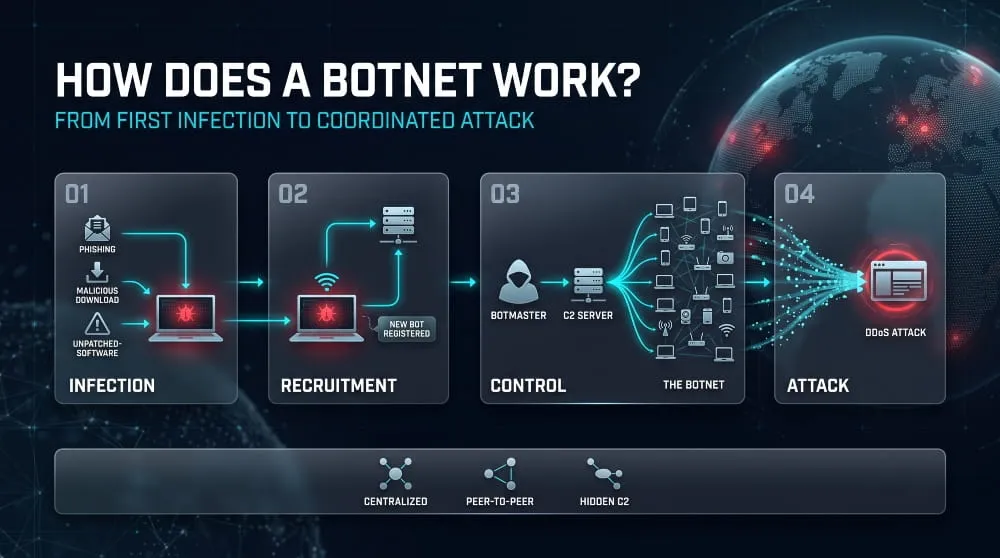
A botnet’s life cycle has four stages: infection, recruitment, control, and attack. In the infection stage, malware lands on a device through phishing, a software vulnerability, or a weak password. In recruitment, the malware contacts the attacker’s infrastructure and registers the device as a new bot. In the control stage, the botmaster sends commands and updates to the whole network. In the attack stage, the bots act together, for example by flooding a target with traffic or sending spam. Many botnets then repeat the cycle, using their own bots to find and infect more devices.
How Computers Become Part of a Botnet
Devices join a botnet when malware infects them, usually without any obvious signs. The most common routes are phishing emails with malicious attachments or links, drive-by downloads from compromised websites, unpatched software vulnerabilities, and trojanized apps or pirated software. Internet-connected devices with default or weak passwords are especially easy targets. The Mirai botnet, for instance, spread by trying a list of roughly 60 common factory-default username and password pairs on exposed cameras and routers, and no software vulnerability was required.
Botmasters, Bots and Command-and-Control (C2) Servers
Three components make up every botnet: the botmaster who runs it, the bots that do the work, and the command-and-control (C2) infrastructure that connects them. The botmaster, sometimes called a bot herder, issues instructions. The C2 server relays those instructions to the bots and collects information back from them, such as which devices are online and what they can do. Each bot runs a small piece of malware that regularly checks in with the C2 and waits for orders. Because C2 links the network together, it is also the main target for defenders and law enforcement trying to disrupt a botnet.
Botnet Architectures: Centralized, IRC, HTTP and Peer-to-Peer
Botnet architecture describes how bots receive instructions, and the four common models trade off simplicity against resilience.
- Centralized (client-server): Every bot connects to one C2 server. It is simple and fast, but taking that server down cuts off the whole network.
- IRC-based: An early centralized variant where bots join a chat channel on an Internet Relay Chat server and read commands posted there. It was popular in the early 2000s and is now easier for defenders to spot.
- HTTP-based: Bots contact C2 over ordinary web traffic, blending in with normal browsing and passing through most firewalls easily.
- Peer-to-peer (P2P): Bots pass commands to one another with no single central server. This design is much harder to dismantle because it has no single point of failure. Storm and Gameover Zeus are well-known examples.
How Botnets Hide (DGA Domains, Fast Flux, Encrypted Traffic)
Botnets hide by making their command infrastructure hard to find, block, or recognize. Three techniques are common:
- Domain generation algorithms (DGAs): Malware generates many pseudo-random domain names, and the botmaster registers only a few as C2 addresses. The Conficker C variant reportedly generated about 50,000 candidate domains a day, making it impractical to block them one by one.
- Fast flux: The botnet rapidly rotates the IP addresses behind a single domain, often using infected devices as proxies, so a blocked address is replaced almost immediately.
- Encrypted traffic: Bots wrap their communication in encryption or mimic normal web traffic, so security tools cannot easily distinguish C2 messages from legitimate use.
Botnet Attack Diagram
A botnet attack follows a simple flow: the botmaster sends a command to C2, C2 relays it to every bot, and the bots act together on the target. The diagram below shows the path.
Botnet Attack Diagram
In a P2P botnet, the C2 layer disappears, and bots relay commands among themselves, which is why these networks are harder to take down.
What Are Botnets Used For?
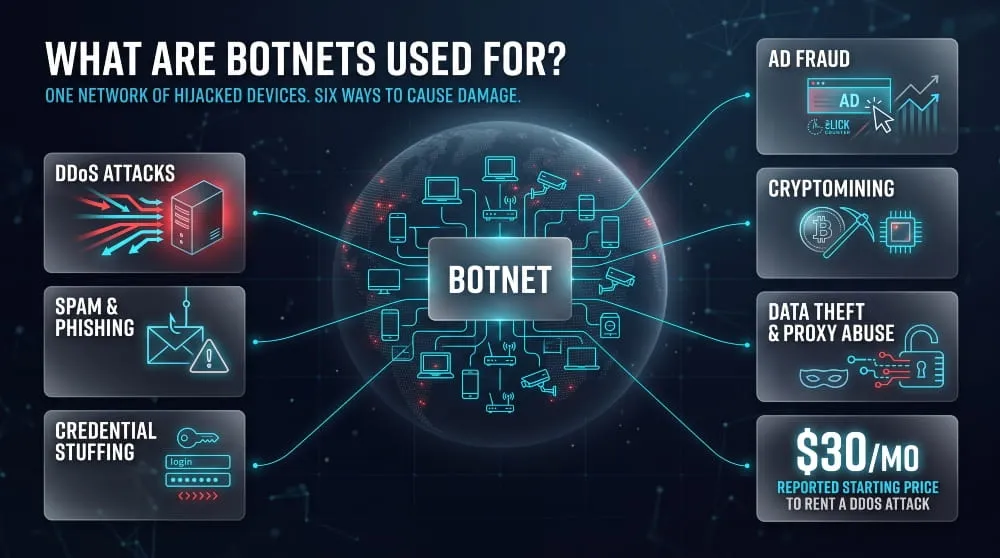
Botnets enable attacks and fraud that require many devices at once. Common uses include DDoS attacks, spam and phishing, credential stuffing, ad fraud, cryptocurrency mining, and data theft or proxy abuse. Attackers also rent botnet capacity to other criminals, so a single network often serves several purposes at once.
DDoS Attacks
DDoS attacks are the classic use of a botnet. In a distributed denial-of-service attack, every bot sends traffic to the same target at once, overwhelming the server or network until legitimate users can no longer get through. A single device cannot generate enough traffic to do this, but thousands of bots can, and because the traffic comes from many different addresses, simple IP blocking does not stop it. Attackers use DDoS to extort businesses, disrupt competitors, make political statements, or distract security teams while another intrusion is underway.
Spam and Phishing Campaigns
Botnets send large volumes of spam and phishing email by spreading the sending across many infected devices. Because each bot sends only a few messages from its own IP address, mail providers find it harder to filter the campaign by sender reputation. These emails often carry malicious links or attachments, which recruit new victims and grow the botnet. Spam botnets such as Cutwail and Necurs became known for exactly this role, delivering banking trojans and ransomware at scale.
Credential Stuffing and Account Takeover
Credential stuffing is when attackers take username and password pairs leaked in earlier breaches and test them automatically against other websites. A botnet makes this practical because each login attempt can come from a different device and IP address, making the traffic look like ordinary customers and helping it slip past rate limits. People who reuse passwords across services are the main victims, and a successful login can lead to account takeover, fraudulent purchases, or account resale.
Ad Fraud and Click Fraud
Botnets commit ad fraud by generating fake clicks, impressions, or video views that advertisers pay for but no real person ever sees. Some operations simulate human browsing on infected home computers so ad networks see the activity as legitimate. The US Department of Justice and industry partners disrupted the 3ve operation in 2018, which combined botnets with hijacked IP addresses to defraud advertisers. The money is steady and low-risk compared with some other attacks, which is why botnets have remained a core tool for ad fraud.
Cryptocurrency Mining
Cryptojacking botnets use infected devices’ processing power to mine cryptocurrency for the attacker, who keeps all the proceeds. Victims pay the cost through slower performance, higher electricity use, and increased wear on their hardware. This type of botnet tends to run quietly for long periods, since the attacker’s goal is steady income rather than a single dramatic attack. Servers and cloud systems are especially valuable targets because they offer far more computing power than a typical laptop.
Data Theft and Proxy Abuse
Botnets also steal data directly and turn infected devices into proxies. Some bots carry information stealers that collect saved passwords, browser cookies, payment details, and files, then sell them or use them for further attacks. Others route the attacker’s traffic through the victim’s device, so the activity appears to come from an ordinary home connection. The 911 S5 network was a large example; in 2024, US authorities said it had compromised roughly 19 million IP addresses and rented them to criminals for fraud and other crimes. In short, an infected device can leak its owner’s data and also lend its address to someone else’s crimes.
Types of Botnets
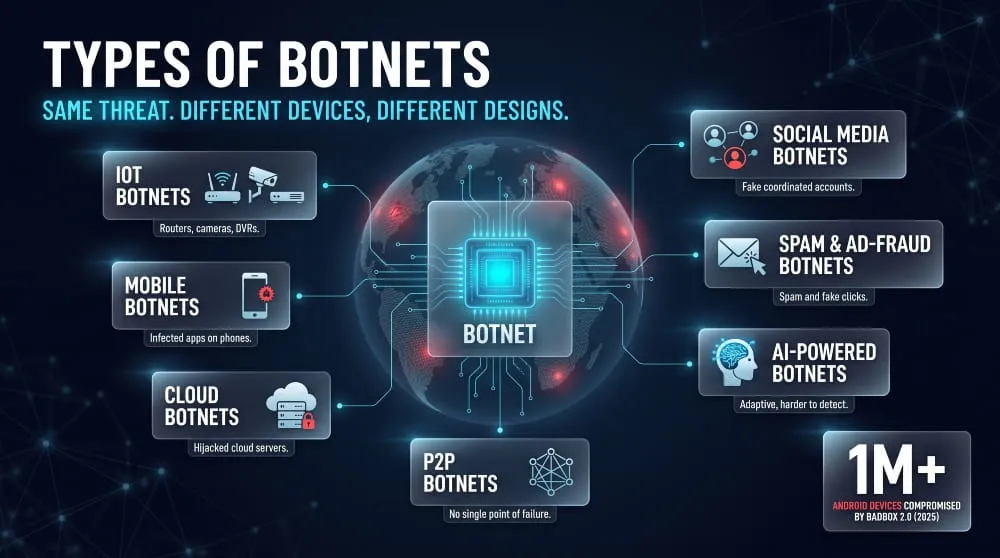
Botnets are usually classified by the kind of device they infect or the job they perform. The main types are IoT, mobile, cloud-based, social media, spam and ad-fraud, AI-powered, and decentralized peer-to-peer botnets. Many real-world botnets mix several of these traits, so the categories describe how a botnet is built and used, not rigid boxes.
IoT Botnets (Routers, Cameras, DVRs)
IoT botnets are built from internet-connected consumer and business devices such as routers, IP cameras, DVRs, and smart TV boxes. These devices are attractive targets because they often ship with default passwords, rarely receive security updates, and run around the clock with nobody watching them. Attackers often use them for DDoS attacks and proxy services. The BADBOX 2.0 operation shows the scale: in 2025, security researchers reported that it had compromised over one million low-cost Android-based devices, many infected before they even reached the buyer.
Mobile Botnets
Mobile botnets recruit smartphones and tablets, usually through malicious or trojanized apps installed from unofficial sources, and sometimes from official app stores. Once installed, the app can send premium-rate SMS messages, commit ad fraud, steal banking credentials, or relay traffic. The Chamois botnet is a well-known case that Google reported affected millions of Android devices before it was disrupted. Phones are valuable to attackers because they carry authentication apps, banking apps, and personal data, along with processing power.
Cloud-Based Botnets
Cloud-based botnets run on compromised cloud servers and virtual machines instead of home devices. Attackers get in through exposed management interfaces, weak credentials, or unpatched software, then use the server’s high bandwidth and computing power. A single cloud instance can provide far more capacity than a home computer, making these botnets especially effective for large DDoS attacks and cryptocurrency mining. Because the infected servers sit in legitimate data centers, defenders can’t always block their traffic outright.
Social Media Botnets
Social media botnets are networks of fake or hijacked accounts controlled by software to act in a coordinated way. They amplify posts, inflate follower counts, spread spam and scams, and push misleading narratives to make them appear popular. These accounts aren’t infected devices in the traditional sense, but they share the botnet structure of many automated units controlled by one operator. One widely cited 2017 academic study estimated that 9-15 percent of active Twitter accounts were bots, giving a sense of how common automated accounts are.
Spam and Ad-Fraud Botnets
Spam and ad-fraud botnets are defined by their purpose more than their hardware. Spam botnets send email at scale, often delivering phishing links and malware, while ad-fraud botnets generate fake clicks and views to steal money from advertisers. Both make money by spreading small tasks across many devices so no single machine stands out. Because the infected devices are ordinary home or office computers, the activity can blend in with normal traffic for a long time.
AI-Powered Botnets
AI-powered botnets use machine learning or generative AI to make their activity harder to detect and cheaper to run. Examples include bots that write convincing, varied phishing messages, mimic human browsing and typing patterns, solve CAPTCHAs, or adapt their behavior when defenses block them. This is an emerging category, and most real attacks still rely on conventional botnet infrastructure with AI added for specific tasks. For defenders, this means simple rules based on repetitive patterns work less reliably than they used to.
Decentralized and P2P Botnets
Decentralized botnets, including peer-to-peer (P2P) designs, have no single command server. Bots pass instructions to one another, so taking down one node does not cut off the network. Gameover Zeus is the best-known example, with authorities estimating that it infected somewhere between 500,000 and one million computers before a 2014 international takedown operation. Newer botnets have experimented with blockchain or distributed storage for command distribution for the same reason: to remove the single point of failure.
Are There “Good” Botnets?
Strictly speaking, no. A botnet is defined as devices controlled without their owners’ consent, so a network of willing participants isn’t a botnet. Volunteer distributed-computing projects such as Folding@home use many computers to do useful work, but participants install the software knowingly and can leave at any time. Researchers also run controlled networks and honeypots to study botnet behavior. A few so-called vigilante botnets, such as Hajime, have been reported to secure vulnerable devices instead of attacking. However, they still access other people’s devices without permission, which makes them unauthorized and generally illegal.
Botnet Attacks: Real-World Impact
Botnet attacks cause real damage: websites and online services go offline, accounts are taken over, money is stolen, and ordinary people’s devices are used against them. The impact ranges from a slow home router to disruptions in core internet infrastructure. The sections below describe what these attacks look like, notable incidents, who gets hurt, and where the numbers are heading.
What a Botnet Attack Looks Like
A botnet attack is a coordinated action by many infected devices on a single target, usually the botmaster’s chosen website, server, network, or user accounts. In a DDoS attack, the bots flood the target with traffic or requests until it can no longer serve real users. In credential stuffing or fraud campaigns, bots instead make many small, human-looking requests spread across many IP addresses. The common thread is scale and distribution: because the activity comes from thousands of ordinary devices, there is no single source to block.
Most attacks are also brief. Cloudflare’s data shows that most network-layer attacks stay below 500 Mbps and last under ten minutes, so defenses must respond automatically because a human team cannot react in time.
Botnet Attack Examples
Several well-documented incidents show how botnet attacks play out in practice:
- Dyn DNS outage (2016): A botnet of hijacked IoT devices attacked the DNS provider Dyn, which made many major sites, including Twitter and Netflix, unreachable for users across large parts of the US and Europe. It showed that hitting one infrastructure provider can disrupt many unrelated services.
- Yandex attack (2021): The Meris botnet, built largely from compromised MikroTik routers, sent an attack at Russian tech company Yandex that peaked at roughly 22 million HTTP requests per second, which was a record at the time.
- Aisuru/Kimwolf record attack (2025): Cloudflare mitigated a record 31.4 Tbps DDoS attack in December 2025, attributed to the Aisuru/Kimwolf botnet. The botnet drew on millions of unofficial Android streaming boxes, and the attack beat the 29.7 Tbps record the same botnet set in September 2025.
Impact on Individuals, Businesses and Infrastructure
Botnet attacks affect three groups in different ways.
For individuals, the damage is often quiet. An infected device runs slower, uses more bandwidth, and may leak saved passwords and personal data. The owner’s IP address can also be blocklisted after it is used in an attack, which can disrupt email delivery and access to some online services. Many victims first learn about the infection from a warning from their internet provider.
For businesses, the main costs are downtime, lost sales, and the recovery effort. A DDoS attack on a store or service during peak hours translates directly into lost revenue, and attackers sometimes pair the attack with an extortion demand. Credential-stuffing botnets add account takeover, fraud losses, and customer support costs, while the reputational damage can outlast the attack itself.
For infrastructure, the risk is knock-on disruption. DNS providers, internet exchanges, utilities, healthcare systems, and government services all depend on being reachable, and an attack on a shared provider can take down many dependent services at once, as the Dyn outage showed.
Botnet Statistics and Trends
Botnet-driven DDoS attacks are growing in size and frequency. In the second quarter of 2026, Cloudflare mitigated 805 network-layer attacks above 1 Tbps, up from 130 in the previous quarter. Across the first half of the year, the company reported mitigating 23.2 million network-layer attacks and 29.64 trillion HTTP DDoS requests.
A few trends stand out:
- A few botnets dominate. Aisuru now accounts for roughly a third of global DDoS traffic, and rival botnets compete to take over the same vulnerable devices.
- Cheap consumer devices are the raw material. Unsecured streaming boxes, routers, and cameras supply much of the capacity.
- Law enforcement pressure works, at least temporarily. Cloudflare linked the drop in attacks after April’s peak to Operation PowerOFF, a crackdown on DDoS-for-hire services across 21 countries.
- Most attacks remain small and short. Large, record-breaking attacks make headlines, but most attacks are modest, which is why automated protection matters.
The Botnet Economy: Botnet-as-a-Service
Botnet-as-a-service is a criminal business model in which botnet operators rent out access to their network of infected devices instead of using it themselves. It lets people with no technical skill launch attacks for a small subscription fee, which helps explain why botnet activity keeps growing. The sections below explain how botnets are monetized, what the market reportedly charges, and why defenders need to understand it.
How Botnets Are Rented and Monetized
Botnet operators make money by selling slices of their network’s capacity to paying customers, much like a legitimate hosting company sells server time. Building a botnet from scratch takes more effort than most criminals want, so many choose to sublease infected computers already controlled by someone else. Customers get a simple control panel and a subscription plan, and they never touch the malware or the infected devices.
These services are usually marketed as “booters” or “stressers.” Stresser is the polite label, implying the service is only for testing your own server’s resilience, but the underlying service is the same. Beyond renting out attacks, operators also monetize their botnets by selling access to the devices as proxies, by installing other criminals’ malware for a fee, and by using the network for their own fraud or extortion.
How Much Does a Botnet Cost? (Threat Awareness)
The reported prices are strikingly low, and that is the point: the barrier to entry is minimal. According to a market overview citing Cloudflare estimates, some attack services cost as little as $30 per month, basic booter subscriptions typically run from $100 to $500 per month, and premium plans can reach $3,000. One service, Paper Stresser, reportedly ran a botnet of 12,000 bots that could produce attacks of up to 700 Gbps, and sold subscriptions for $30 to $125 a month.
Compare that with the cost to the victim. Research from Arbor Networks’ ASERT team put the mean cost of a rented attack at about US$66, against a potential cost to the victim of around US$ 500 per minute of downtime. That imbalance explains the appeal: attackers spend tens of dollars, and targets can lose thousands. Prices vary by the attack’s power and duration, and vendors charge more to hit organizations known to have strong DDoS protection.
Why This Matters for Defenders
The botnet economy means that the number of attackers is no longer limited by technical skill. A disgruntled customer, a rival, a gamer, or an extortionist can rent an attack, so any organization with an online presence can become a target without doing anything to attract a sophisticated adversary. Defenders should plan for frequent, short, inexpensive attacks as well as rare large ones.
It also means that enforcement against the marketplace has an effect. Cloudflare linked the drop in DDoS activity after April 2026 to Operation PowerOFF, a coordinated crackdown on DDoS-for-hire services across 21 countries. Individual operators do get caught: in one case, a service that ran for almost a decade and earned about $400,000 ended in arrests in 2023. The practical lesson for security teams is to rely on automated, always-on mitigation to keep devices patched. So they never join someone’s rental pool and treat DDoS threats and extortion emails as a routine business risk.
Signs Your Device or Network Is Part of a Botnet
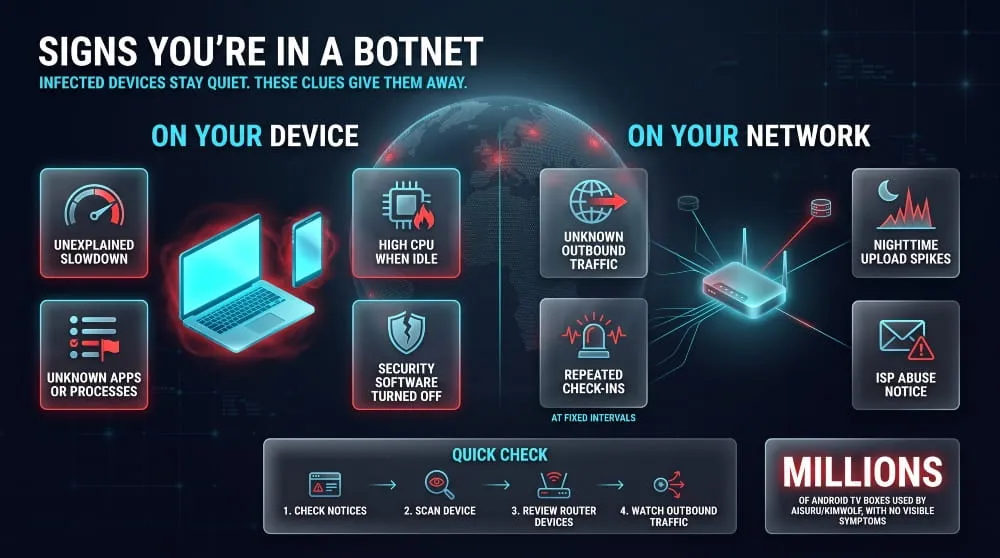
The most common signs of a botnet infection are unexplained slowdowns, unusual network activity, and warnings from your internet provider or security software. Infected devices are designed to stay quiet, so symptoms are often subtle or absent. The sections below cover what to look for on devices and networks, how to check, and how security teams detect botnets at scale.
Symptoms on Computers and Phones
An infected computer or phone usually shows signs of hidden background activity. Common signs include unexplained slowdowns, high CPU or battery use when the device is idle, fans running constantly, and unusually heavy data use. Other signals include programs or browser extensions you didn’t install, security software that has been turned off, unfamiliar processes in the task manager, and contacts reporting spam or strange messages from your accounts.
Some devices give no warning at all. Researchers tracing the Aisuru/Kimwolf botnet found that attackers exploited millions of unofficial Android streaming boxes, devices with no antivirus and no obvious signs of compromise. That is why the absence of symptoms does not prove a device is clean.
Network-Level Warning Signs
At the network level, the clearest sign of a botnet is outbound traffic nobody can explain. Watch for devices that constantly connect to unfamiliar external addresses, traffic that continues overnight when no one is using the network, sudden spikes in upload bandwidth, and lookups for many strange or randomly generated domain names. Other red flags include mail servers or IP addresses landing on blocklists, a flood of bounced emails you never sent, and notices from your ISP or hosting provider about suspicious activity from your connection.
Another giveaway is a consistent, machine-like rhythm. Bots tend to “check in” with their controller at regular intervals, so repeated small connections at fixed times are more suspicious than random human browsing.
How to Check Whether You’re in a Botnet
You can usually confirm or rule out a likely infection with a few basic checks:
- Look for notices. Check your email and your provider’s account page for abuse or malware warnings, since ISPs often notify customers when their connections show botnet behavior.
- Scan the device. Run a full scan with a reputable, up-to-date security product, and consider a second-opinion scanner or an offline boot scan for stubborn cases.
- Review running processes and installed apps. Remove anything unfamiliar, and on phones, check which apps have unusual permissions or heavy background data use.
- Inspect your router. Review the list of connected devices for anything you don’t recognize, make sure the admin password isn’t the factory default, and confirm the DNS settings haven’t been changed.
- Check outbound connections. Use your operating system’s built-in network monitor or the router’s traffic logs to look for constant connections to unknown addresses.
- Check your IP and accounts. See whether your public IP address appears on an email or abuse blocklist, and review account login activity for access you do not recognize.
If any check turns up something suspicious, disconnect the device from the network and follow the removal steps later in this guide.
Botnet Detection Techniques (Traffic Analysis, Honeypots, Machine Learning)
Security teams detect botnets by looking for the behavior and infrastructure that infected devices cannot easily hide. Four methods are the most widely used:
- Traffic analysis: Analysts examine network flow data for beaconing (regular check-ins to a controller), connections to known malicious addresses, unusual DNS queries, and the high volumes of failed lookups typical of domain generation algorithms.
- Honeypots and sinkholes: A honeypot is a deliberately vulnerable system used to attract and study malware. A sinkhole redirects traffic aimed at a botnet’s controller domain to a defender-run server, revealing how many devices are infected and where they are.
- Machine learning: Models learn what normal traffic looks like and flag deviations, such as a camera that suddenly sends large volumes of data or a device whose communication pattern matches a known malware family. This helps with new or encrypted threats that lack a known signature.
- Threat intelligence: Teams match traffic against shared lists of known botnet controller addresses, domains, and file hashes, catching known botnets quickly.
In practice, organizations combine several of these, because each method has blind spots. Encrypted traffic can hide content from analysts, and machine learning can generate false alarms, so layered detection performs better than any single tool.
How to Prevent Botnet Attacks
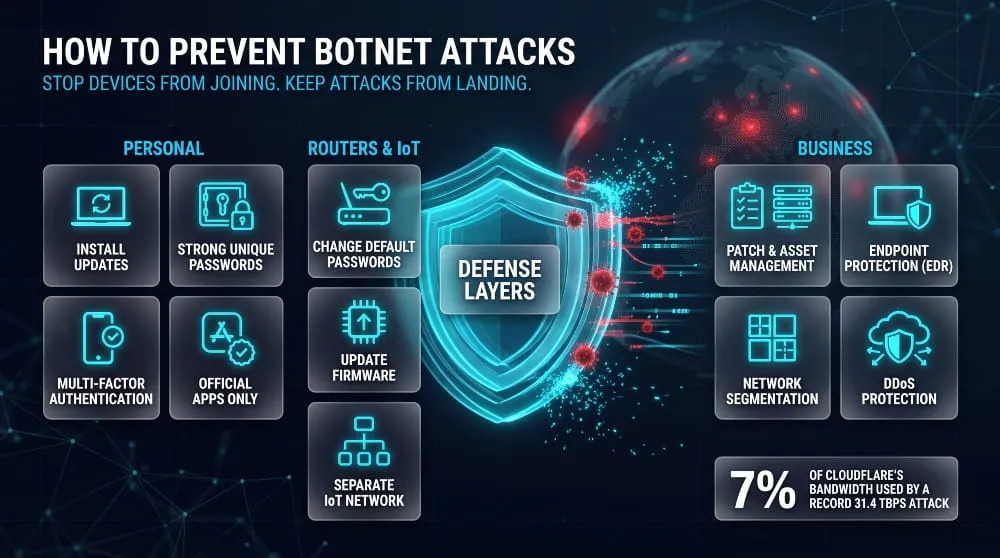
Prevent botnet attacks by keeping devices from being recruited and preparing your network to absorb traffic floods. For individuals, that means patching, using strong, unique passwords, and downloading cautiously. For organizations, that means layered defenses plus an automated DDoS mitigation plan. The sections below cover personal habits, router and IoT hardening, business controls, and what to do while an attack is underway.
Personal Protection Checklist
The most effective personal defenses are simple habits that close common infection vectors. This checklist covers the essentials:
- Install updates promptly. Turn on automatic updates for your operating system, browser, and apps, since botnets routinely exploit known, already-patched vulnerabilities.
- Use strong, unique passwords. A password manager makes this practical, and reusing passwords lets credential-stuffing botnets break into multiple accounts at once.
- Turn on multi-factor authentication. Even if a password leaks, a second factor blocks most automated login attempts.
- Be skeptical of links and attachments. Phishing email remains a leading way malware reaches devices, so avoid opening unexpected files.
- Download apps only from official stores. Pirated software and unofficial app sources often carry bot malware.
- Run reputable security software. Keep it updated and enabled, and run full scans periodically.
Securing IoT Devices and Routers
IoT devices and routers need specific attention because they are the raw material of most large botnets. They ship with weak defaults, rarely get updates, and run all day without anyone checking them. First, change every default password and admin username during setup, since automated scanners test factory credentials first. Then update the firmware, and enable automatic updates if the device supports them.
Beyond that, turn off features you don’t use, such as remote administration, UPnP, and open ports, and put smart devices on a separate guest or IoT network so a compromised camera cannot reach your computers. Prefer products from vendors that publish security updates, and retire devices that no longer receive them. Cheap, unbranded streaming boxes deserve extra caution: the Aisuru/Kimwolf botnet’s record attack drew on millions of unofficial Android TV devices, showing how much capacity poorly secured consumer hardware can provide to attackers.
Business and Enterprise Defense Layers
Businesses reduce botnet risk best with several overlapping layers, since no single control catches everything. A sound baseline has the following parts:
- Patch and asset management. Maintain an inventory of every internet-facing system and device, and patch them on a defined schedule so no forgotten server becomes a recruit.
- Endpoint protection. Deploy endpoint detection and response (EDR) tools that spot malicious behavior, not only known malware signatures.
- Network segmentation and egress filtering. Limit which systems can reach the internet, block outbound connections to known malicious destinations, and monitor DNS for suspicious lookups.
- Email and web filtering. Stop phishing and drive-by downloads before they reach users.
- Identity controls. Enforce multi-factor authentication, rate-limit logins, and use bot-management tools to counter credential stuffing.
- DDoS protection and capacity planning. Use a provider that can absorb large floods upstream, and test the setup before you need it.
- Threat intelligence and monitoring. Feed known botnet indicators into your security tools, and watch for beaconing and unusual traffic patterns.
Staff training is the last layer. Many infections start with a single click, so regular phishing awareness reduces risk more than most technical purchases.
Botnet Mitigation During an Active Attack
When an attack is already underway, the goal is to keep legitimate users connected while filtering out malicious traffic. Speed matters because most attacks are short, and Cloudflare data shows most network-layer attacks last under ten minutes, so mitigation must be automatic and not wait for a person to react.
The standard response runs in this order. First, activate or confirm your DDoS protection so traffic routes through a scrubbing service or CDN that filters bad requests upstream. Second, apply rate limiting and geo- or reputation-based filters to the affected endpoints. Third, if your architecture allows, scale up capacity and serve cached or static versions of key pages to reduce load. Fourth, contact your ISP or hosting provider, who can often block traffic closer to the source. Finally, keep a traffic log for analysis and, if there is an extortion demand, report it to law enforcement instead of paying.
Upstream capacity is the deciding factor in large attacks. Cloudflare reported that its record 31.4 Tbps attack used only about 7% of its available bandwidth, showing why large mitigation networks can absorb floods that would overwhelm a single organization’s connection.
How to Remove Botnet Malware
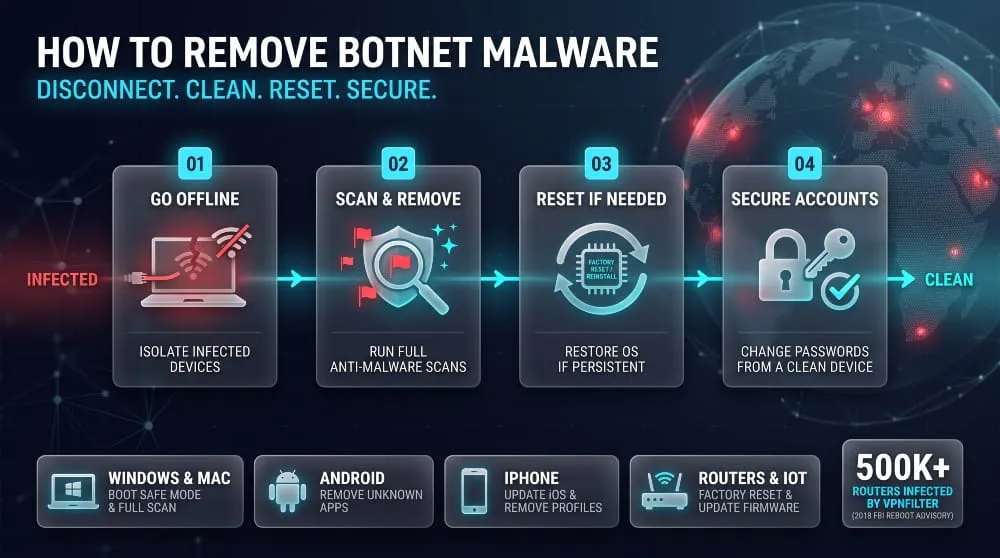
To remove botnet malware, disconnect the infected device from the internet, run a full scan with reputable security software, delete anything malicious, and then change your passwords from a clean device. If the infection survives, a factory reset or clean reinstall is the reliable fix. The sections below outline the steps for each device type, followed by what to do afterward.
On Windows and Mac
On a computer, start by taking it offline, because a connected bot keeps receiving commands and can reinstall itself. Unplug the network cable or turn off Wi-Fi, then restart in Safe Mode, which loads only essential software and keeps many bots from running.
On Windows, run a full scan with Microsoft Defender or another reputable antivirus, and use a Microsoft Defender Offline scan to catch malware that hides while Windows is running. Then run a second-opinion scanner, since different tools catch different threats. After that, review startup programs, scheduled tasks, installed apps, and browser extensions, and remove anything you do not recognize.
On a Mac, update macOS first, then check Login Items, installed profiles in System Settings, and the Applications folder for unfamiliar entries. Run a scan with a reputable anti-malware tool and remove what it finds. Mac infections are less common than Windows ones, but they do happen, usually through pirated software or fake installers.
If the malware returns after cleaning, back up only your personal files (not programs), then erase the drive and reinstall the operating system. A clean reinstall is slower, but it is the only way to be sure a persistent infection is gone.
On Android and iPhone
Android phones are the more common target for botnet malware, usually through apps installed from outside the official store. Disconnect from Wi-Fi and mobile data, then restart in Safe Mode, which disables third-party apps. Open the app list and uninstall anything you didn’t install or don’t recognize, paying special attention to apps with device administrator or accessibility permissions, since malware often abuses these. If the symptoms continue, run a Google Play Protect scan and a scan with a reputable mobile security app, back up your photos and contacts, and perform a factory reset.
iPhones are much harder to infect because of Apple’s app sandboxing and review process, and botnet infections on a standard, unmodified iPhone are rare. Jailbroken devices are the main exception. If you suspect a problem, update iOS to the latest version, delete unfamiliar apps, remove unknown configuration profiles under Settings, and change your Apple ID password. If the device is jailbroken, restoring it to factory firmware through a computer removes the modification and any malware that came with it.
Router and IoT Device Cleanup
Routers, cameras, and other IoT devices usually cannot run antivirus software, so cleanup means resetting them and hardening the settings. Many of these botnets live only in the device’s memory, so a simple restart can remove the infection. Still, the device often gets reinfected within minutes if it remains exposed with a weak password.
That is why a restart alone is not enough. In 2018, the FBI asked the public to reboot home routers because of the VPNFilter malware, which Cisco Talos estimated had infected at least 500,000 devices. Rebooting disrupted the malware, but a full fix required a factory reset and a firmware update.
For any suspected IoT device, follow these steps in order:
- Disconnect the device from the network.
- Perform a factory reset using the reset button or the manufacturer’s instructions.
- Update the firmware to the latest version before reconnecting.
- Set a new, strong admin password, and turn off remote administration and UPnP.
- Reconnect it to a separate guest or IoT network and monitor it.
If the manufacturer no longer issues updates, replace the device. This applies especially to unbranded streaming boxes and old cameras, which cannot be reliably secured.
Post-Infection Steps (Passwords, Monitoring)
After you remove the malware, assume anything typed or stored on the infected device may have been exposed. From a clean device, change the passwords for your email, banking, and other key accounts first, and enable multi-factor authentication wherever it is offered. Review account activity for logins you don’t recognize, and check your email settings for forwarding rules or connected apps an attacker may have added.
Then monitor for follow-on problems. Watch bank and card statements, consider a credit freeze if financial data was at risk, and monitor your network for repeat unusual connections. If the infected device belonged to a business, treat it as a security incident: report it to your IT or security team, preserve logs, and reimage the system instead of relying on a scan alone. If your internet provider sent the original warning, tell them once the device is clean.
Are Botnets Illegal? Law and Enforcement
Yes. Building, operating, renting, or using a botnet is illegal in nearly every country, because it involves accessing other people’s devices without permission and usually causing damage or fraud. Owners of infected devices are treated as victims, not offenders. The sections below explain which laws apply and how authorities dismantle botnets.
Legal Status of Botnet Creation and Operation
Botnets are illegal because each stage of running one breaks computer crime law. Infecting a device without the owner’s consent is unauthorized access, remotely controlling it is unauthorized use, and the attacks the botnet carries out, such as DDoS, fraud, or data theft, are separate offenses.
The main legal frameworks follow the same pattern:
- United States: The Computer Fraud and Abuse Act (CFAA) criminalizes unauthorized access to protected computers and knowingly causing damage to them, and prosecutors commonly add wire fraud, conspiracy, and identity theft charges in botnet cases.
- United Kingdom: The Computer Misuse Act 1990 covers unauthorized access and impairing the operation of a computer, which includes denial-of-service attacks.
- European Union: Directive 2013/40/EU on attacks against information systems requires member states to criminalize illegal system interference and treats attacks on large numbers of systems, such as through a botnet, as an aggravating factor that carries heavier penalties.
- International: The Council of Europe’s Budapest Convention on Cybercrime provides a common basis for cross-border cooperation on investigations and extradition.
Liability also extends beyond the person who built the malware. Selling or renting access to a botnet, offering a “booter” or “stresser” service, and paying for an attack can all be prosecuted. Calling a service a stress-testing tool does not change its legal status when a customer uses it against systems they do not own.
People whose devices are infected are generally not breaking the law. They may, however, receive abuse notices from their internet provider, and in some cases businesses face regulatory questions if negligent security allowed customer data to be exposed. Legal details differ by country, so this section is general information and not legal advice.
How Law Enforcement Dismantles Botnets
Law enforcement takes down botnets by cutting the link between the operator and the infected devices, then pursuing the people behind them. Because bots depend on a command-and-control (C2) channel, authorities target that infrastructure first. The usual toolkit includes seizing or sinkholing C2 servers and domains under court orders, working with internet providers and security firms to notify victims, and arresting and charging the operators.
The 2014 Gameover Zeus takedown is a classic case. A coalition of law enforcement agencies and private security companies disrupted the botnet’s peer-to-peer network. It seized key infrastructure, making it one of the first operations to take on a decentralized botnet with no single server to switch off. In 2024, the US Justice Department announced the arrest of the alleged administrator of the 911 S5 proxy network and said the network had compromised roughly 19 million IP addresses.
Authorities increasingly go after the supply chain as well as individual botnets. Cloudflare credited Operation PowerOFF, a coordinated crackdown on DDoS-for-hire services across 21 countries, with helping reduce attack volumes after April 2026. Courts have also authorized remote cleanup: in 2024, the US Justice Department said it disrupted the KV botnet by removing the malware from compromised small-office routers under a court order.
Takedowns rarely end a botnet permanently. Operators rebuild, rivals take over the freed devices, and new strains appear, which is why prevention and patching by device owners remain important alongside enforcement.
Key Takeaways
- A botnet is a network of hijacked devices that one attacker controls remotely, usually without the owners knowing.
- Botnets work in four stages: infection, recruitment, control through a command-and-control (C2) channel, and coordinated attack.
- Common uses include DDoS attacks, spam and phishing, credential stuffing, ad fraud, cryptocurrency mining, and data theft or proxy abuse.
- Any connected device can be recruited, but routers, cameras, streaming boxes, and unpatched computers are the easiest targets.
- Botnet access is sold as a service, which lets people with little skill rent attacks for small fees.
- Warning signs are unexplained slowdowns, unusual outbound traffic, and abuse notices from your internet provider, though some infections show no symptoms.
- Prevention comes down to basics: updates, strong unique passwords, multi-factor authentication, secured routers, and layered business defenses.
- Removal means going offline, scanning, deleting the malware, and resetting or reinstalling if it persists, then changing passwords from a clean device.
- Running or renting a botnet is illegal, and authorities regularly take botnets down, but they often return, so prevention still matters.
Botnets commonly carry out distributed denial-of-service attacks.
The missing word is denial. Botnets commonly carry out distributed denial-of-service (DDoS) attacks, in which many infected devices flood a target with traffic until it can no longer serve legitimate users.
Frequently Asked Questions (FAQ)
What is a botnet in simple words?
A botnet is a group of infected devices, such as computers, phones, routers, and cameras, that a hacker controls remotely. The owners usually have no idea. The hacker uses the devices together to carry out attacks or fraud that would be impossible with a single machine, such as knocking a website offline with a flood of traffic.
What does a botnet do?
A botnet carries out tasks for its controller using the combined power of every infected device. Common activities include DDoS attacks, spam and phishing emails, testing stolen passwords across many sites, generating fake ad clicks, mining cryptocurrency, and stealing data. Attackers also rent botnet capacity to other criminals, so one network often serves several purposes at once.
Can a botnet infect my phone?
Yes, mainly Android phones. Botnet malware usually arrives through apps installed from unofficial sources, malicious links, or text messages, and it can then send spam, commit ad fraud, or steal banking details. iPhones are much harder to infect, and infections on a standard, unmodified iPhone are rare. Jailbroken devices are the main exception.
Can I be part of a botnet without knowing?
Yes, and that is the normal situation. Botnet malware is designed to stay hidden, and many infected devices show no symptoms. Researchers found that the Aisuru/Kimwolf botnet relied on millions of unofficial Android TV boxes, leaving owners no obvious sign of compromise. Look for unexplained slowdowns, heavy background data use, or an abuse notice from your internet provider.
Is a botnet a virus?
No. A virus is malware that attaches itself to files and spreads when they are opened, while a botnet is a network of devices infected with malware, which may be a Trojan, worm, or other type. Malware is the tool, and the botnet is the result when many infected devices link to one controller.
What’s the biggest botnet ever?
It depends on how you measure “biggest.” By attack power, the largest on record is the Aisuru/Kimwolf botnet, whose December 2025 attack of 31.4 Tbps was the largest publicly disclosed DDoS attack, according to Cloudflare. By estimated infected-device count, older botnets such as Conficker are often cited at roughly nine to fifteen million computers, and the 911 S5 proxy network was reported to span about 19 million IP addresses. Estimates vary, so treat these as ranges.
What is the quickest way to check if I’m in a botnet?
Check for a malware or abuse notice from your internet provider, run a full scan with reputable security software, and check your router’s list of connected devices for ones you don’t recognize. Also watch for unexplained outbound traffic or a device that stays busy while idle. None of these is definitive, so if something looks wrong, disconnect the device and follow the removal steps.
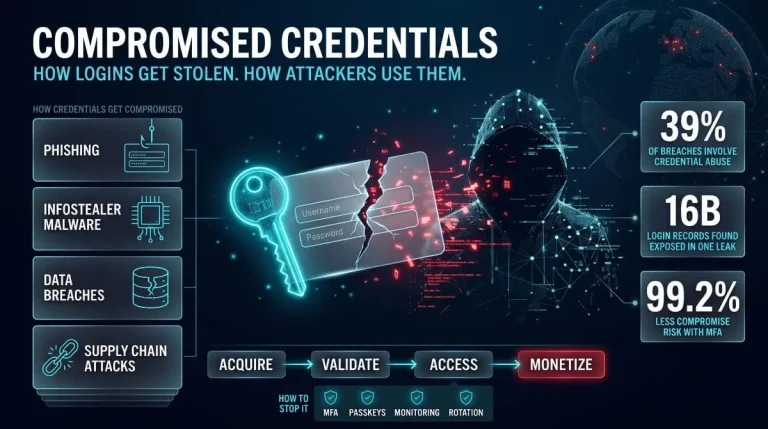
Compromised Credentials | Definition, Attack Methods, Detection, and Response (Complete Guide)
Compromised credentials are login details, such as usernames, passwords, session tokens, or API keys, that an unauthorized party has stolen, leaked, or obtained, so the account…
Read more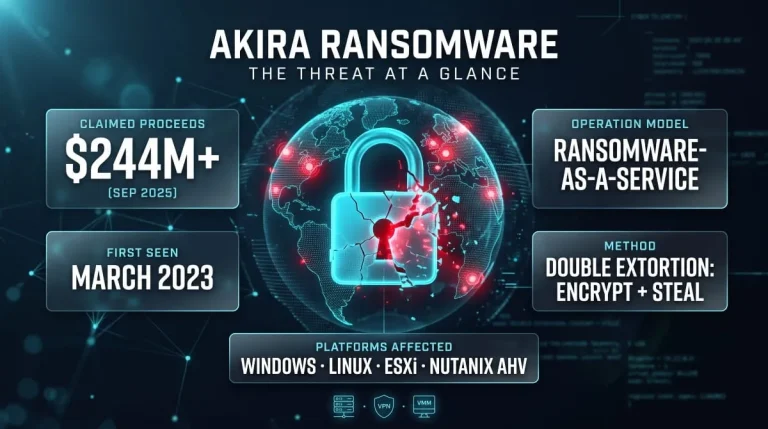
Akira Ransomware | Guide to the Group, TTPs, SonicWall/Cisco Attacks, CISA & FBI Advisories, and Recovery
What Is Akira Ransomware? Akira ransomware is a ransomware-as-a-service (RaaS) operation active since March 2023 that steals a victim’s data and then encrypts their systems to…
Read more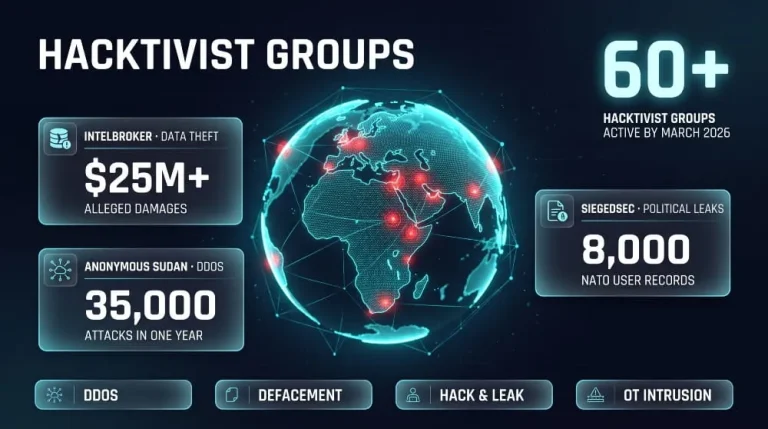
Hacktivist Groups to Watch | IntelBroker, Anonymous Sudan & SiegedSec (Threat Intelligence Guide)
IntelBroker, Anonymous Sudan and SiegedSec are three of the most closely tracked hacktivist and data-leak actors of recent years, and all three have drawn law-enforcement action.…
Read more