
Compromised Credentials | Definition, Attack Methods, Detection, and Response (Complete Guide)
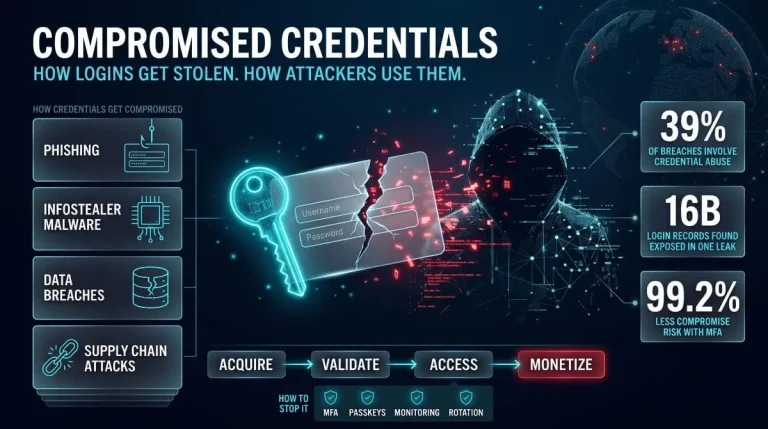
Compromised credentials are login details, such as usernames, passwords, session tokens, or API keys, that an unauthorized party has stolen, leaked, or obtained, so the account is no longer secure. They are dangerous because they let an attacker walk through the front door as a legitimate user. This guide explains what credential compromise is, how it happens, how to spot it, and what to do when it does.
What Are Compromised Credentials? (Credential Compromise Definition)
Compromised credentials are authentication details that someone other than their rightful owner has obtained or can use. A credential compromise is the event that creates that exposure, whether through phishing, malware, a data breach, or a leaked database. From that moment, the login can no longer be trusted, even if it still works.
Credential compromise meaning in plain language
A credential compromise means someone else now holds the key to your account. The key might be a password typed into a fake login page, a token lifted from an infected laptop, or an API key left in a public code repository. The owner often notices nothing, because the credential keeps working exactly as before. That is why a compromise is defined by exposure, not by damage: the moment a secret leaves your control, it is compromised, whether or not anyone has used it yet.
Compromised user credentials vs. compromised login credentials vs. compromised passwords
The three terms overlap, but they describe different scopes. Compromised passwords are the narrowest case, covering a single exposed secret. Compromised login credentials are what a specific sign-in requires, usually a username plus a password and sometimes a one-time code. Compromised user credentials are the broadest, covering everything that proves a person’s identity across systems, including passwords, session cookies, access tokens, and MFA factors. In practice, a stolen password is the most common starting point, but a stolen session token can be worse, because it can bypass the password and MFA entirely.
Credential compromise vs. data breach vs. account takeover
A credential compromise exposes a login secret, a data breach exposes data, and an account takeover is when an attacker uses a stolen credential to control an account. They often form a chain. A breach at one company can leak credentials; those credentials are then compromised, and an attacker who logs in with them has completed an account takeover. The distinction matters for response: a data breach calls for notification and containment, while a credential compromise calls for immediate resets and session revocation, even if no takeover has happened yet.
Why compromised credentials remain a top attack vector
Compromised credentials remain a top attack vector because a valid login lets an attacker blend in with normal users and avoid triggering defenses built to catch exploits. Verizon’s 2026 Data Breach Investigations Report found that stolen credentials or credential abuse appear in 39% of breaches across the full attack chain. Vulnerability exploitation has now overtaken credential abuse as the most common way attackers first get in, but credentials still drive what happens next: lateral movement, privilege escalation, and monetization. Attackers also buy access from initial access brokers, so a single leaked login can be resold and used long after the original theft.
How Credentials Get Compromised
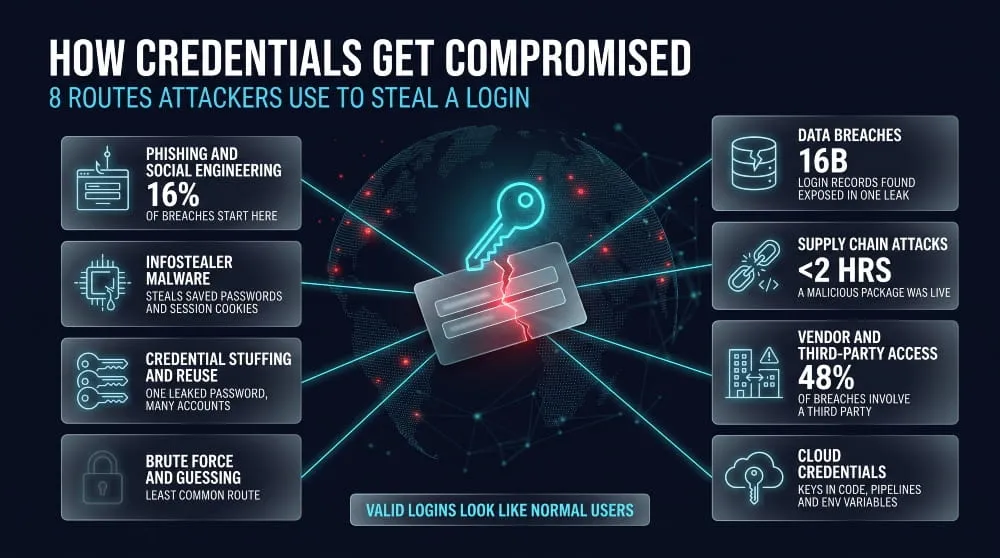
Credentials get compromised mainly through phishing and social engineering, infostealer malware, reused passwords, breaches at services you use, and supply chain attacks on tools and vendors. Password guessing is the least common route. Attackers prefer methods that hand them a working login, because it saves them from breaking in.
Phishing and social engineering
Phishing steals credentials by tricking a person into typing them into a fake page or handing them over directly. In Verizon’s 2026 DBIR, phishing accounted for 16% of initial access in breaches, and the newly tracked category of pretexting accounted for another 6%. Pretexting is when an attacker invents a believable scenario, such as posing as IT support, to talk a target into giving up access. The same report found that phone- and text-based social engineering is now succeeding more often than traditional phishing email, which is why training that focuses only on suspicious email links leaves a gap.
Infostealer malware and stealer logs
Infostealer malware compromises credentials by silently copying saved passwords, session cookies, and tokens from an infected device and sending them to an attacker. The haul, called a stealer log, is sold or traded and often includes the session cookies that let a buyer skip the password and MFA prompt. Verizon’s 2026 DBIR ties this directly to ransomware: for half of ransomware victims with a prior credential leak, the leak came within 95 days of the attack. For a deeper breakdown of the malware families involved, see our guide to infostealer malware.
Credential stuffing and password reuse
Credential stuffing is an automated attack that tries username and password pairs from past leaks against other websites, and it works because people reuse passwords. A single old breach can therefore unlock accounts at services that were never breached. In Verizon’s 2026 data, stolen credentials remain the top action in basic web application attacks, and the report traces them to phishing, infostealers, and prior breach data bought on criminal markets. Reuse turns one leaked password into many compromised accounts, so the leak itself is only the first step.
Brute force and password guessing (and why it’s not the most common cause)
Brute force and password guessing rarely cause credential compromise at scale, because stealing or buying a working credential is cheaper and faster than guessing one. The same DBIR finding applies: the credentials used in attacks mostly come from phishing, infostealers, and old breach data rather than from cracking. Guessing still succeeds against weak, short, or default passwords and against accounts with no lockout or MFA. Strong unique passwords defend against guessing, but they do nothing against a credential that has already been stolen.
Data breaches and billions of leaked credentials
Data breaches compromise credentials by exposing stored logins in bulk, and those logins then circulate for years. In June 2025, Cybernews reported 30 exposed datasets holding about 16 billion login records, with significant duplication. Researchers who examined the files estimated that roughly 85% came from infostealer logs and 15% from older breach data. The number overstates the count of unique accounts, but it shows how much valid login data is already in circulation, and why a password that was safe last year may not be today.
Supply chain attacks (case studies: npm package compromises, platform incidents such as Vercel)
Supply chain attacks compromise credentials by breaching a trusted tool or vendor, so the theft happens somewhere the victim never controlled. Two 2026 incidents show how. In April, Vercel disclosed that an employee’s use of a third-party AI tool, Context.ai, led to the takeover of the employee’s Google Workspace account. The attacker then reached internal environments and environment variables that were not marked as sensitive, and a limited subset of customers were told to rotate their credentials. On April 22, a malicious version of the @bitwarden/cli npm package (2026.4.0) was live for under two hours after attackers compromised a GitHub Action in Bitwarden’s build pipeline. It was built to steal npm and GitHub tokens, SSH keys, and cloud credentials, while Bitwarden said vault data was not affected. In both cases, the lesson is the same: secrets stored in developer tools and pipelines are credentials too, and you must rotate them after any exposure.
How vendor and third-party credentials get compromised
Vendor and third-party credentials get compromised when a supplier’s account, token, or integration is stolen and then used to reach your systems. Verizon’s 2026 DBIR found third-party involvement in 48% of breaches, up 60% from the year before. The risk comes from access that outlives its purpose: shared service accounts, long-lived API keys, and OAuth grants to tools nobody reviews. An attacker who takes over a vendor employee’s account inherits whatever trust you extended to that vendor.
How attackers exploit compromised cloud credentials
Attackers exploit compromised cloud credentials by logging in as a legitimate identity, then using its permissions to read data, create resources, or escalate privileges. Because the activity looks like normal API usage, it can run unnoticed for a long time. Access brokers sell this kind of foothold openly, with SpyCloud’s summary of the 2026 DBIR putting typical prices at around $700 for a non-privileged account and $1,300 for admin access. Keys embedded in code, CI/CD systems, and environment variables are common targets, which is why the stealer in the Bitwarden incident specifically targeted AWS, Azure, and Google Cloud credentials.
What Is a Credential Compromise Attack?
A credential compromise attack is an intrusion in which an attacker obtains valid login credentials and uses them to access systems as a legitimate user. The attack succeeds because the attacker doesn’t need to exploit anything; they sign in. Verizon’s 2026 DBIR found credential abuse in 39% of breaches when counting the full attack chain, because stolen credentials keep working long after the initial breach.
Attack lifecycle: acquisition, validation, access, monetization
A credential compromise attack follows four stages: acquisition, validation, access, and monetization. In acquisition, the attacker obtains credentials through phishing, infostealer malware, a breach dump, or a purchase from an access broker. In validation, they test whether the logins still work, usually with automated tools and often against many services at once. In access, they sign in and quietly explore; in monetization, they steal data, deploy ransomware, commit fraud, or resell the access. Different people often handle the stages, since brokers sell validated access to buyers who never touched the original theft.
Initial access to privilege escalation
Privilege escalation is how an attacker turns one low-level login into control of far more of the environment. After signing in, the attacker looks for more powerful credentials: admin passwords stored in scripts, tokens in memory, cached logins on shared machines, or over-permissioned cloud roles. Verizon’s 2026 report notes that once attackers have device access, they commonly steal internal system data to escalate privileges and widen their reach. Each new credential they collect is another valid identity, which is why one compromised account can become a domain-wide incident.
Preventing lateral movement, including on legacy systems with no agents
Preventing lateral movement means limiting what any single stolen credential can reach, and this works even on legacy systems that cannot run security agents. The controls sit around the system instead of on it. Segment the network so a compromised workstation cannot talk to servers it has no reason to reach, and route admin access through a monitored jump host or privileged access tool. Give each machine a unique local administrator password so one cracked password doesn’t unlock the fleet, and remove shared and service accounts with broad rights. For monitoring, use authentication and network logs from domain controllers, VPNs, and switches to detect unusual logins without installing anything on the legacy host. Where a legacy application cannot support MFA, place it behind a gateway or proxy that enforces it.
Real-world incident examples
Real incidents show how ordinary these attacks are. In 2024, a threat group tracked as UNC5537 accessed the Snowflake environments of about 165 organizations using credentials stolen by infostealer malware, some of which dated back to 2020. Mandiant said the campaign succeeded because of missing MFA, unrotated credentials, and no checks limiting access to trusted locations. It also found that an infected contractor laptop could expose several organizations at once. In April 2026, the Vercel incident followed the same pattern on the supply chain side, starting with one compromised third-party AI tool and ending in access to a customer’s credentials. In both cases, a valid login did the work that an exploit would otherwise have had to do.
Signs Your Credentials Have Been Compromised
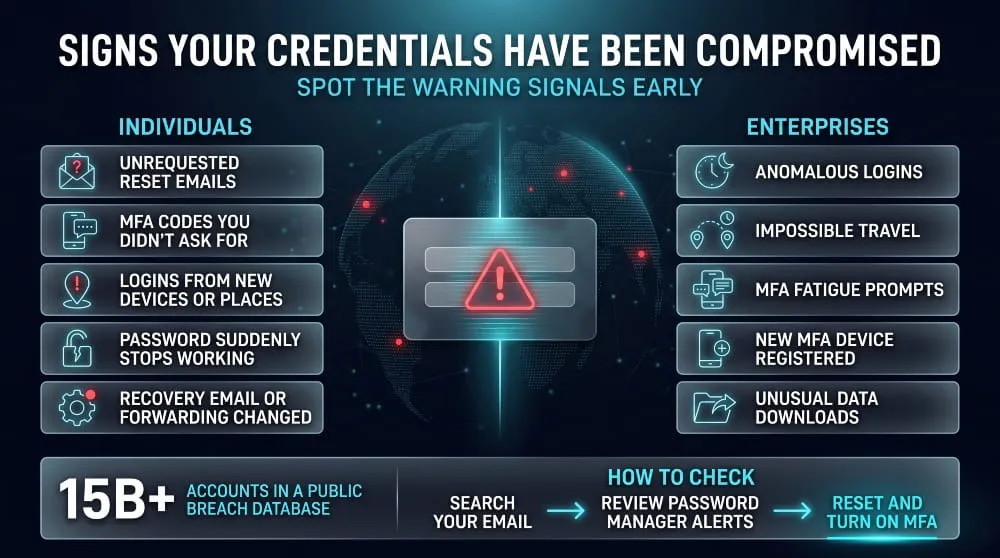
The clearest signs of compromised credentials are activity you didn’t start: password reset emails, login alerts from unfamiliar places, MFA prompts you didn’t trigger, and account settings that changed on their own. Often there is no sign at all, because stolen credentials keep working normally until someone uses them. That is why the practical test is to look for anomalies and to check proactively against known leaks.
Warning signs for individuals
An individual’s credentials are likely compromised if you see sign-in alerts from unknown devices or locations, unexpected password reset or verification emails, or MFA codes you never requested. Other signs are a password that suddenly stops working, sent messages or posts you didn’t write, and unfamiliar purchases or transfers. Check the account’s own settings too, since attackers often change the recovery email, phone number, or mail forwarding rules to keep access after you reset the password. Contacts telling you they received odd messages from you is a late sign, but a reliable one. Any one of these is enough reason to change the password from a clean device and review active sessions.
Warning signs for enterprises (anomalous logins, impossible travel, MFA fatigue)
In an enterprise, compromised credentials show up as authentication patterns that don’t fit the user. Anomalous logins include sign-ins at unusual hours, from new devices or countries, or after a run of failed attempts that ends in a success, which is the signature of credential stuffing. Impossible travel is when the same account signs in from two places too far apart for the elapsed time. VPNs and mobile networks cause false positives, so treat it as a signal to investigate and not as proof. MFA fatigue is when an attacker with a valid password floods the user with push approval requests until one is accepted, so repeated unrequested prompts, especially at night, are a strong warning. Newly registered MFA devices, new mailbox forwarding rules, unfamiliar OAuth app consents, and large downloads from an account that rarely touches that data are further signs of takeover.
How to check if your credentials are compromised
You can check whether your credentials are compromised by searching your email address in a breach database such as Have I Been Pwned, and by using the breach alerts built into your password manager or browser. Have I Been Pwned held more than 15 billion compromised accounts as of late 2025, so the odds that an address appears in at least one breach are high. A result tells you which services leaked your data and when, which tells you which passwords to change. A clean result means only that your address wasn’t found in the data that service indexes. It does not prove your credentials are safe, because credentials stolen by infostealer malware or sold privately may not appear yet. If you do find a match, change that password everywhere you used it, turn on MFA, and treat any reused password as exposed. Organizations that need to check many accounts continuously, rather than one address at a time, need ongoing monitoring, which the monitoring section below covers.
How to Detect Compromised Credentials
Compromised credentials are detected by combining three signals: leaked credentials found outside your network, abnormal behavior on accounts inside it, and tripwires that fire when a fake credential is used. No single method catches everything, because each one sees a different stage of the attack. External monitoring spots exposure before a login happens, behavioral analytics spots misuse after it, and deception catches an attacker who is already looking around.
Credential compromise detection methods overview
Detection methods fall into three groups. Exposure detection looks for your organization’s credentials in breach dumps, paste sites, dark web markets, and stealer logs, and it can warn you before an attacker signs in. Behavioral detection watches authentication and account activity for patterns that don’t fit the user, using identity logs, SIEM correlation, and identity threat detection tools. Deception detection plants decoy credentials that no legitimate user should ever touch, so any use is a confirmed alert. Mature programs use all three, because exposure detection is early but incomplete, behavioral detection is broad but noisy, and deception is precise but narrow.
Dark web and stealer log monitoring
Dark web and stealer log monitoring detects compromised credentials by matching your domains, emails, and employee identities against data collected from criminal markets, forums, and malware infection logs. Stealer logs matter most because they often include the full URL, username, password, and session cookies from an infected device. A match tells you a credential is exposed even if nobody has used it yet, which gives you time to reset it and revoke sessions. The limit is coverage: a clean result only means nothing matching was found in the sources being watched. For how the malware behind these logs works, see our infostealer malware guide.
Canary tokens and honeytokens
Canary tokens and honeytokens detect compromised credentials by acting as decoys that fire an alert the moment someone uses them. A fake cloud access key placed in a code repository, a decoy password in a shared vault, or a bait document in a file share has no legitimate use, so any attempt to use it signals that an attacker is searching your environment. Because normal users never touch them, they produce very few false positives, and the alert usually includes the source IP and timing of the attempt. They detect an attacker only if they find and use the bait, so they complement other methods rather than replace them.
Behavioral analytics, SIEM, and identity threat detection
Behavioral analytics, SIEM, and identity threat detection and response (ITDR) detect credential misuse by comparing activity against what is normal for that account. A SIEM collects logs from identity providers, VPNs, and cloud platforms and correlates them, for example, by flagging a successful login right after many failures. User behavior analytics builds a baseline per user and flags deviations such as a new location, device, or unusual data volume. ITDR focuses on identity-layer attacks, such as new MFA device registrations, suspicious token use, and privilege changes. These tools detect credential use, not exposure, so they act after login, and their value depends on log coverage and tuning.
Why detection is harder than companies assume (myth: “these attacks are easy to detect”)
Credential compromise attacks are hard to detect because the attacker uses a real login and generates activity that looks legitimate. Signature-based tools have nothing to flag when no malware runs and no exploit fires. Time matters: IBM’s 2025 report found a mean of 241 days to identify and contain a breach, and breaches contained in under 200 days averaged $3.87 million, compared with $5.01 million for those that ran longer. This difference shows the cost of dwell time, and credential-based intrusions are among the hardest to shorten because there is no obvious break-in to find.
Challenges detecting compromised credentials in enterprises
Enterprises struggle to detect compromised credentials because identity activity spans too many systems and devices. Logs sit in separate SaaS, cloud, and on-premises tools, so a login that looks harmless in one place may be suspicious only when combined with another. Credentials stolen from unmanaged devices, such as a contractor’s personal laptop, never touch corporate endpoint tools, as in the 2024 Snowflake campaign. Service accounts and API keys have no human behavior to baseline; stolen session tokens can bypass MFA entirely, and high alert volumes bury real signals. Legacy systems add blind spots where logging is weak or absent.
Compromised Credentials Monitoring
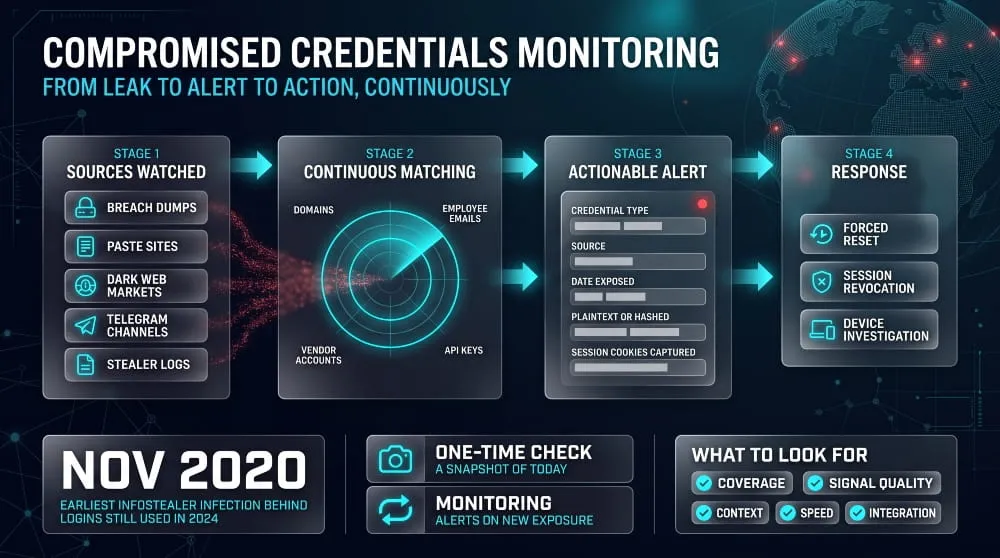
Compromised credentials monitoring continuously scans breach data, dark web sources, and stealer logs for your organization’s credentials, with alerts so you can reset them before an attacker uses them. It closes the gap between when a credential leaks and when someone notices. Without it, most organizations learn about a leak only after an attacker has abused the login.
What continuous monitoring covers
Continuous monitoring covers the places stolen credentials appear and the identities that matter to your organization. On the source side, that means breach dumps, paste sites, dark web forums and markets, combo lists, Telegram channels, and infostealer logs. On the identity side, that means your corporate domains and employee emails, customer-facing accounts, and often vendor or partner accounts, plus exposed secrets such as API keys. A useful alert says which credential was exposed, where it was found, when, and whether the password was in plaintext or hashed. For stealer logs, it also helps to know the malware family and whether session cookies were captured, because that determines whether a password reset is enough or sessions must also be revoked. The goal is to turn each match into an action: a forced reset, a session revocation, or an investigation of the infected device.
Monitoring vs. one-time compromised credentials checks
A one-time check answers whether a credential appears in known leaks today, while monitoring answers whether anything new has appeared since. Credentials leak continuously and stay valuable for years. In the 2024 Snowflake campaign, Mandiant found credentials from infostealer infections dating back to November 2020 still being used to log in, which shows how stale a single snapshot can become. One-time checks suit individuals who want to know where they were exposed. Organizations need monitoring, because their risk changes every time an employee is phished, a device is infected, or a vendor is breached. A related control is screening passwords at creation and reset against known-compromised lists, which NIST’s digital identity guidance (SP 800-63B) recommends. Screening blocks known-leaked passwords from being chosen, but it doesn’t tell you about credentials that leak afterward, so it complements monitoring.
What to look for in a monitoring approach (criteria, not product rankings)
A good monitoring approach is judged on source coverage, signal quality, context, speed, and how well it connects to your response. Coverage should include fresh stealer logs and criminal channels, not only old public breach dumps, because recent infections are what attackers use. Signal quality means accurate matches to your verified domains, deduplicated records, and few false alerts, since noisy alerts get ignored. Context such as the exposure date, source, credential type, and infected-device details lets a team triage quickly and decide between a reset and a deeper investigation. Speed matters because the window between leak and abuse can be short, so check how quickly new exposures become alerts. The last test is integration: alerts should reach your identity provider, SIEM, or ticketing system so resets and session revocations can happen automatically. Also ask how the provider collects and handles credential data, and whether it can cover customers and vendors as well as employees.
Credential Compromise Scope Analysis
Credential compromise scope analysis is the investigation that determines which accounts, systems, and data an attacker could reach with a stolen credential and what they actually touched. It decides how big the response needs to be. Resetting one password is enough only when you can show that nothing else was exposed, and that is rarely the case.
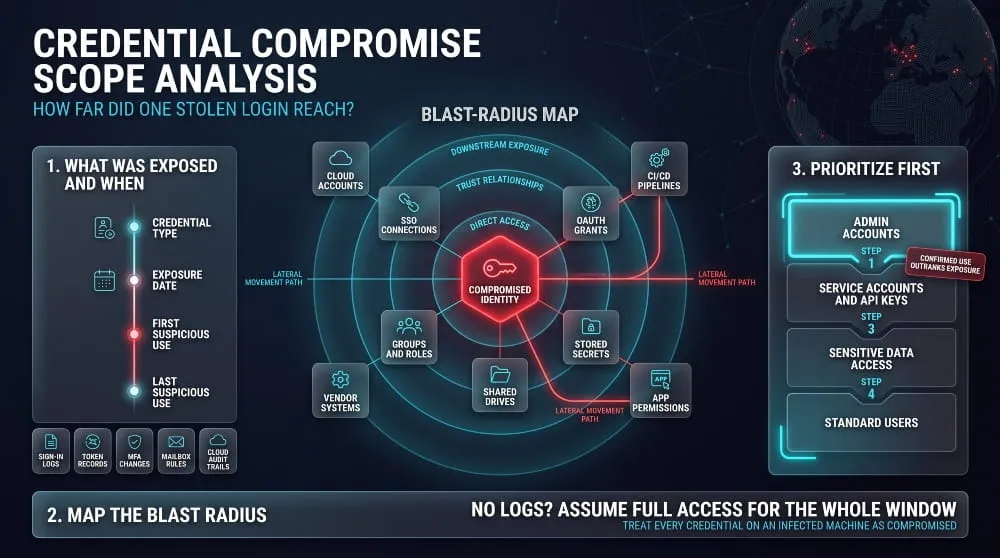
Determining which accounts, systems, and data are exposed.
The first step is to identify what was compromised and when, then trace what that credential did. Start with the credential type, because a password, a session token, and an API key each need different handling. Then build a timeline that compares the exposure date with the first and last suspicious use. Evidence comes from identity provider sign-in logs, token issuance records, MFA registration changes, mailbox rule changes, VPN logs, and cloud audit trails. Check where else the credential was used, since reused passwords extend the scope to every account that shares them. Where logs are missing, or retention is too short, assume the attacker used the account’s full permissions across the entire window. The Bitwarden CLI incident shows the same rule applied to machines: security vendors advised that anyone who installed the malicious version should treat every credential on that machine and in connected CI/CD environments as compromised.
Mapping blast radius and lateral movement paths
Mapping the blast radius means listing everything the compromised identity could reach, directly and through trust relationships. Direct access includes group memberships, assigned roles, application permissions, and shared drives. Indirect access includes single sign-on connections, OAuth grants to third-party apps, secrets stored in environment variables or scripts, and service connections that let one system act on another. Lateral movement paths are the routes from that identity to more powerful ones, such as a server where an administrator’s credentials are cached or a shared local admin password. Attack-path analysis tools can model these routes in directory and cloud environments, but a manual review of group nesting and role assignments finds many of the same gaps. The Vercel incident shows why the map must extend past your own walls: the attacker’s access to environment variables put customers’ downstream API keys and credentials at risk, so the affected parties went well beyond the original account.
Prioritizing privileged and service accounts
Privileged and service accounts come first in a scope review, because they carry the most access and are the least likely to have MFA or regular rotation. The usual order is administrator accounts, then service accounts and API keys with broad permissions, then accounts with access to sensitive data, then standard user accounts. Service accounts need extra care because applications depend on them, and careless rotation can cause an outage, so list what relies on each one before changing it. Prioritize confirmed use over mere exposure: a credential seen in a stealer log and then used from an unfamiliar IP outranks one that only appeared in an old dump. Long-lived secrets in CI/CD pipelines belong near the top, since they often combine broad access with little monitoring.
Compromised Credentials Incident Response
When credentials are compromised, respond by containing the account, revoking every active session and token, resetting the credential, and then investigating how it was exposed. Speed matters, and so does order: a password reset alone leaves stolen session tokens working. In NIST’s current guidance, a forced change is justified when evidence shows a credential has been compromised.
Immediate containment steps
Immediate containment means stopping the attacker’s access before investigating, while preserving the evidence you will need later. Start by capturing the relevant logs, since resets and account changes can overwrite or bury them. Then disable or lock the compromised account, or force a sign-out and reset, and block any attacker IP addresses you have identified. If the credential came from an infostealer infection, isolate the infected device, because anything typed or stored on it should be treated as exposed, and a reset done on that machine will be stolen again. Handle privileged and service accounts first, then standard users, in line with the scope analysis above. If the incident may involve more than one account, escalate to your incident response team right away.
Forced resets, session and token revocation
A reset works only when you revoke active sessions and tokens at the same time, because a stolen session cookie or refresh token can keep working after the password changes. Revoke all sessions for the affected user in the identity provider, invalidate refresh tokens, and remove OAuth grants and app passwords you don’t recognize. Rotate API keys, cloud access keys, and any secrets stored in environment variables or CI/CD systems, as Vercel advised affected customers and as the standard response to the Bitwarden package compromise. Then look for persistence the attacker may have created: new access keys, extra MFA devices, mailbox forwarding rules, and newly authorized apps. Coordinate service account rotations with the teams that own the dependent systems, since an uncoordinated change can cause an outage.
NIST guidance on password resets after a breach or credential compromise
NIST’s position is that passwords should be changed when there is evidence of compromise, not on a fixed schedule. NIST SP 800-63B Revision 4, released in August 2025, tells verifiers not to require periodic password changes, but to force a change when there is evidence the authenticator has been compromised. It also requires screening new passwords against a blocklist of commonly used and known-compromised passwords, and sets a 15-character minimum when a password is the only authentication factor. In practice, this means a breach notice, a stealer-log match, or suspicious account activity should trigger a reset, and the new password should be checked against the blocklist so the user can’t pick a leaked one. Rotating everyone’s password every 90 days is not required, and NIST says it tends to produce weaker passwords.
Preventing credential reuse after an MFA compromise
After an MFA compromise, rebuild the account’s authentication from scratch so neither the old password nor the old second factor can be reused. Remove all registered MFA methods, verify the person’s identity through a trusted channel, and have them re-enroll on a clean device. Assign a new, unique password that passes blocklist screening, and ask the user to change it anywhere else it was used, since the attacker will try it elsewhere. Use the incident to move to phishing-resistant methods such as passkeys or FIDO2 security keys, which can’t be approved by a user who is being flooded with push prompts or tricked on a lookalike page. If push MFA stays, enable number matching and limit repeated prompts.
Communication, logging, and post-incident review.
Good incident handling keeps a clear record, tells the right people promptly, and ends with fixes that change the outcome next time. Keep a timeline of detection, containment, and each reset, since you’ll rely on it for scope decisions and any later audit. Tell affected users plainly what happened and what you need them to do, and involve legal and compliance early, because notification duties depend on the data involved and where you operate. The post-incident review should answer how the credential was exposed, how long it was usable before it was revoked, and which control would have shortened that window. The 2024 Snowflake campaign points to the usual candidates: MFA enforcement, regular credential rotation, and restrictions on where accounts can sign in from.
How to Prevent Credential Compromise
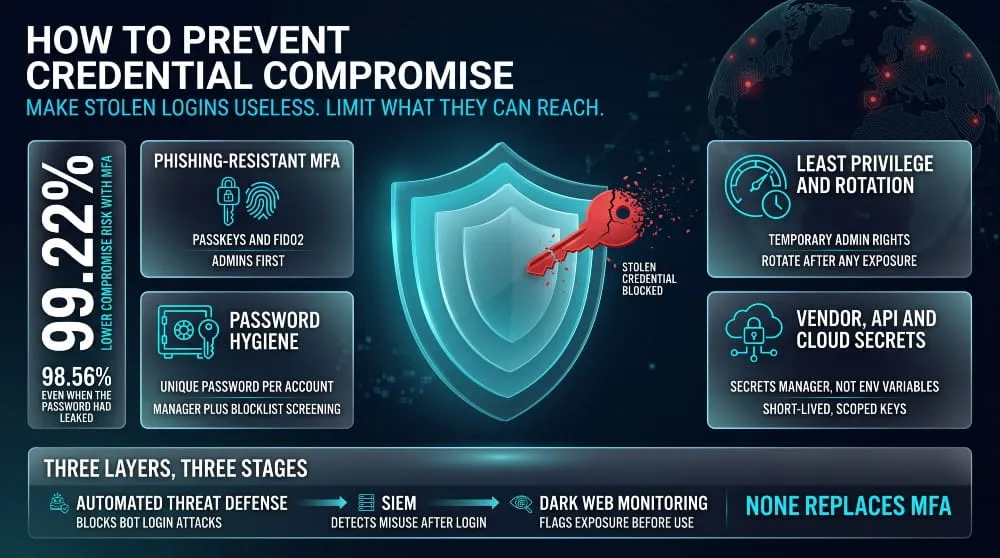
Prevent credential compromise by making stolen credentials useless and limiting what they can reach: phishing-resistant MFA, unique passwords, least-privilege access with regular rotation, and tight control over vendor, API, and cloud secrets. No single control stops every route, so the layers work together. The aim is that a leaked password alone can’t be used to sign in, and a successful sign-in can’t reach much.
MFA and phishing-resistant authentication (passkeys, FIDO2)
MFA is the single most effective control against credential theft, and phishing-resistant forms are the strongest. A Microsoft study of Azure Active Directory accounts found that MFA reduced the risk of compromise by 99.22%, and by 98.56% even for accounts whose passwords had already leaked. The remaining risk comes from attacks that target weaker factors, such as SMS interception, MFA fatigue, and phishing sites that relay codes in real time. Passkeys and FIDO2 security keys close most of that gap, because they are cryptographically tied to the real website and won’t work on a lookalike page. Start with administrators and anyone with access to sensitive data, then extend to all staff, and replace plain push approval with number matching if push MFA remains.
Password hygiene and password manager use
A unique password for every account, stored in a password manager, limits a single leak to a single account. This is the direct defense against credential stuffing, which depends on reuse. Password managers also fill credentials only on the matching domain, helping against phishing, and many include breach alerts. For organizations, current NIST guidance favors long passwords, blocklist screening against known-compromised passwords, and resets only when there is evidence of compromise, over forced periodic rotation and complexity rules. The practical policy is length, uniqueness, screening, and MFA, rather than frequent changes.
Least privilege and credential rotation
Least privilege limits the damage when a credential is stolen, and rotation limits how long a stolen one stays useful. Give each account only the access its role needs, use separate admin accounts, and grant elevated rights temporarily and not permanently. Remove accounts and keys that are no longer in use, since dormant ones are rarely watched. Shorten the life of tokens and secrets, and rotate them on a schedule and after any exposure; this would have limited the Snowflake campaign, where credentials from 2020 were still valid in 2024. Scan code repositories and CI/CD pipelines for hard-coded secrets, because developers’ tools hold some of the company’s most valuable credentials.
Securing vendor, API, and cloud credentials
Vendor, API, and cloud credentials need the same discipline as employee logins, and often more, because nobody signs in with them interactively. Keep an inventory of third-party integrations and OAuth grants, and remove the ones you don’t recognize or no longer use. Scope each API key to the minimum permissions and prefer short-lived credentials issued by your cloud platform over long-lived static keys. Store secrets in a dedicated secrets manager and not in plain environment variables or code. The Vercel incident showed the cost of treating some variables as non-sensitive, since those were the ones the attacker could read. Review vendor access regularly and require MFA and conditional access for supplier accounts that reach your systems.
Comparison table: automated threat defense vs. SIEM vs. dark web monitoring for stopping compromised credentials
Automated threat defense, SIEM, and dark web monitoring protect different stages of a credential attack, so they complement each other rather than replace one another.
| Feature | Automated Threat Defense | SIEM | Dark Web Monitoring |
|---|---|---|---|
| What It Does | Blocks automated login attacks such as bots, credential stuffing, and brute force at the login point | Collects and correlates logs from identity, network, and cloud systems to surface suspicious activity | Finds your organization’s credentials exposed in breach dumps, stealer logs, and criminal markets |
| Stage Covered | Attempted use | Use, after a login | Exposure, before use |
| Prevents or Detects | Prevents by blocking | Detects and supports investigation | Detects exposure so you can reset in time |
| Strongest At | Stopping high-volume automated attacks | Cross-system correlation, forensics, compliance reporting | Early warning from outside your network |
| Blind Spots | Low-and-slow attacks and valid logins by a human using stolen credentials | Sees misuse, not exposure; depends on log coverage and tuning | Doesn’t see activity inside your network; coverage depends on its sources |
Use automated threat defense to blunt bulk attacks, a SIEM to catch and investigate misuse, and monitoring to learn about leaks before they’re used. None of the three replaces MFA, which does the most to make a stolen password harmless.
Compromised Credentials: Frequently Asked Questions
Are credentials most commonly compromised by randomly guessing passwords?
No. Guessing is not the most common way credentials are compromised. Most stolen credentials come from phishing, infostealer malware, and data from earlier breaches that attackers buy and reuse, because those routes give an attacker a working login without any cracking. Guessing still works against weak or default passwords, but a long, unique password protects against it far better than it protects against theft.
Are credential compromise attacks easy for companies to detect?
No. They are hard to detect because the attacker signs in with a real username and password, and the activity looks like a normal user. IBM’s 2025 report found a mean of 241 days to identify and contain a breach, and breaches contained in under 200 days cost an average of $3.87 million, compared with $5.01 million for slower ones. Detection depends on spotting unusual behavior, such as new locations, odd hours, or unfamiliar devices, and on learning about leaks from outside the network.
What should I do first if my credentials are compromised?
Change the password right away from a device you trust, and sign out of all active sessions so any stolen login stops working. Then turn on MFA, change the same password on any other account where you used it, and check the account’s recovery email, phone number, and forwarding rules for changes you didn’t make. If the credential came from malware, scan the device before using it again, because a new password typed on an infected machine can be stolen too. For a work account, tell your IT or security team immediately so that they can look for further access.
How long do stolen credentials stay valuable to attackers?
They can stay valuable for years, for as long as the password is unchanged and the account has no MFA. In the 2024 Snowflake campaign, Mandiant found that credentials taken by infostealer malware as far back as November 2020 were still being used to log in. Credentials can also be resold and reused so that a single theft can fuel attacks long after the original leak. The only reliable way to end their value is to reset or revoke them.
Can you detect compromised credentials before they are used?
Yes, in many cases. Monitoring for leaked credentials in breach dumps, stealer logs, and criminal markets can show that a login is exposed before anyone signs in with it, which gives you time to reset it. Password screening at sign-up and reset can also block credentials that are already known to be leaked. This early warning is limited to what the monitoring can see, so it works best alongside MFA and behavior-based detection on your own systems.
What’s the difference between compromised credential monitoring and a breach check?
A breach check looks up whether a credential appears in known leaks at one moment, while monitoring keeps watching and alerts you when new exposures appear. A check suits someone who wants to know whether their email has been exposed. Monitoring suits an organization because new leaks, infections, and vendor breaches keep happening, and a one-time result quickly goes out of date. Monitoring can also cover many accounts and sources at once and pass alerts to your incident response process.
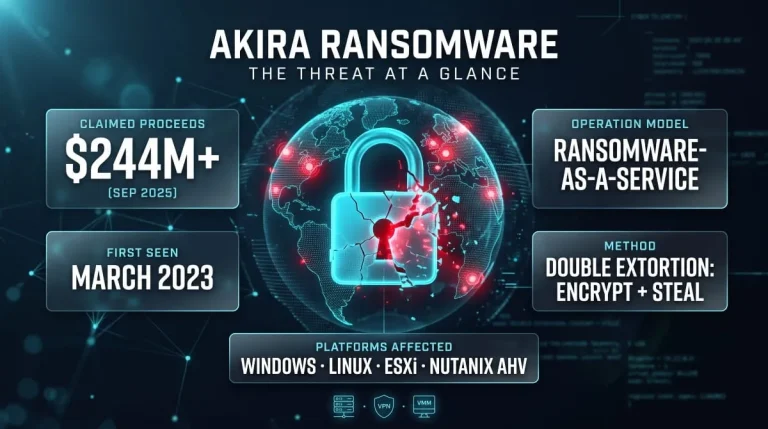
Akira Ransomware | Guide to the Group, TTPs, SonicWall/Cisco Attacks, CISA & FBI Advisories, and Recovery
What Is Akira Ransomware? Akira ransomware is a ransomware-as-a-service (RaaS) operation active since March 2023 that steals a victim’s data and then encrypts their systems to…
Read more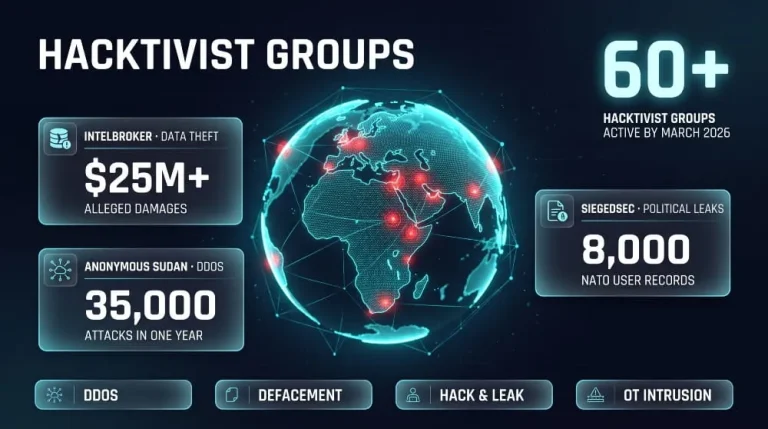
Hacktivist Groups to Watch | IntelBroker, Anonymous Sudan & SiegedSec (Threat Intelligence Guide)
IntelBroker, Anonymous Sudan and SiegedSec are three of the most closely tracked hacktivist and data-leak actors of recent years, and all three have drawn law-enforcement action.…
Read more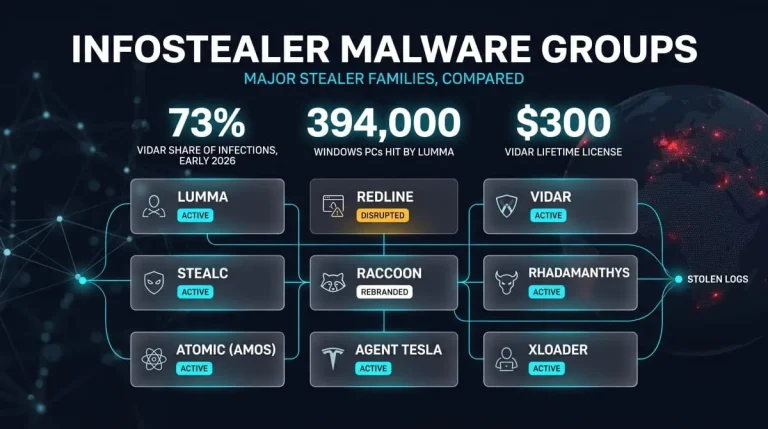
Infostealer Malware Groups | How Lumma, RedLine, Vidar, StealC, Raccoon and Other Stealers Work (and How to Detect and Remove Them)
Infostealer malware groups are distinct malware families, such as Lumma, RedLine, Vidar, StealC, and Raccoon, that steal saved passwords, session cookies, and crypto wallets from infected…
Read more