
What Is a DDoS Attack? The Complete Guide to Types, Prevention, Detection & Recovery
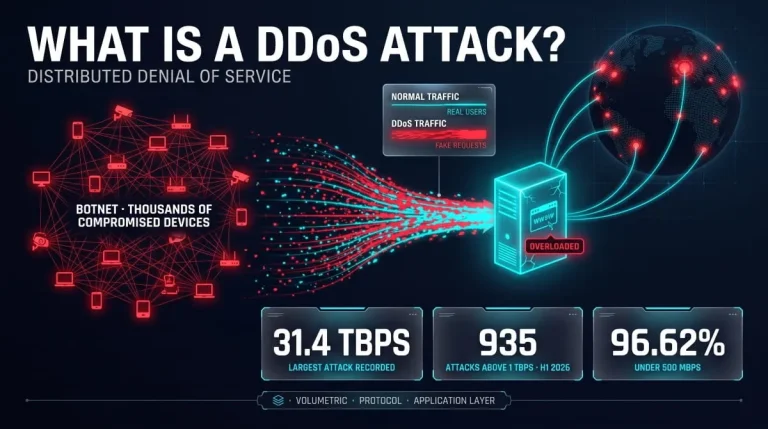
A DDoS attack (distributed denial-of-service attack) floods a server, website, or network with traffic from many compromised devices at once, overwhelming it so legitimate users can’t get through. Attackers use botnets to generate the volume, making the traffic hard to distinguish from real visitors and hard to block.
What Is a DDoS Attack? (Definition and Meaning)
A DDoS attack tries to knock a website, server, or network offline by sending it more traffic or requests than it can handle. Because the flood comes from thousands of devices at once, the target can’t easily distinguish attackers from genuine users, so real customers get timeouts and error pages. The aim is disruption, not stealing data.
Distributed Denial of Service: What Each Word Means
Denial of service means legitimate users are denied access to a service they should be able to use. Distributed means the attack traffic comes from many sources, usually a botnet of hijacked computers, routers, cameras, and other connected devices, rather than one machine. That distribution is what gives a DDoS attack its power and makes it harder to stop than a single-source attack.
What a DDoS Attack Does to a Server, Website or Network
Every system has finite bandwidth, connection slots, processor time, and memory. A DDoS attack exhausts one or more of them, so pages load slowly. Timeouts occur, APIs stop responding, and servers or load balancers may crash or restart—Cloudflare’s threat reporting notes that even a 100 Mbps flood can overwhelm an unprotected server or website. The damage is to availability: hardware is rarely harmed, and a router hit by an attack typically freezes or reboots rather than breaking physically.
DDoS Attack Examples
Typical examples include a game server knocked offline on launch day by junk connections, an online store flooded with page requests during a sale, and a bank’s customer portal slowed by a traffic flood that arrives alongside an extortion email. At internet scale, the 2016 attack on DNS provider Dyn briefly made major sites such as Twitter, Netflix, and Reddit unreachable for many users.
DDoS in Cybersecurity: Where It Fits
In security terms, a DDoS attack targets availability, the third pillar of the confidentiality-integrity-availability model. It differs from a data breach, which targets confidentiality, and from ransomware, which locks data. Defenders classify it as a network-layer or application-layer attack, and attackers sometimes use it as a distraction while a separate intrusion happens elsewhere.
How Does a DDoS Attack Work?
Step-by-Step Anatomy of an Attack
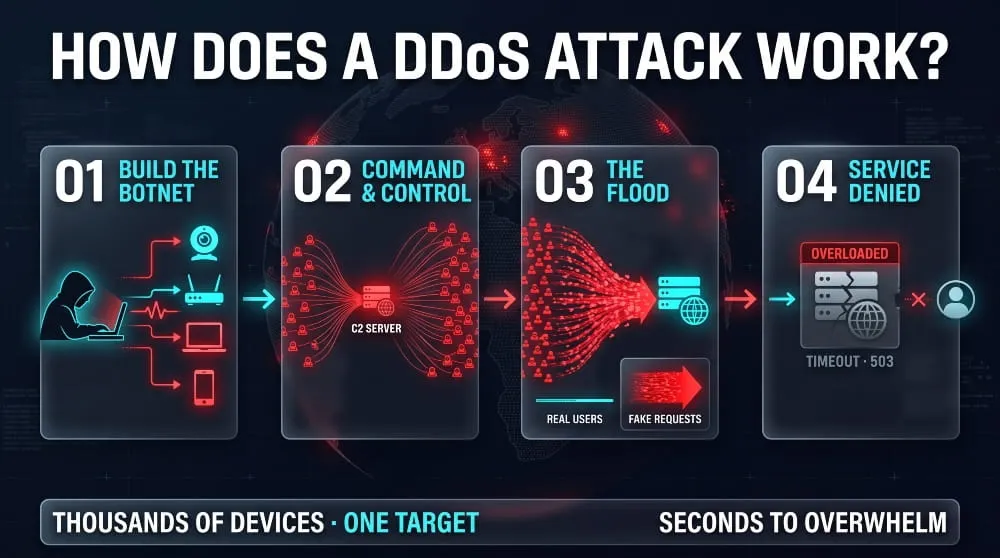
A DDoS attack follows four stages. First, the attacker builds or rents a botnet by infecting devices with malware. Second, the attacker picks a target, such as an IP address, domain, or specific application endpoint. Third, the attacker commands the botnet to send traffic or requests all at once. Fourth, the attacker watches the target’s response and changes tactics if defenses start filtering the flood.
Botnets, Zombies and Command-and-Control
A botnet is a network of infected devices, often called zombies or bots, that obey a remote controller. The attacker’s command-and-control server tells every bot when to attack and what to hit. Owners usually don’t know their device is compromised. Many botnets are built from poorly secured Internet of Things hardware, which is why default passwords on cameras and routers matter far beyond the owner’s own network.
Why the Traffic Is Hard to Block
Each bot sends traffic that can look like an ordinary request, and the sources are scattered across thousands of networks, so blocking one IP address barely dents the flood. Attackers also spoof source addresses and rotate tactics mid-attack. Defenders must therefore filter by behavior, such as request rate, protocol anomalies, and known botnet signatures, rather than by blocking individual senders.
Diagram: Normal Traffic vs DDoS Traffic
| Feature | Normal Traffic | DDoS Traffic |
|---|---|---|
| Flow | Visitors → Network → Server → Fast response | Thousands of bots → Network chokes → Server overloaded → Timeouts |
| Sources | Real users across normal locations | Infected devices, often spread across many networks |
| Volume | Rises and falls with the day | Sudden, sustained spike far above baseline |
| Pattern | Varied pages and behavior | Repetitive requests, identical packets or unusual protocols |
| Result | Site loads normally | Slow pages, errors, outage |
Types of DDoS Attacks
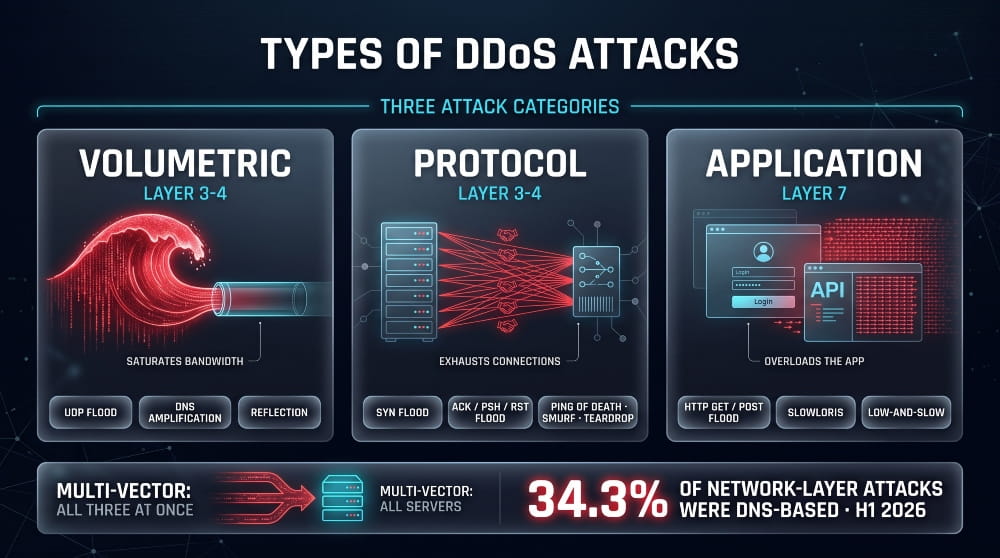
DDoS attacks fall into three main categories: volumetric attacks that saturate bandwidth, protocol attacks that exhaust connection and network resources, and application-layer attacks that overload a specific service. Many real attacks combine all three.
Volumetric Attacks (UDP Flood, Amplification, Reflection)
Volumetric attacks try to saturate the target’s bandwidth. A UDP flood sends huge numbers of packets to random ports. Reflection and amplification attacks go further: the attacker sends small requests to open servers with the victim’s address spoofed, and those servers reply to the victim with much larger responses. Attackers abused misconfigured memcached servers this way to achieve amplification of tens of thousands of times.
Protocol Attacks / Layer 3–4 (SYN Flood, ACK/PSH/Reset Floods, Ping of Death, Smurf, Teardrop)
Protocol attacks exploit weaknesses in network and transport protocols. A SYN flood opens countless half-completed TCP connections until the server’s connection table is full. ACK, PSH, and RST floods bombard stateful devices such as firewalls with spoofed TCP packets. Ping of death, Smurf, and Teardrop abuse ICMP and IP fragmentation, but modern systems are largely patched against these legacy attacks.
Application-Layer Attacks / Layer 7 (HTTP GET/POST Flood, Slowloris, Low-and-Slow)
Layer 7 attacks target the application itself, such as a login page or search function, with requests that look legitimate. HTTP GET and POST floods send enormous volumes of page or form requests. Slowloris and other low-and-slow attacks hold connections open by sending data very slowly, exhausting the server’s connection limit with very little bandwidth, which makes them hard to spot.
DNS-Based and Other Notable Attack Types
DNS floods overwhelm name servers that translate domains into IP addresses, making a site unreachable even if its web server is fine. In Cloudflare’s first-half 2026 report, DNS-based attacks made up 34.3% of network-layer attacks, and CLDAP amplification floods rose 580% quarter over quarter in Q2. Other notable types include NTP and SSDP amplification, as well as ransomware-driven campaigns.
Multi-Vector and IoT Botnet Attacks
Multi-vector attacks launch several attack types simultaneously; for example, a volumetric flood saturates bandwidth while a Layer 7 attack exhausts the application. Defenders must handle every vector at once. IoT botnets such as Mirai and its successors supply the raw power, since millions of low-security connected devices can each contribute traffic.
Quick-Reference Table: Attack Type, Layer, Mechanism, Typical Target
| Attack Type | Layer | Mechanism | Typical Target |
|---|---|---|---|
| UDP flood | 3–4 | Saturates bandwidth with UDP packets | Network links, servers |
| Amplification / reflection (DNS, NTP, memcached, CLDAP) | 3–4 | Spoofed requests trigger oversized replies to the victim | Bandwidth, edge routers |
| SYN flood | 4 | Fills the TCP connection table with half-open connections | Servers, load balancers |
| ACK / PSH / RST flood | 4 | Spoofed TCP packets overload stateful devices | Firewalls, load balancers |
| Ping of death, Smurf, Teardrop | 3 | Malformed or broadcast ICMP/IP packets (legacy) | Unpatched hosts |
| HTTP GET/POST flood | 7 | High volume of legitimate-looking requests | Web apps, APIs |
| Slowloris / low-and-slow | 7 | Holds connections open with slow partial requests | Web servers |
| DNS flood | 7 / DNS | Overwhelms name servers with queries | DNS infrastructure |
DoS vs DDoS: What’s the Difference?
Side-by-Side Comparison Table
The core difference is the number of attacking sources: a DoS attack comes from one system, while a DDoS attack comes from many.
| Factor | DoS Attack | DDoS Attack |
|---|---|---|
| Attack Sources | One device or connection | Many devices, usually a botnet |
| Scale | Limited by one machine’s bandwidth | Can reach terabits per second |
| Ease of Blocking | Block the single source | Hard: sources are numerous and often spoofed |
| Traceability | Usually traceable to one origin | Origin hidden behind bots and spoofed addresses |
| Typical Use | Small-scale or targeted disruption | Large-scale outages and extortion |
Is Slowloris a DoS or DDoS Attack?
Slowloris is classically a DoS attack because one machine can run it: it needs very little bandwidth to hold many connections open on the target. It becomes a DDoS attack when an attacker runs it from many machines at once. Which label applies depends on how it is deployed, not on the technique.
DDoS vs Brute Force and Other Attack Types
A brute-force attack tries to guess credentials, such as passwords, to gain access, so it targets confidentiality and access. A DDoS attack doesn’t try to get in; it tries to keep everyone out by exhausting resources. Unlike SQL injection or phishing, a DDoS attack needs no vulnerability in the target’s code, only enough traffic.
Who Launches DDoS Attacks, and Why?
Common Motives (Extortion, Hacktivism, Competition, Gaming Grudges, Cover for Other Attacks)
The main motives are extortion (pay or stay offline), hacktivism (political protest), competitive sabotage, personal grudges such as gaming disputes, and distraction while attackers breach the network another way. Some attacks are just a show of capability. The purpose of a DDoS attack is nearly always disruption that someone can monetize or exploit.
Who Is Behind DDoS Attacks?
Attackers range from lone individuals renting capacity to organized criminal groups, hacktivist collectives, and state-linked actors. DDoS-for-hire services, often called booters or stressers, let people with no technical skill launch attacks for a small fee. In 2026, the international Operation PowerOFF crackdown on these services led to arrests and the takedown of 53 domains.
Unintentional DDoS: Traffic Spikes and Misconfigurations
Not every flood is an attack. A viral post, a ticket sale, or a product launch can send a flash crowd that overwhelms a site, and a buggy client stuck in a retry loop can unintentionally hammer a server. The effect looks identical, but the traffic comes from real users or faulty software, so the fix is capacity and rate limiting, not blocking.
Who and What Gets Targeted?
Financial Institutions and Banks
Banks and payment providers are targeted because downtime directly costs money and trust, making them vulnerable to extortion. Attackers also time floods to cover fraud attempts. As a result, financial firms usually run always-on scrubbing and strict response plans.
Gaming Platforms and Online Services
Gaming servers, streaming sites and other consumer services are frequent targets because outages are instantly visible and rivalries or grudges are common. Cloudflare reported that the media, production and publishing sector received the largest share of HTTP DDoS requests in the first half of 2026, at 14.2%.
Healthcare, Government and Critical Infrastructure
Hospitals, public agencies, and utilities are targeted for political and disruptive impact. An outage can block patient portals or public services even if clinical systems keep running. Hacktivist campaigns often single out government sites during geopolitical tension.
IoT Devices and Cloud Environments
IoT devices are both victims and weapons: weak passwords turn them into botnet nodes, which then attack others. Cloud workloads are targeted too, since a flood can drive up usage costs and exhaust shared resources even when the provider keeps the infrastructure running.
Signs and Symptoms of a DDoS Attack
Early Warning Signs
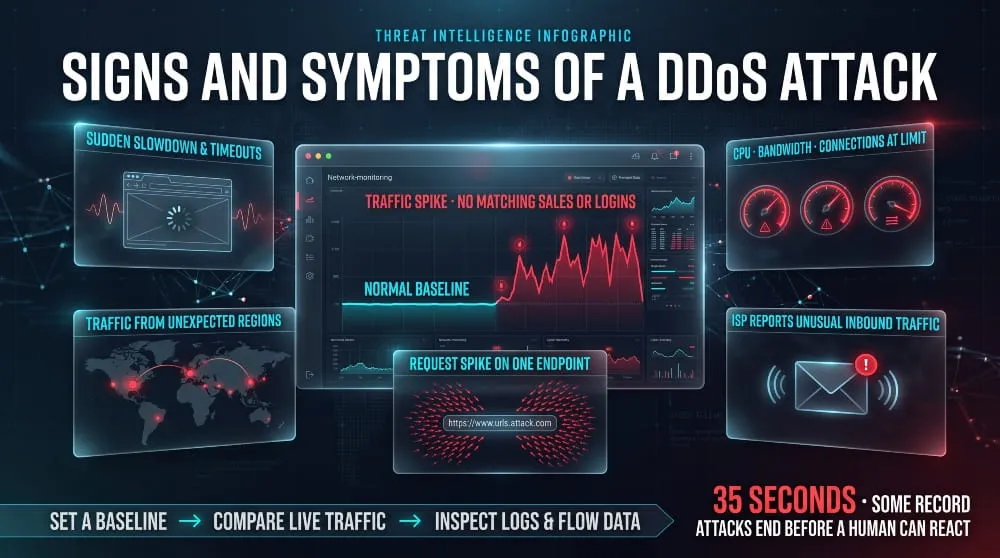
Classic signs include a sudden slowdown, intermittent timeouts, a surge of traffic from unexpected regions or a single device type, and a spike in requests to a single page or endpoint. Monitoring tools may also show saturated bandwidth, high CPU, or exhausted connection tables, with no corresponding rise in real sales or logins.
How to Detect a DDoS Attack (Traffic Patterns, Logs, Monitoring)
Detection starts with a traffic baseline. Compare live traffic against normal levels for packets per second, requests per second, and connection counts. Then inspect logs and flow data for repeated identical requests, odd user agents, many sources hitting one URL, or protocol anomalies. Automated detection matters because large attacks can be over in seconds.
Am I Under DDoS Attack? Quick Checklist
- Your site or service is slow or down for many users at once, not just you
- Traffic spiked sharply with no marketing event or news to explain it
- Many requests come from similar sources or hit the same URL repeatedly
- Server CPU, bandwidth, or connection counts are maxed out
- Your hosting provider or ISP reports unusual inbound traffic
If several apply, treat it as an attack and start your response plan.
Can a DDoS Attack Be Traced?
Partly. You can usually identify the bots sending traffic, and sometimes the botnet or the malware family behind it. Tracing it to the human controller is far harder because of spoofed addresses, layered infrastructure, and cross-border hosting. It usually takes ISPs and law enforcement working together.
How to Prevent and Mitigate DDoS Attacks
Prevention Best Practices (Pre-Attack Hardening)
The strongest prevention is preparation. Keep your origin server’s IP address hidden behind a proxy or CDN, close unused ports and services, patch exposed systems, and change default credentials on connected devices so they can’t join a botnet. Write an incident response plan and name an owner before anything goes wrong. Establish a traffic baseline so anomalies stand out.
Rate Limiting, Firewalls and Traffic Filtering
Rate limiting caps how many requests a single source can make in a given window, blunting application-layer floods. Web application firewalls filter malicious HTTP patterns, and network firewalls with SYN cookies and connection limits resist protocol attacks. These controls help most against small and mid-sized attacks.
Load Balancing, CDNs and Overprovisioning
Load balancers spread traffic across several servers, and a content delivery network absorbs requests at edge locations close to the senders. Overprovisioning bandwidth gives headroom, but it can’t match a multi-terabit flood, so most organizations rely on a provider that absorbs and scrubs traffic upstream before it reaches them.
Layer 3/4 vs Layer 7 Mitigation Strategies
Layer 3/4 attacks are fought with large network capacity, anycast routing, SYN cookies, packet filtering, and upstream scrubbing. Layer 7 attacks need smarter, behavior-based defenses: bot detection, challenges, rate limits per endpoint, and caching of heavy pages. A complete defense covers both, because attackers switch layers when one is blocked.
Can a Firewall Stop a DDoS Attack?
A firewall alone usually can’t stop a serious DDoS attack. It can drop obviously bad packets, but the flood can saturate the firewall itself or the internet link in front of it. Firewalls work best as one layer alongside upstream scrubbing, a CDN, and rate limiting.
DDoS Mitigation Techniques Compared
What to Do During a DDoS Attack
Immediate Response Playbook
- Confirm it is an attack and not a traffic spike or outage
- Activate your incident response plan and notify your team
- Contact your hosting provider, ISP, or DDoS protection provider right away
- Turn on stricter rate limits, challenges, and geo or protocol filters
- Preserve logs and packet captures for later analysis
- Communicate status to customers through a channel that doesn’t depend on the attacked system
How to Stop a DDoS Attack in Progress
You can’t realistically stop a large attack from your own server; you reroute and filter it. Move traffic through a scrubbing service or CDN, enable under-attack protections, block abusive patterns or ranges, and scale capacity if possible. Cutting the flood before it reaches your network is the only reliable approach.
How Long Do DDoS Attacks Last?
Attack durations vary from seconds to days. Most are short bursts, and Cloudflare’s H1 2026 report says most attacks lasted under 10 minutes, although some record-sized attacks ended after just 35 seconds. Persistent campaigns can resume repeatedly over days or weeks, so continue monitoring after traffic returns to normal.
Recovering From a DDoS Attack
Post-Attack Cleanup and Forensics
Once traffic normalizes, collect logs, flow records, and packet captures to determine the attack type, size, sources, and entry points. Check that nothing else happened during the attack, such as a breach, and confirm services and data are intact. Document the timeline for insurers and regulators.
Restoring Services and Hardening Afterward
Bring services back in stages, watching for a second wave. Then close the gaps the attack exposed: tune rate limits, add or upgrade protection, hide origin IPs again, and fix any misconfigured exposed services. Communicate openly with customers about what happened and what changed.
Incident Response Plan Checklist
- Named incident lead and escalation contacts
- Contacts and contract terms for your ISP and DDoS protection provider
- Documented traffic baselines and alert thresholds
- Pre-approved mitigation steps and a customer communication template
- Log retention and forensic procedures
- A post-incident review within days of the attack
The Cost and Impact of DDoS Attacks
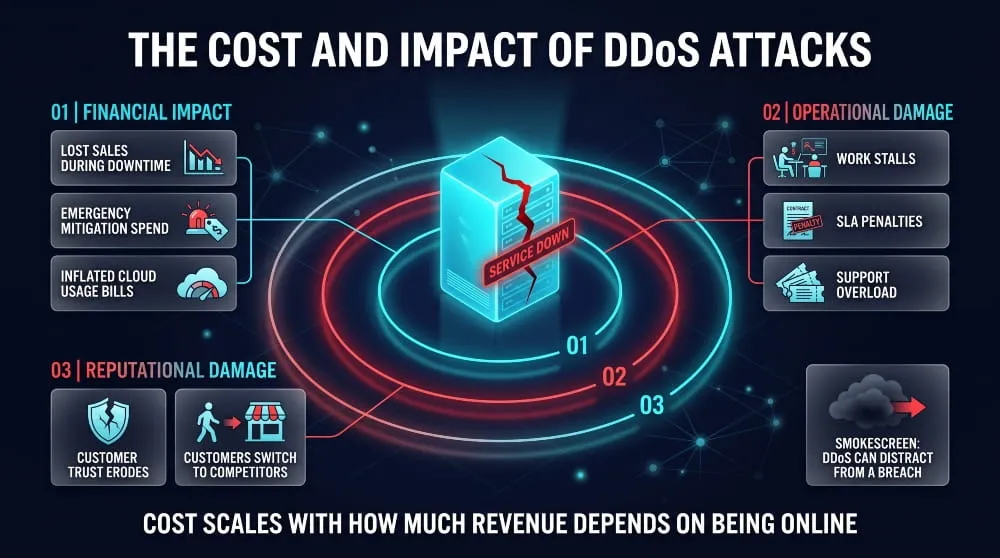
Financial Impact (Downtime, Lost Revenue, Mitigation Spend)
The financial cost comes from lost sales during downtime, emergency mitigation spending, overtime, and, for cloud users, inflated usage bills. Costs scale with how much revenue depends on being online, so an e-commerce site or payment platform loses far more per minute than a brochure site.
Operational and Reputational Damage
Outages stall employees and customers, trigger service-level penalties, and erode trust; customers who can’t reach you may switch to a competitor. Reputational damage often outlasts the attack itself, especially with poor communication.
Can DDoS Attacks Steal Data? (Smokescreen Attacks)
A DDoS attack doesn’t steal data on its own, since its job is to overwhelm. But it can serve as a smokescreen: while the security team is busy with the flood, attackers may exploit another weakness. That is why teams should look for signs of intrusion during and after every attack.
Biggest and Most Famous DDoS Attacks in History
Record-Breaking Attacks by Size (Gbps / Tbps)
The largest DDoS attack publicly reported peaked at 31.4 Tbps and 200 million requests per second, launched by the Aisuru/Kimwolf botnet and mitigated by Cloudflare. For comparison, GitHub’s 2018 memcached amplification attack peaked at about 1.35 Tbps, which was then a record. Records keep rising as botnets grow.
Dyn (2016) and the Mirai Botnet
On 21 October 2016, the Mirai botnet, built from insecure IoT devices such as cameras and routers, attacked DNS provider Dyn. Because many sites relied on Dyn for name resolution, platforms including Twitter, Netflix, and Reddit became unreachable for many users. The attack showed how a single infrastructure dependency can take down much of the web.
Other Landmark Attacks and What They Taught the Industry
In 2000, a teenager known as Mafiaboy disrupted Yahoo, CNN, and eBay. In 2007, coordinated attacks weakened Estonian government and bank sites and prompted a national rethink of cyber defense. In 2013, a large attack on Spamhaus showed the power of DNS amplification. The shared lesson: critical dependencies need redundancy and always-on protection.
DDoS Attack Statistics and Trends
How Common Are DDoS Attacks?
Very common. In the first half of 2026, Cloudflare mitigated 23.2 million network-layer attacks and 29.64 trillion HTTP DDoS requests. It also blocked 935 attacks above 1 Tbps, 805 of them in Q2 alone, showing terabit-scale attacks are no longer exceptional.
Average Attack Size and Duration
Most attacks are small and short. Cloudflare found that 96.62% of incidents stayed under 500 Mbps, and most ended in under 10 minutes. The danger is that even a modest flood can take down an unprotected site, and that large attacks finish before a human can react.
Where the Threat Is Heading
Three trends stand out: larger botnets producing multi-terabit attacks, growth in DNS and amplification floods, and cheap DDoS-for-hire services widening the pool of attackers. Law enforcement pressure can cause short-term drops, but activity tends to recover. Automated, always-on protection is becoming the baseline defense.
Are DDoS Attacks Illegal?
Legal Consequences and Penalties
Yes. Launching a DDoS attack is illegal in the United States, the United Kingdom, the European Union, and most other jurisdictions; paying for a booter service is, too. In the US, the Computer Fraud and Abuse Act applies, with prison terms of up to ten years in serious cases, plus fines and civil liability. Penalties differ by country and by damage caused.
How to Report a DDoS Attack
First, report an attack to your hosting provider or ISP so they can filter traffic. In the United States, you can file a complaint with the FBI’s Internet Crime Complaint Center (IC3) and notify CISA. Outside the US, report to your national CERT or police cybercrime unit. Keep logs and timestamps as evidence.
Frequently Asked Questions (FAQ)
What does DDoS stand for?
DDoS stands for distributed denial of service. It describes an attack in which many devices send traffic to one target at once, denying legitimate users access to a website, server, or network.
Can DDoS attacks be traced? / Are they permanent?
DDoS attacks can often be traced to the bots sending the traffic but rarely to the person controlling them without law enforcement help. They aren’t permanent: an attack ends when the attacker stops or when the traffic is filtered, though attackers may return.
How long does a DDoS attack last?
A DDoS attack can last from a few seconds to several days. Most are short, with most lasting under ten minutes, but persistent campaigns can run for days or weeks.
Can a DDoS attack hack or steal data?
No, a DDoS attack alone doesn’t hack systems or steal data, because it only floods resources. It can, however, serve as a smokescreen, distracting defenders while a separate intrusion occurs.
What is the difference between DoS and DDoS?
A DoS attack comes from a single source, while a DDoS attack comes from many, typically a botnet. That makes DDoS attacks larger, harder to block, and harder to trace.
Can a VPN or firewall stop a DDoS attack?
A VPN can protect an individual, such as a gamer, by hiding their home IP address, but it doesn’t protect a website or server. A firewall helps filter bad traffic but can’t stop a large flood on its own, so organizations also need upstream DDoS protection.
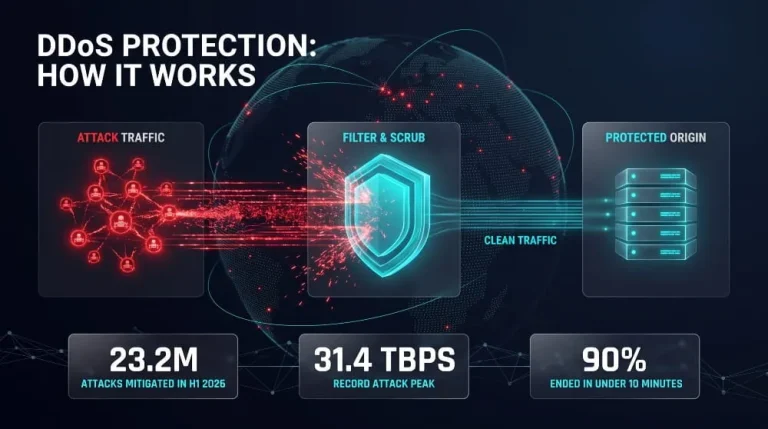
DDoS Protection | How It Works and How to Protect Against DDoS Attacks
DDoS protection combines tools and techniques to detect and filter malicious traffic from a distributed denial-of-service (DDoS) attack before it overwhelms a website, server, or network.…
Read more
Botnet Groups | How Mirai, Emotet, QakBot, Aisuru and Other Botnets Work (and How to Detect and Stop Them)
Botnet groups are networks of hacked devices run by criminal operators, who use them to steal data, spread ransomware, and launch DDoS attacks. Each group works…
Read more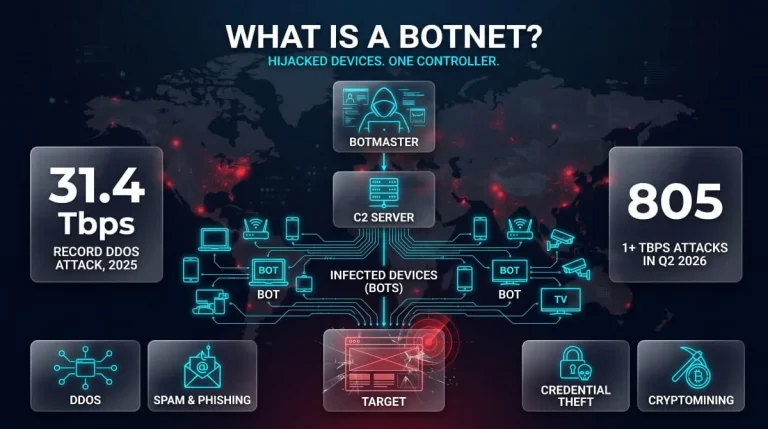
What Is a Botnet? Definition, How Botnets Work, Types, Examples & How to Stay Protected
A botnet is a network of internet-connected devices, such as computers, phones, routers, and cameras, infected with malware and secretly controlled by an attacker. The attacker,…
Read more