
DDoS Protection | How It Works and How to Protect Against DDoS Attacks
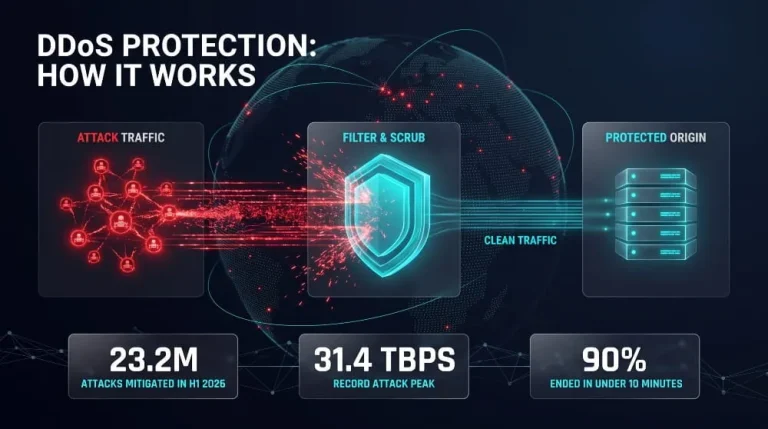
DDoS protection combines tools and techniques to detect and filter malicious traffic from a distributed denial-of-service (DDoS) attack before it overwhelms a website, server, or network. It identifies attack traffic, absorbs or scrubs it away from your infrastructure, and lets legitimate requests through, usually automatically and within seconds.
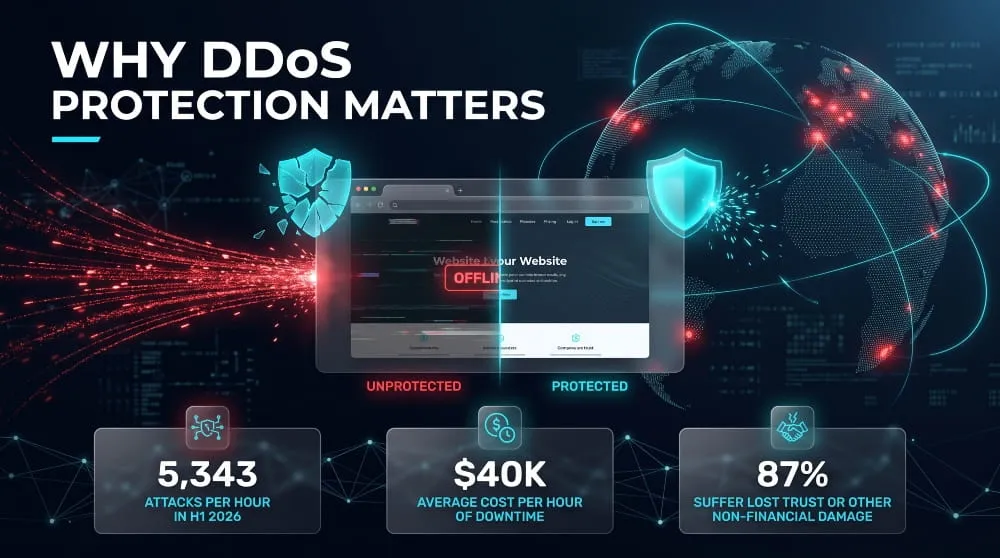
The need is no longer occasional. Cloudflare reported mitigating 23.2 million network-layer DDoS attacks in the first half of 2026 alone, roughly 5,300 attacks per hour. This guide explains how DDoS protection works, the types available, and how to protect a website, server, or network of any size.
What Is DDoS Protection?
DDoS protection is the set of defenses that keeps a website, server, or network online during a distributed denial-of-service attack. It detects malicious traffic and filters it out before it reaches your infrastructure. Its goal is availability: legitimate users keep getting through while attackers flood the target with junk requests. It can be delivered as a cloud service, on-premises hardware, or a mix of both.
DDoS vs. DoS: What “Denial of Service Protection” Means
Denial of service protection defends against attacks that make a system unavailable to users. DDoS protection is designed for attacks that come from many sources at once.
In a DoS attack, one machine or connection sends the flood, so blocking that single source usually stops it. In a DDoS attack, thousands or millions of compromised devices, known as a botnet, send traffic simultaneously. No single address to block, so defenses must distinguish attack traffic from real visitors across the whole stream. In practice, “DoS protection,” “denial of service protection,” and “DDoS protection” are used interchangeably, because the distributed variety is the one that demands dedicated defenses.
DDoS Protection Meaning in Plain English
DDoS protection works like a bouncer at your website’s front door. When a crowd of fake visitors tries to jam the entrance, it turns them away and keeps the line moving for real customers.
Technically, it watches incoming traffic, learns what normal looks like, and spots surges or patterns that don’t fit. It then blocks, filters, or redirects that traffic while normal requests keep loading. It can cover websites, servers, DNS, APIs, and entire networks.
DDoS Protection vs. DDoS Mitigation: Are They the Same?
They overlap heavily, but they are not identical. DDoS mitigation absorbs and filters attack traffic while an attack is underway. DDoS protection is the broader capability: preparation, detection, mitigation, monitoring, and recovery planning together. Mitigation is the response; protection is the whole system that makes it possible.
The difference matters because of speed. Cloudflare found that about 90% of the network-layer attacks it mitigated in the first half of 2026 ended in under 10 minutes, which is too fast for anyone to respond by hand. When evaluating a “DDoS mitigation service” or a “DDoS protection service,” look past the label and confirm that detection and mitigation are automated and always on.
Why DDoS Protection Matters
DDoS protection matters because a successful attack takes your site, app, or network offline when customers need it most, and the cost is lost revenue, staff time, and trust. Attackers can rent this capability cheaply, and almost any business with an online presence can be a target. Protection is what keeps an attack from turning into an outage.
What a DDoS Attack Can Cost Your Business
A DDoS attack costs a business money in three ways: lost revenue while services are down, the staff and emergency spend needed to recover, and lasting damage to customer trust. A widely cited Incapsula survey of 270 North American organizations put the average cost at roughly $40,000 per hour, or about $500,000 per incident, because nearly half of attacks lasted between six and 24 hours. That survey dates from 2014 and relies on self-reported estimates, so treat it as an order-of-magnitude benchmark and calculate your own hourly figure.
The visible outage is often only part of the damage. In that same research, 87% of targeted organizations reported at least one non-financial consequence, such as lost customer trust or lost intellectual property. Attacks can also double as cover. Half of respondents said malware was installed or activated during their incident, which means the flood can distract your team while something else happens quietly.
Who Needs DDoS Protection? (SMBs, Enterprises, Financial Services, SaaS)
Any organization whose revenue or operations depend on being reachable online needs DDoS protection, regardless of size. Incapsula’s CEO noted that targets have broadened beyond financial institutions and government sites to any company that depends on online channels, such as online retailers and SaaS vendors.
- SMBs: Small businesses are rarely targeted directly, but they are easy to knock offline and often lack a dedicated security team. An outage can cost them proportionally more, and attackers also use them for extortion.
- Enterprises: Large organizations have more public-facing assets (websites, APIs, DNS, VPN gateways) and more revenue per hour at stake, which makes them a frequent and higher-impact target.
- Financial services: Banks, fintechs, and payment providers are persistent targets, and customers expect them to stay available.
- SaaS: Software providers sell uptime directly. An attack on a shared platform hits every customer at once and puts contractual service-level commitments at risk.
Benefits of DDoS Protection and Its ROI
The core benefit of DDoS protection is continuity: your services stay available while an attack is filtered out, which protects revenue, reputation, and your team’s time. Secondary benefits include faster incident response through automated mitigation, less strain on origin servers because junk traffic never reaches them, and a stronger position when customers or auditors ask about resilience.
The ROI is easiest to see as avoided loss. Divide annual online revenue by 8,760 hours to get an average hourly figure, then multiply by the downtime a successful attack could cause. A business earning $5 million a year loses roughly $570 per hour in direct sales on average, and much more during peak periods, before accounting for recovery labor and churn. If a day of downtime would cost more than a year of protection, the investment pays for itself after a single incident.
Do I Need DDoS Protection? A Quick Self-Check
You probably need DDoS protection if an hour of downtime would noticeably hurt your business. Check whether any of these apply to you:
- Your revenue, bookings, or customer support depends on a website, app, or API staying online.
- You run customer-facing infrastructure with its own IP addresses, such as servers, DNS, or a VPN gateway.
- You have service-level commitments, or users who would leave after a bad outage.
- You have been threatened, extorted, or hit by an attack before.
- Your only defense today is a standard firewall, which can’t absorb large traffic floods.
If you checked even one, basic always-on protection is worth having. If you checked several, make it a priority.
How DDoS Attacks Work
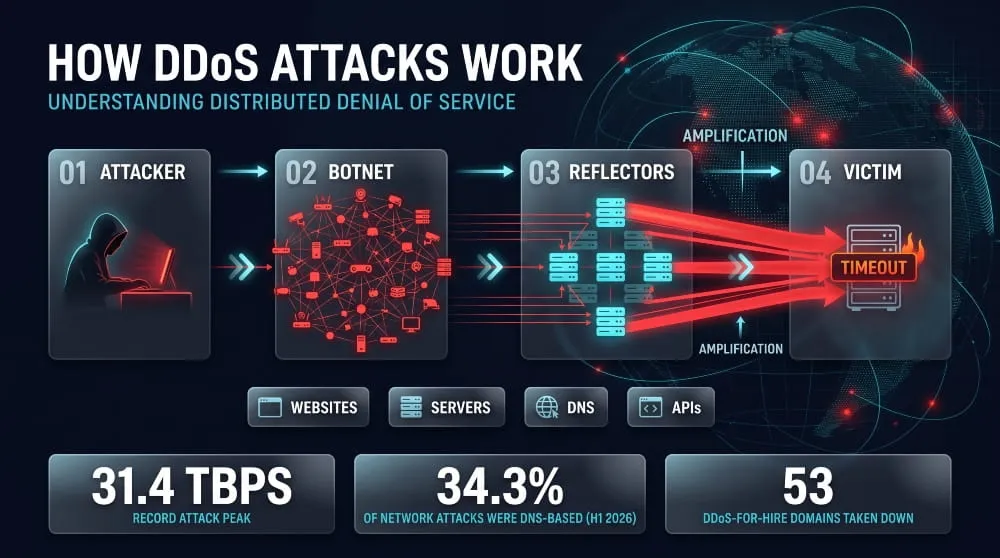
A DDoS attack works by directing traffic from thousands of compromised devices at one target until it can no longer serve real users. The attacker usually controls those devices remotely, then either floods the target directly or tricks other servers into doing it. The target can be a website, a server, a DNS provider, or an API, and the result is the same: legitimate requests time out.
Botnets, Reflection and Amplification
A botnet is a network of infected devices, such as routers, cameras, and servers, that an attacker controls as a single entity. Because the traffic comes from many ordinary-looking sources, there is no single address to block. Cloudflare recently mitigated a record attack that peaked at 31.4 Tbps, launched by the Aisuru/Kimwolf botnet.
Reflection and amplification let attackers do more with less. The attacker sends small requests to publicly reachable servers (DNS resolvers are a common choice) with the victim’s IP address spoofed as the sender. Those servers reply to the victim with much larger responses, so a modest amount of attacker bandwidth turns into a flood, and the traffic appears to come from legitimate infrastructure.
DDoS-for-Hire Services and Who Launches Attacks
DDoS-for-hire services, often called booters or stressers, let anyone rent attack capacity with no technical skill. That is why attackers range from extortionists demanding payment to hacktivists, competitors, disgruntled users, and bored teenagers. Cloudflare’s latest report also notes that attacks increasingly follow geopolitical events, with more targeting of government organizations.
Law enforcement is pushing back. Operation PowerOFF, which targeted DDoS-for-hire services, led to four arrests and the takedown of 53 domains. But the services are cheap to rebuild, so the supply of low-skill attackers continues.
Common Attack Vectors and Targets (Websites, Servers, DNS, APIs)
Attackers choose a vector based on what they want to exhaust: bandwidth, server resources, or application capacity.
- Websites: HTTP floods send large volumes of page requests that look like real visitors, overloading the web server or application.
- Servers: SYN and UDP floods consume connection tables, CPU, or bandwidth at the network and transport layers until the server stops responding.
- DNS: Floods and amplification attacks against DNS can make a perfectly healthy site unreachable because nobody can resolve its name. DNS-based attacks made up 34.3% of network-layer attacks in the first half of 2026.
- APIs: Repeated calls to expensive endpoints, such as search, login, or checkout, can exhaust back-end resources with relatively little traffic.
Each vector needs a different defense, which is why effective DDoS protection works at several layers instead of just one.
How DDoS Protection Works
DDoS protection works in three moves: it learns what normal traffic looks like, spots traffic that deviates from it, and filters out the malicious portion while letting legitimate requests through. Modern systems do this automatically, because attacks move too fast for manual response. Cloudflare notes that attacks exceeding 1 Tbps occur too quickly for manual protection.
Detection and Traffic Baselining
DDoS detection starts with a baseline: a continuously updated profile of normal traffic volume, request rates, protocols, geographies, and client behavior. Monitoring systems compare live traffic against that profile and flag sudden spikes, odd protocol mixes, or request patterns no real user would produce.
Good detection combines two methods. Signature matching quickly catches known attack patterns. Behavioral analysis catches new or disguised floods by recognizing deviations from the baseline, even when the individual requests look valid. The baseline also reduces false positives, since a genuine traffic surge, like a product launch, differs from an attack in how it behaves, not just how large it is.
Traffic Filtering, Scrubbing and Rate Limiting
Once traffic is flagged, filtering separates good from bad. Filtering rules block packets by source, protocol, port, or malformed structure. Scrubbing goes further: it reroutes suspicious traffic to a dedicated cleaning facility or network, inspects it in depth, and forwards only clean traffic to your servers.
Rate limiting caps how many requests a single source or client can make in a given window. It is a blunt but effective tool against floods that mimic real visitors, since no legitimate user needs hundreds of requests per second. The trade-off is tuning: limits set too low will block real customers, so they are usually applied selectively to expensive endpoints and suspicious clients.
Proxies, Anycast Networks and CDNs
Proxies, anycast networks, and CDNs protect by putting a large, distributed layer between attackers and your origin servers. A reverse proxy answers requests on your behalf, keeping your real server address hidden and directing attack traffic to the proxy instead of you.
Anycast routing advertises the same IP address from multiple data centers, so attack traffic splits across locations instead of piling onto one. A CDN adds capacity and caching, serving repeat requests from the edge without ever touching your origin. Together they turn a concentrated flood into a diluted load that distributed infrastructure can absorb.
Challenge-Based Defenses (CAPTCHA, Proof of Work)
Challenge-based defenses test whether a client is a real browser and a real person before letting it through. They work because bots in an attack are optimized for volume, not for passing tests.
A CAPTCHA asks the visitor to prove they are human, which stops simple bots but adds friction for real users. Proof-of-work challenges ask the visitor’s browser to solve a small computational puzzle. That is nearly invisible to one person but expensive for a botnet trying to send millions of requests. Most systems apply these selectively, only to traffic that already looks suspicious, to protect everyone else’s experience.
What Happens During an Attack, Step by Step
During an attack, protection follows a repeatable sequence, usually completed in seconds:
- Detect: Monitoring flags traffic that breaks from the baseline.
- Classify: The system identifies the attack type, such as a volumetric flood, a protocol attack, or an application-layer flood.
- Divert: Suspicious traffic is rerouted to the protection layer, either already in-line (always-on) or switched in on demand.
- Filter and scrub: Drop, rate-limit, or challenge malicious traffic, and pass legitimate traffic through.
- Deliver: Clean traffic reaches your servers, and users notice little or nothing.
- Adapt and report: Rules adjust as attackers change tactics, and logs feed a post-incident review.
Types of DDoS Attacks and the Protection for Each Layer
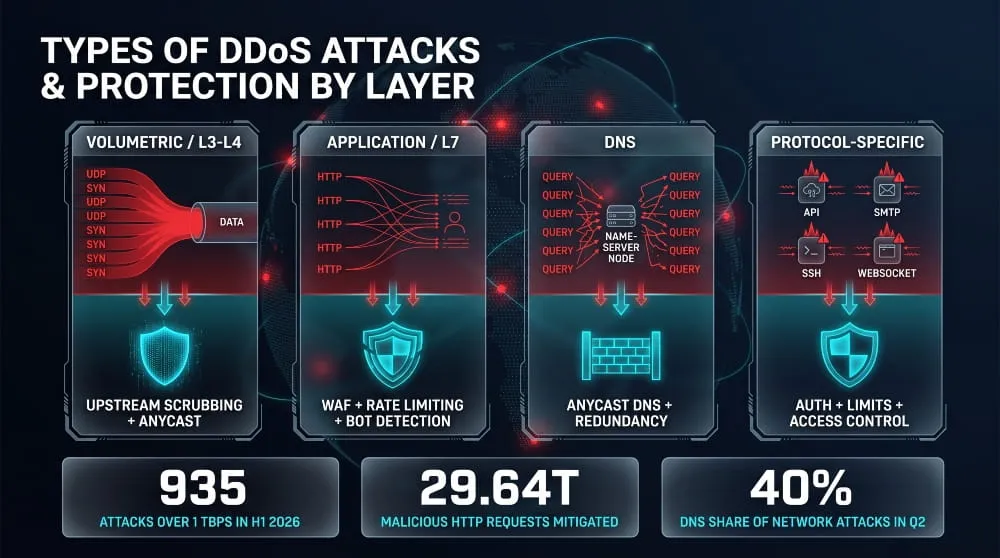
DDoS attacks target different layers of the network stack, and each layer needs its own defense. Bandwidth floods need raw capacity and upstream scrubbing, request floods need application-aware filtering, and DNS and protocol-specific attacks need controls built around those services. A protection setup that covers only one layer leaves the others exposed.
Volumetric and Network-Layer Protection (Layer 3/4, UDP, TCP)
Volumetric and network-layer attacks try to fill your internet connection or exhaust the connection-handling capacity of your servers and network devices. UDP floods and reflection attacks push huge amounts of junk traffic at a target. At the transport layer, TCP SYN floods open half-finished connections until the server’s connection table is full. Cloudflare mitigated 935 network-layer attacks exceeding 1 Tbps in the first half of 2026, far beyond what any single organization’s own link can absorb.
The defense is capacity and distance. Traffic must be filtered upstream, at a provider with more bandwidth than the attack, using scrubbing and anycast distribution so the flood never reaches your own pipe. Closer to the server, stateless filtering, SYN cookies, connection limits, and blocking spoofed or unneeded protocols reduce what gets through.
Application-Layer (Layer 7 / L7) DDoS Protection
Application-layer DDoS attacks send requests that look legitimate, such as page loads, searches, and logins, in volumes that overwhelm the web server or application behind them. They require far less bandwidth than volumetric attacks, making them hard to spot by size alone. Cloudflare mitigated 29.64 trillion malicious HTTP requests in the first half of 2026.
Layer 7 protection has to understand behavior, not just volume. It relies on a web application firewall, per-client rate limiting, bot detection, and selective challenges to separate real visitors from automated floods. Caching static content and protecting expensive endpoints, like search and checkout, with tighter limits also reduces the damage a small attack can do. To work, the protection must sit in front of the application and inspect encrypted traffic.
DNS DDoS Protection
DNS DDoS attacks either overwhelm the servers that answer questions about your domain or abuse DNS servers to reflect traffic at a victim. When DNS goes down, a healthy website becomes unreachable because browsers can no longer find it. The attack type is growing: DNS-based attacks climbed from 25.7% to 40% of all network-layer attacks between the first and second quarters of 2026.
Protection starts with anycast-based authoritative DNS, which spreads queries across many locations, and ideally a second DNS provider for redundancy. Response rate limiting and closing open resolvers (servers that answer queries from anyone) cut off the reflection and amplification path. Reasonable cache lifetimes, known as TTLs, also help resolvers keep answering from memory when your name servers are under pressure.
Protocol-Specific Protection (API, SMTP, SSH, WebSocket)
Each service has its own weak point, so each needs its own guardrails.
Protect APIs with authentication, per-key rate limits and quotas, and strict limits on payload size and query complexity, since a few expensive calls can cost more than thousands of simple ones. SMTP servers should cap connections and message rates per sender and sit behind a filtering gateway so floods never reach the mail server. SSH is best handled by limiting exposure: restrict access to allowed addresses or a VPN, require key-based authentication, and rate-limit connection attempts. WebSocket services hold connections open, so they need caps on concurrent connections per client, authenticated handshakes, message-rate limits, and idle timeouts to stop attackers from tying up server resources.
Types of DDoS Protection and Deployment Models
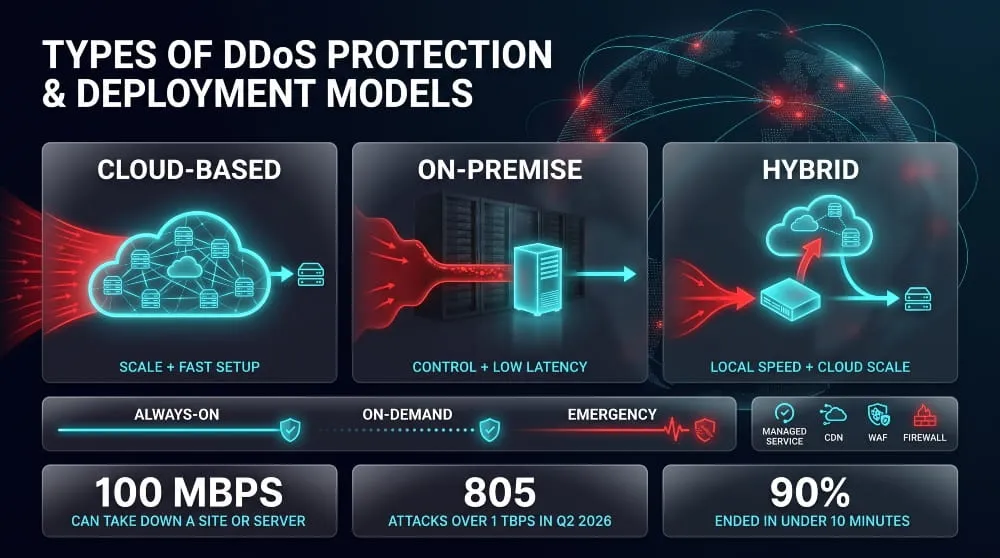
DDoS protection comes in three main deployment models (cloud-based, on-premises, and hybrid), delivered in different operating modes (always-on, on-demand, or emergency) and sold either as a self-run tool or a managed service. The right combination depends on how much attack capacity you need, how much control you want, and how quickly you must react. Most organizations end up with a cloud layer for scale, plus something closer to their own infrastructure for precision.
Cloud-Based DDoS Protection
Cloud-based DDoS protection filters attack traffic in a provider’s network before it reaches yours. You route traffic through the provider via DNS changes or BGP routing, and only clean traffic reaches your servers. Its main advantage is capacity: the provider’s network is far larger than any single company’s internet connection, so it can absorb volumetric floods that would saturate your link. It also deploys quickly and requires little hardware. The trade-offs are dependence on a third party and a short setup step to route traffic through the service.
On-Premise DDoS Protection
On-premise DDoS protection uses appliances or software installed in your own data center to detect and block attacks at the network edge. It gives you low-latency filtering, full control over rules and data, and visibility into traffic that never leaves your environment. Its limit is physical: an appliance can only handle what your internet connection can carry, so a flood that fills the link is dropped before the device ever sees it. On-premise protection suits organizations with strict data-control requirements or complex internal networks, and it works best paired with upstream capacity.
Hybrid DDoS Protection
Hybrid DDoS protection combines an on-premises appliance with a cloud scrubbing service. The local device handles small and mid-size attacks instantly, keeping latency low. When traffic approaches your link’s capacity, the system signals the cloud service to take over and scrub the rest upstream. This layered approach covers both attack types: fast, precise handling for application-layer and smaller attacks, and cloud scale for large volumetric floods. It costs more and requires more coordination than either model alone, so it suits organizations with substantial infrastructure and uptime requirements.
Always-On vs. On-Demand vs. Emergency Protection
These three modes describe when protection activates. Always-on routes all traffic through the protection layer continuously, so mitigation starts the moment an attack begins, with no switchover delay. On-demand keeps traffic flowing normally and diverts it to the scrubbing service only after an attack is detected or declared, which costs less but allows a gap before protection takes effect. Emergency protection is what you buy during an attack already in progress, with rushed onboarding and limited tuning. Because most attacks are short and fast, always-on is the safest default for anything business-critical, while on-demand suits lower-risk assets.
Managed DDoS Protection and DDoS Protection as a Service
DDoS protection as a service (DDoSaaS) is a cloud model delivered via subscription, and managed DDoS protection adds a provider’s security team on top. With a managed service, the vendor’s engineers tune the rules, watch for attacks, respond during incidents, and report afterward. That is valuable for organizations without 24/7 security staff, because attacks do not wait for business hours. The trade-offs are less hands-on control and reliance on the provider’s responsiveness, so confirm response times and escalation paths in writing before you commit.
Where CDNs, WAFs and Firewalls Fit In
A CDN, a web application firewall (WAF), and a network firewall each cover a different slice of the problem, and none replaces dedicated DDoS protection on its own. A CDN absorbs and distributes traffic across many edge locations and caches content, reducing load on the origin. A WAF inspects HTTP requests and blocks malicious or abusive ones at the application layer. A network firewall enforces access rules at the perimeter and filters traffic by address, port, and protocol. In a layered design, they work together: the DDoS protection layer absorbs the brute-force volume, and the others handle what gets past it.
Do Firewalls, WAFs or VPNs Protect Against DDoS?
Not on their own. A firewall or WAF helps against small and application-level floods, but it cannot stop a volumetric attack that fills your bandwidth, because the traffic has to reach the device before it can be filtered. A VPN protects your connection privacy by hiding your home IP address, but it doesn’t protect a public website or server that everyone must be able to reach. The scale problem is real: even a 100 Mbps attack can take down a website or server. Firewalls and WAFs belong in your defense, but they work best behind upstream DDoS protection that absorbs the flood first.
How to Protect Against DDoS Attacks (Step by Step)
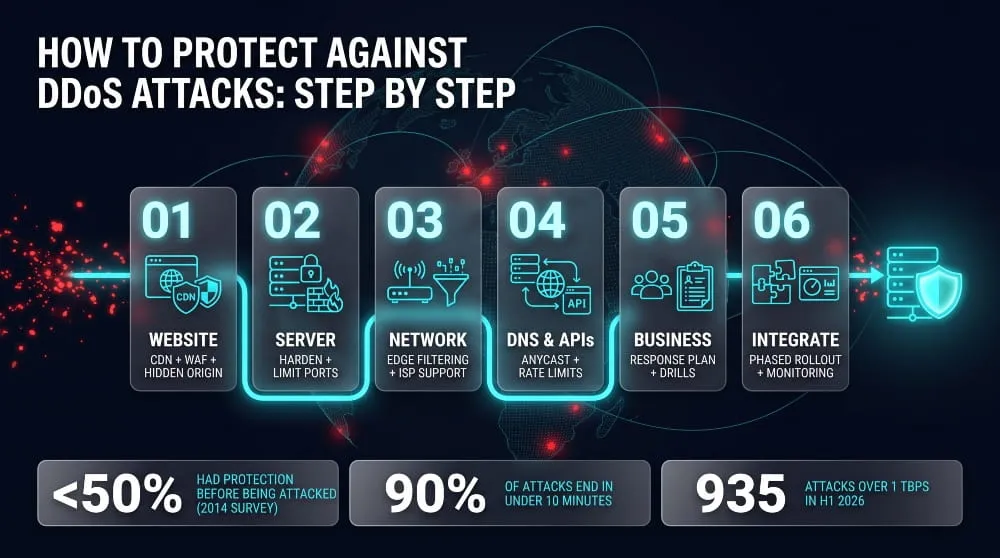
To protect against DDoS attacks, put a scalable filtering layer in front of your public assets, harden and hide the systems behind it, and have a response plan ready before an attack starts. No single control is enough. Each step below covers a different layer, and together they leave an attacker with far fewer weak points.
Protect Your Website from DDoS
The most effective way to protect a website from DDoS is to place it behind a CDN or reverse proxy that absorbs traffic before it reaches your server. Then lock the origin down so it only accepts connections from that proxy’s IP ranges. If attackers can still reach your real server address directly, they can bypass the protection entirely, so keep that address private and replace it if it has leaked.
Cache static content at the edge so repeat requests never touch your server, and enable a web application firewall with rate limits on expensive pages like login, search, and checkout. Set up alerts for traffic spikes and slow response times so you know about an attack within minutes, not after customers complain.
Protect Your Server from DDoS
To protect a server from DDoS, reduce what it exposes and give it room to absorb pressure. Patch the operating system, close unused ports and services, and use a host firewall to allow only the traffic the server needs. Restrict administrative access, such as SSH, to a VPN or a short list of trusted addresses.
At the connection level, enable SYN cookies, set sensible connection limits and timeouts, and put a load balancer in front of multiple instances so one machine is not a single point of failure. Autoscaling can add headroom for legitimate surges. Be realistic about the limit: a hardened server can survive small attacks, but a large flood has to be stopped upstream, before it reaches the machine.
Protect Your Network from DoS and DDoS Attacks
Network protection starts at the edge, where you can filter traffic before it consumes your bandwidth. Apply ingress filtering to drop packets with spoofed source addresses, block protocols you don’t use, and rate-limit ICMP and UDP. Shut down open services that attackers can abuse as reflectors, such as open DNS resolvers.
Know your capacity and use flow monitoring to spot departures from it. Agree in advance with your internet provider on how they will help during an attack, including upstream filtering. Ask what blackholing means for you before you rely on it: it stops the flood by dropping all traffic to the targeted address, which finishes the attacker’s job for them. Multiple upstream links add redundancy if one is saturated.
Protect Your DNS and APIs from DDoS
DNS and APIs need their own protection because they are critical to everything else you run. For DNS, use an anycast-based provider, add a second DNS provider for redundancy, and make sure none of your resolvers answer queries from the open internet.
For APIs, require authentication, issue per-client keys, and enforce rate limits and quotas so one caller cannot consume everything. Cap payload sizes and query complexity, cache responses where it is safe, and put the API behind a gateway that can throttle abusive clients. Add timeouts and circuit breakers so a flood of slow requests does not take down the services behind it.
Protect Yourself and Your Business from DDoS
For a business, protection is as much about preparation as it is about technology. Write a short response runbook that names who decides, who talks to your provider and your internet service provider, and who communicates with customers. Record your normal traffic levels so you can recognize an attack, and rehearse the plan at least once. Preparation rarely happens in advance: in a DDoS Impact Survey of nearly 300 North American companies, fewer than half of respondents had DDoS protection in place before an attack. That survey is dated, but the lesson holds: preparing is far cheaper than improvising.
For individuals, such as streamers and gamers, the main risk is a leaked home IP address. Keep your IP private, avoid peer-to-peer connections with strangers where you can, and ask your internet provider to assign a new address if you are targeted.
Integrating DDoS Protection with Existing Infrastructure
Add DDoS protection in phases so you don’t break production traffic. First, list every internet-facing asset, including websites, APIs, DNS, mail, and VPN gateways, because anything you miss stays exposed. Then onboard the service in monitor-only mode, if it offers one, to learn your baseline and tune thresholds before blocking anything.
Next, route traffic through the protection layer using DNS or BGP changes. Confirm that your origin still receives the real client IP address, usually through a forwarded header, so your logs and rate limits keep working. Check that TLS certificates are valid end to end, and restrict your origin firewall to the provider’s address ranges. Finally, send logs and alerts to your existing monitoring tools and test the setup with an authorized simulation, so the first time you see it working isn’t a real attack.
DDoS Protection Best Practices and Strategy
The best DDoS protection strategy is layered, automated, and rehearsed: a scalable filtering layer, enough redundancy to survive failures, continuous monitoring, and a written plan your team has practiced. Technology alone is not enough. Most failures come from gaps in preparation, ownership, or testing, so the practices below focus on the decisions you make before an attack begins.
Building a DDoS Protection Program and Response Plan
A DDoS protection program is a documented set of assets, owners, controls, and procedures that turns a chaotic outage into a managed incident. Start with a risk assessment that lists your internet-facing assets, ranks them by business impact, and sets a target for how long each one can be down. Those targets decide how much protection each asset deserves.
Then write the response plan. It should name who declares an incident, who contacts your DDoS provider and internet service provider, who handles customer and executive communications, and the escalation path when mitigation isn’t working. Keep contact details and runbooks somewhere that does not depend on the systems under attack. Review the plan after every incident and at least once a year, and run a tabletop exercise so your team follows it the first time in a real emergency.
Redundancy, Capacity Planning and Monitoring
Redundancy means no single link, server, provider, or region can take you offline. Use multiple upstream connections where possible, spread workloads across locations, and run a secondary DNS provider. Capacity planning then tells you how much headroom you have, so measure your normal and peak traffic, know your bandwidth ceiling, and confirm that your protection service can absorb attacks well above both.
Attack scale keeps rising, so assumptions made a few years ago may no longer hold. Cloudflare mitigated 805 network-layer attacks exceeding 1 Tbps in the second quarter of 2026, more than six times the previous quarter. Monitoring ties it all together. Track traffic volume, request rates, error rates, and latency; set alerts for deviations from your baseline; and ensure alerts reach someone who can act at any hour.
Techniques and Methods That Work Against Large-Scale Attacks
Large-scale attacks are stopped by capacity and automation, not by clever manual tuning. The best techniques share a few traits.
Upstream scrubbing and anycast distribution spread and absorb floods across a network far larger than your own. Always-on mitigation removes the delay between detection and defense, which matters because attacks can peak within seconds. Automated detection and rule deployment keep response times far shorter than a human could achieve. Layer 7 controls, including rate limiting, bot detection, and a web application firewall, handle the low-bandwidth floods that volumetric defenses miss.
Hiding your origin infrastructure behind a proxy or CDN also removes the easiest target. Finally, assume attackers will adapt. Multi-vector attacks combine volumetric, protocol, and application floods, and shift tactics mid-attack, so layered defenses and regular rule reviews matter more than any single control.
Compliance and Risk Considerations
DDoS attacks are an availability risk, and most security and resilience frameworks expect you to manage availability. Standards such as ISO 27001 and the SOC 2 availability criterion require you to identify, mitigate, and test against threats to uptime. In regulated sectors, the expectations are stricter. For example, EU financial entities fall under the Digital Operational Resilience Act (DORA), which requires ICT risk management and resilience testing.
Contracts matter too. If you promise customers an uptime service-level agreement, a DDoS outage can trigger credits or penalties, and your vendors’ SLAs should align with your commitments. Document your controls, keep records of tests and incidents, and review your provider’s certifications and data-handling terms, especially if traffic routes through their network. Which obligations apply depends on your industry and region, so confirm specifics with your compliance or legal team.
How to Choose DDoS Protection Services and Solutions
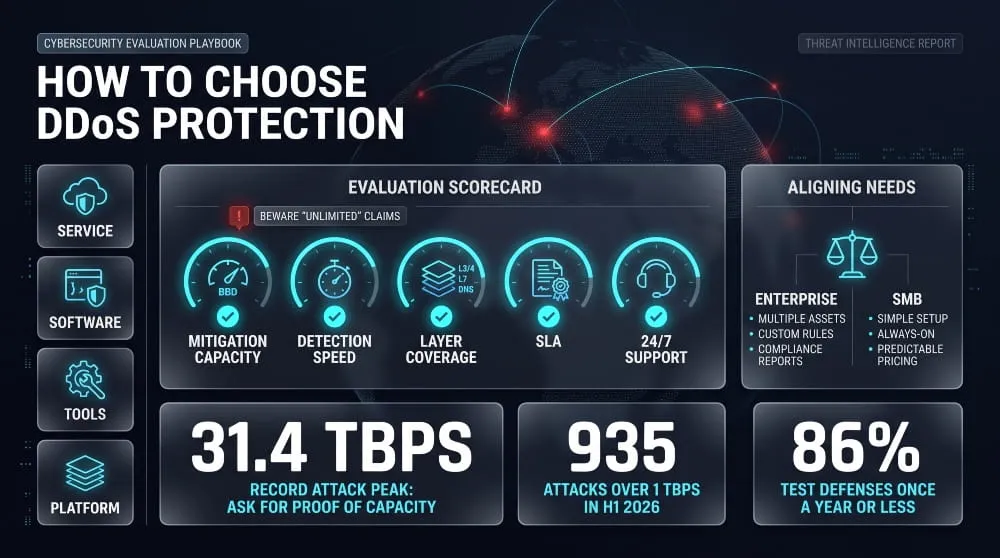
To choose DDoS protection, match the solution to the assets you need to keep online, then compare providers on mitigation capacity, detection and response speed, coverage across network and application layers, contractual guarantees, and support quality. The product label matters less than what it can actually absorb and how fast it reacts. Define your requirements first, then test vendors against them instead of comparing feature lists.
Services vs. Software vs. Tools vs. Platforms
These four terms describe different things, and mixing them up can lead you to buy the wrong protection.
A provider runs a DDoS protection service: they route your traffic through their network and absorb and filter the attack on their infrastructure. Software (including hardware appliances) runs on your servers or network, so it can only handle what your connection can carry. Tools are narrower utilities, such as traffic analyzers, rate limiters, or testing kits, that support a defense but cannot stop a large flood alone. Platforms bundle DDoS protection with related controls, such as a web application firewall, bot management, DNS, and a CDN, in one console. For internet-facing assets, a service or platform is usually the foundation, with software and tools playing supporting roles.
Key Evaluation Criteria (Mitigation Capacity, Detection Speed, Layer Coverage, SLAs, Support)
Mitigation capacity is the first filter. A provider’s network must be far larger than the biggest attacks you could face. Cloudflare recently reported mitigating a record attack that peaked at 31.4 Tbps and 200 million requests per second. Ask for the provider’s total network capacity and the largest attack it has handled, not a vague claim of “unlimited” protection.
Detection and mitigation speed comes next. Look for automated, always-on mitigation with a stated time-to-mitigate, not a process that waits for a person to act.
Layer coverage should include volumetric and network-layer attacks (Layers 3 and 4) as well as application-layer (Layer 7) floods, plus DNS protection. A service strong at one layer and weak at another leaves a gap.
SLAs turn promises into obligations. Check what is guaranteed (uptime, mitigation time), what the remedies are, and what the exclusions say. Support matters because attacks do not follow business hours: look for 24/7 access to engineers, defined response times, and a clear escalation path. Finally, check the pricing structure, not just the price. Flat-rate and usage-based models behave very differently during a large attack, so ask whether attack traffic ever triggers overage charges.
Enterprise vs. SMB Requirements
Enterprises and SMBs need the same core protection but weigh the criteria differently. Enterprises typically need protection for entire networks and multiple assets, hybrid or on-premises options, Custom rules, integration with their security monitoring, compliance documentation, and dedicated support. SMBs usually need simple onboarding, automated always-on protection that works without a security team, predictable pricing, and clear support for a handful of websites or applications. If you lack in-house security staff, favor a managed or fully automated service over one that expects you to tune rules yourself.
Outsourced vs. In-House: Pros and Cons
Outsourcing to a provider gives you scale and expertise that are hard to build alone: capacity beyond your own bandwidth, round-the-clock monitoring, and faster time to protection. The costs are recurring fees, dependence on a third party, and less direct control over rules and data.
An in-house approach (on-premises appliances and your own team) offers full control, low-latency filtering, and data that stays inside your environment. But your internet link caps it, requires specialist staff and upkeep, and cannot absorb large floods on its own. For most organizations, the practical answer is a hybrid: outsource volumetric defense and keep application-specific tuning in-house.
Questions to Ask Any Provider
Use the same questions with every vendor so the answers are comparable:
- What is your total mitigation capacity, and what is the largest attack you have mitigated?
- How quickly do you detect an attack and start mitigation, and is it automatic?
- Which layers do you cover (3/4, 7, DNS), and what is excluded?
- Is protection always on, or on demand, and what is the switchover time?
- How does pricing work during a large attack, and are there overage or surge fees?
- What do the SLA terms guarantee, and what remedies apply if you miss them?
- Do you offer 24/7 engineer-level support, and what are the response times?
- Can I test the protection, and how do you handle false positives?
- How does onboarding work, and what changes in my traffic routing or latency?
- What data do you log or inspect, and how is it stored and protected?
How to Test and Verify Your DDoS Protection
You test DDoS protection by confirming that your traffic really flows through the protection layer, then running controlled, authorized simulations and measuring how quickly attacks are detected and mitigated. Having a service switched on is not the same as being protected. Testing helps you find gaps before an attacker does.
Why Testing Matters
Testing matters because DDoS protection can be deployed and still fail, usually through configuration gaps rather than a lack of capacity. A new subdomain may bypass the proxy, a rule may be too loose, a threshold may be tuned for last year’s traffic, or an attack type may not be covered at all. Infrastructure also changes constantly, so a setup that worked at launch can quietly drift.
Most teams check far too rarely. In a survey of about 300 security leaders by DDoS-testing vendor MazeBolt, 86% said they test their DDoS defenses once a year or less. The source sells testing, so read the figure as indicative, but the pattern is believable: protection that is checked once a year is trusted for the other 364 days—Re-test after any major infrastructure change, provider switch, or real incident.
How to Check Whether a Site Has DDoS Protection
You can check a site’s protection from the outside in a few minutes, using four signals:
- DNS records: Look up the site’s IP addresses and name servers. If they resolve to a CDN or DDoS protection provider’s network, traffic is likely being proxied.
- HTTP headers: Response headers often reveal a CDN or WAF in the path, through, server, via, or caching headers.
- IP ownership: A WHOIS or ASN lookup on the IP shows whether it belongs to a protection provider or to a hosting company.
- Challenge pages: Interstitial “checking your browser” pages are a sign that bot filtering is active.
These checks only show that a protection layer exists, not that it is working. The most important follow-up is on your own infrastructure: confirm that your origin server cannot be reached directly. If old DNS records, unproxied subdomains, or mail servers expose your real server IP, an attacker can bypass the protection and flood the origin. Lock the origin firewall to your provider’s address ranges, and check it periodically.
Testing Effectiveness Safely (Scope, Authorization, Metrics)
Test DDoS protection only with explicit authorization, a defined scope, and a plan to stop the test immediately if something goes wrong.
Authorization comes first. Only test systems you own or are formally permitted to test. Notify your DDoS provider, hosting company, and internet service provider in advance, since a simulated flood can trigger their abuse systems or breach their terms. Never run tests against third-party sites, and avoid public “stresser” or “booter” services, which are often illegal and unsafe.
Define scope and method. Decide which assets, attack types, and traffic levels are in scope. Start in a staging environment or during an off-peak window, begin with low volumes, and ramp up gradually. Prefer controlled simulation tools or vendors that run non-disruptive tests, and agree in advance on a kill switch and a rollback plan. Tell internal teams the test is happening so nobody mistakes it for a real incident.
Measure what matters. A good test produces numbers you can compare over time:
- Time to detect: how long it took to flag the attack.
- Time to mitigate: how long before malicious traffic was actually being filtered.
- Traffic handled: the peak volume and request rate absorbed without impact.
- False positives: how many legitimate requests were blocked or challenged.
- User impact: error rates, latency, and origin load during the test.
- Recovery time: how long services took to return to normal afterward.
Record the results, fix the gaps, and repeat the test. Run it again after each change to confirm the fix worked.
Frequently Asked Questions (FAQ)
Does DDoS protection actually work?
Yes, when properly configured, always on, and tested. Most attacks are small and short enough for automated systems to handle without anyone noticing. Cloudflare reported that about 90% of the network-layer attacks it mitigated in the first half of 2026 ended in under 10 minutes. Protection fails mainly through gaps like exposed origin servers, outdated rules, or untested coverage, so verify it regularly instead of assuming it works.
Is DDoS protection worth it for a small business?
Yes, if your business depends on a website, online store, or app being reachable. Small businesses are easier to knock offline and usually have no security team to respond so that an outage can cost more in proportion. Many providers include basic always-on protection in entry-level plans, which often makes it inexpensive compared with even a day of lost sales.
What is the difference between DoS and DDoS protection?
DoS protection defends against attacks from a single source, while DDoS protection defends against attacks from many sources at once. You can often stop a single-source flood by blocking one address. A distributed attack uses thousands of compromised devices, so defending against it requires large-scale filtering that can tell attack traffic from real users. In practice, people often use the terms interchangeably.
Can a firewall or WAF stop a DDoS attack?
A firewall or WAF can stop small and application-layer attacks, but not a large flood. Both devices must receive the traffic before they can filter it, so a volumetric attack can saturate your connection before they can act. They work best behind upstream DDoS protection, which absorbs the volume while the firewall and WAF handle finer filtering.
What layers of attack does DDoS protection cover?
Complete DDoS protection covers three areas: volumetric and network-layer attacks (Layers 3 and 4, including UDP and SYN floods), application-layer attacks (Layer 7, such as HTTP request floods), and DNS attacks. Coverage varies by provider, and some cover only part of this range. Always confirm which layers are included, and ask about protocol-specific services like APIs, mail, and SSH.
Cloud, on-premises, or hybrid: which is right for me?
Cloud-based protection suits most organizations because it offers large capacity and fast setup. On-premises suits organizations that need tight data control and low-latency filtering, but it’s limited by your internet link. Hybrid combines both and fits larger organizations with substantial infrastructure and strict uptime needs. If you’re unsure, start with always-on cloud protection and add local controls as your needs grow.
How do I know if my site is protected?
Look up your domain’s DNS records and IP ownership to see whether traffic goes through a protection provider, and check the response headers for signs of a CDN or WAF. Then confirm that your origin server rejects direct connections that don’t come from the provider. The final proof is a controlled, authorized test that measures how quickly you detect and mitigate an attack.
What should I do during a live attack?
Stay calm and follow your plan:
- Confirm it is an attack, not a legitimate traffic surge, by checking monitoring and logs.
- Contact your DDoS provider and internet service provider, and activate or escalate mitigation.
- If you don’t have protection, ask your provider about emergency onboarding.
- Tighten rate limits and block obvious malicious sources, and keep your origin address private.
- Keep stakeholders and customers informed through a channel that doesn’t depend on the affected systems.
- After the attack, collect logs, review what worked, and update your response plan.

Botnet Groups | How Mirai, Emotet, QakBot, Aisuru and Other Botnets Work (and How to Detect and Stop Them)
Botnet groups are networks of hacked devices run by criminal operators, who use them to steal data, spread ransomware, and launch DDoS attacks. Each group works…
Read more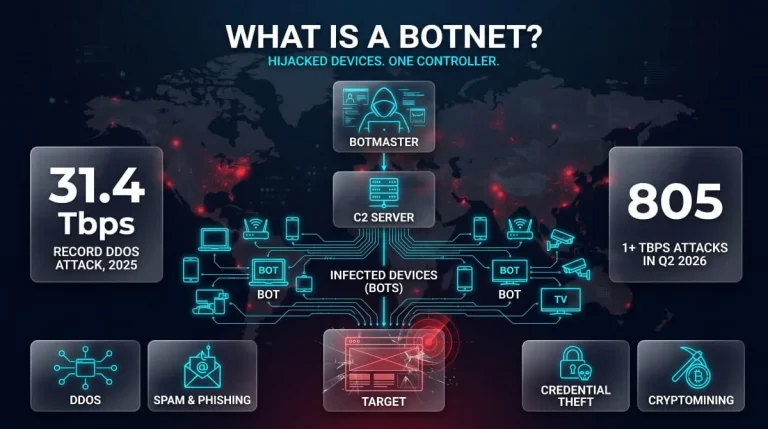
What Is a Botnet? Definition, How Botnets Work, Types, Examples & How to Stay Protected
A botnet is a network of internet-connected devices, such as computers, phones, routers, and cameras, infected with malware and secretly controlled by an attacker. The attacker,…
Read more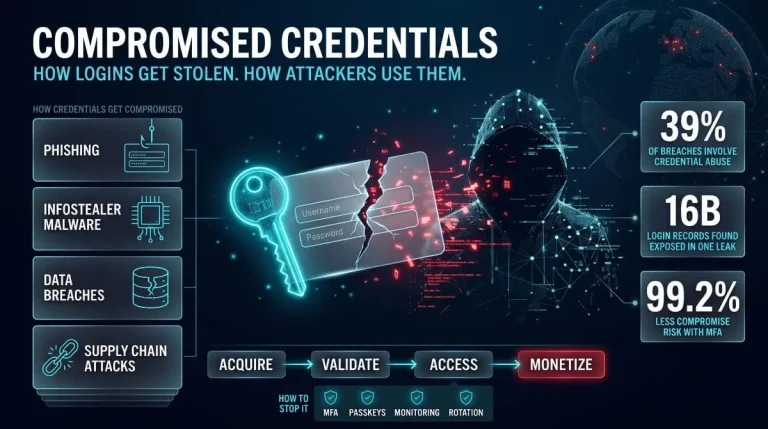
Compromised Credentials | Definition, Attack Methods, Detection, and Response (Complete Guide)
Compromised credentials are login details, such as usernames, passwords, session tokens, or API keys, that an unauthorized party has stolen, leaked, or obtained, so the account…
Read more