
What Is a Keylogger? Definition, Types, Detection and Removal (Complete 2026 Guide)
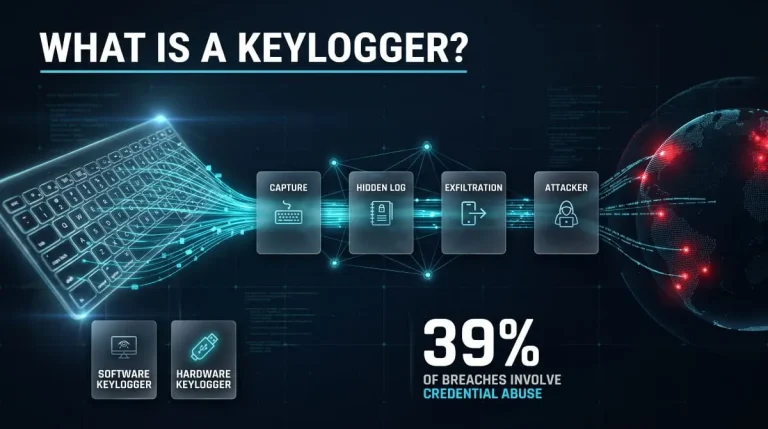
A keylogger is software or hardware that records every keystroke typed on a device, usually without the user knowing. Attackers use keyloggers to steal passwords, card numbers, and private messages, while some employers and parents use them for legitimate monitoring.
What Is a Keylogger? (Definition and Meaning)
A keylogger is a tool that secretly logs what a person types. The sections below cover what that means in practice, what a keylogger collects, and where you are most likely to run into one.
Keylogger Definition in Plain English
A keylogger is a program or physical device that monitors the keyboard and records every keypress. Think of it as a hidden stenographer sitting between your fingers and the screen. The word is short for keystroke logger, and the activity itself is called keylogging. Whether a keylogger is harmful depends entirely on who installed it and whether the device owner agreed to it.
Keylogger vs Keystroke Logger: Are They the Same?
Yes, keylogger and keystroke logger mean the same thing. Keylogger is the common shorthand, and you will also see key logger, keystroke recorder, and keyboard logger used for the same tools. Keylogging describes capturing keystrokes, while a keylogger is the software or device that does it.
What Data Does a Keylogger Capture?
A keylogger captures the characters you type: usernames, passwords, search queries, emails, chat messages, and card or bank details entered into forms. Most also record a timestamp and the name of the active window or app, which lets an attacker see which password belongs to which account. Many modern keyloggers add screenshots and clipboard contents. A keylogger cannot see what you do on a different device, and it doesn’t capture a fingerprint, face scan, or passkey approval because none of those involve typing.
What Does a Keylogger Do? (Purpose and Capabilities)
A keylogger records keystrokes, stores them in a log, and passes that log to whoever controls it. In criminal hands, attackers use it for credential theft, financial fraud, and espionage. In legitimate settings, the same capability supports parental controls, workplace compliance monitoring, digital forensics, and usability research. The technology is identical in both cases. Consent and intent separate them.
Keylogger Examples at a Glance
Keyloggers range from a small USB adapter plugged in behind a desktop to full malware families. Snake Keylogger is a . NET-based stealer that logs keystrokes and screenshots and usually arrives as a phishing attachment. Agent Tesla is a commercial-style remote access trojan with keylogging built in. Zeus was a banking trojan that combined keylogging with web form capture. On the legitimate side, parental-control and employee-monitoring apps include keystroke logging as a feature.
How Do Keyloggers Work?
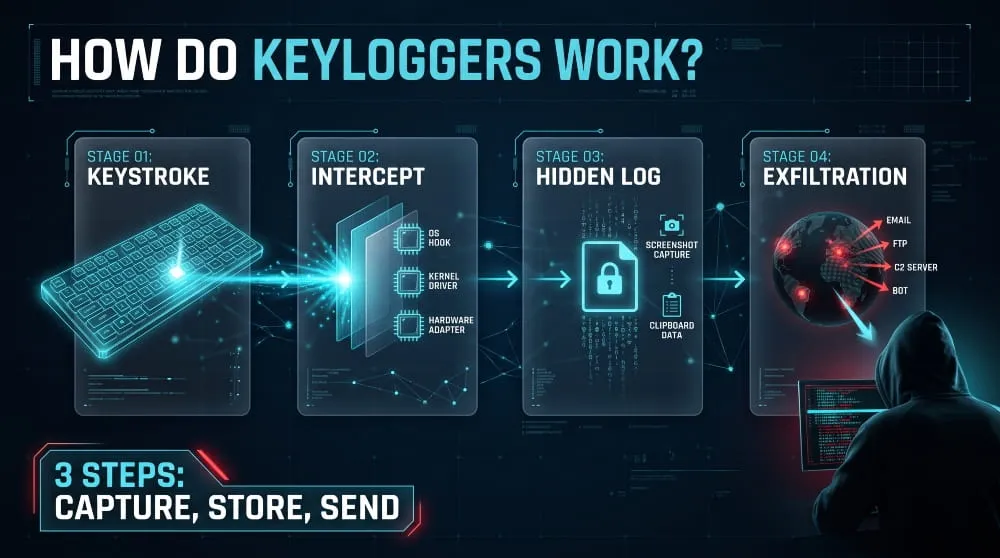
A keylogger works by intercepting a keystroke after you press a key but before the application needs it to finish processing, then copying and saving it. The interception method differs between software and hardware.
How Keystrokes Get Captured (Hooks, Drivers, Hardware Interception)
Software keyloggers capture keystrokes in three main ways. Some register a keyboard hook with the operating system to receive notifications for every key event. Others repeatedly poll the keyboard state and note which keys are down. Kernel-level keyloggers install a driver that sits in the keyboard’s data path. Browser-based keyloggers use JavaScript listeners on a web page or a malicious extension. Hardware keyloggers skip the operating system entirely and record the signal between the keyboard and the computer.
Where the Logged Data Is Stored and Sent
A keylogger first writes captured keystrokes to a local file, often hidden or encrypted, then sends it to the operator. Malware keyloggers typically send logs by email, FTP, an HTTP request to a command-and-control server, or a messaging bot. Commercial monitoring tools upload logs to an online dashboard. Hardware keyloggers store data in internal memory, so attackers must retrieve the device unless a wireless model transmits logs over Wi-Fi or Bluetooth.
Keylogger Extras: Screenshots, Clipboard and Remote Access
Many keyloggers do more than record keys. Screenshot capture, clipboard monitoring, and active-window tracking close gaps left by raw keystrokes, such as a password pasted from a manager or entered with an on-screen keyboard. Some keyloggers also include remote access features, letting the operator browse files or control the machine. That overlap is why security teams often treat keyloggers as part of broader infostealer and spyware families.
Types of Keyloggers
Keyloggers fall into two main families, software and hardware, with wireless, remote, and acoustic variants built on the same idea. The right type to worry about depends on whether an attacker can reach your device remotely or physically.

Software Keyloggers (Kernel-Level, Browser-Based, Application-Level)
Software keyloggers run as programs or code on the target system. Application-level keyloggers run with normal user privileges and use standard hooks, which makes them common and relatively easy to find. Kernel-level keyloggers run as drivers or rootkits with deep system access, making them harder to detect and remove. Browser-based keyloggers capture what you type into web pages through a malicious extension or script injected into a compromised site, such as a checkout page.
Hardware Keyloggers (USB, Inline and Keyboard-Embedded)
A hardware keylogger is a physical device that records keystrokes without any software on the target computer. The most common form is a small inline adapter plugged between a keyboard and a USB or PS/2 port. Others are built into a keyboard, a cable, or a charger-style accessory. Because they operate below the operating system, antivirus software cannot see them, but they still require physical access to the machine.
Wireless and Remote Keyloggers
A remote keylogger is software that sends logs to an operator over the internet. In contrast, a wireless keylogger is a hardware device that transmits logs over Wi-Fi or Bluetooth or intercepts a wireless keyboard’s radio signal. Researchers have shown that some budget wireless keyboards transmit keystrokes with weak or no encryption, allowing nearby attackers to read what you type. Both types let the attacker collect data without returning to the target.
Acoustic and Other Advanced Keyloggers
Acoustic keyloggers infer what you type from the sound of your keystrokes, captured by a nearby microphone and analyzed with machine-learning models trained on typing noise. Researchers have demonstrated this with high accuracy under lab conditions. Other advanced approaches read keystrokes from electromagnetic emissions, from a phone’s motion sensors resting on the same desk, or from compromised keyboard firmware. These attacks are rare, but they show that keylogging doesn’t always require malware.
Comparison Table: Software vs Hardware Keyloggers
Software keyloggers are easier to deploy remotely, while hardware keyloggers need physical access but avoid software detection. The table compares the two across the factors that matter most for defense.
| Factor | Software Keylogger | Hardware Keylogger |
|---|---|---|
| How it gets installed | Phishing, trojans, malicious downloads or extensions | Plugged in or built into a keyboard or cable |
| Access required | Remote | Physical |
| Visible to antivirus | Often, if known | No |
| Typical detection method | Process review and security scans | Physical inspection of cables and ports |
| Removal | Uninstall or reinstall the operating system | Unplug or replace the device |
| Common use | Credential theft, monitoring software | Targeted theft on shared or public computers |
Is a Keylogger Malware, Spyware or a Virus?
A keylogger is a type of spyware and counts as malware when installed without the device owner’s knowledge or consent. It is not a virus in the strict sense, because it does not copy itself from file to file.
Keylogger as a Type of Malware
Malware is software built to damage a system or steal from it, and a covert keylogger fits that definition because it collects data the user never agreed to share. CISA and NIST both describe keylogging similarly: capturing keystrokes without the user’s awareness. The same program a parent or employer installs openly on a device they own is monitoring software rather than malware.
Keylogger vs Spyware: What’s the Difference?
Spyware is the broader category of software that gathers information about a user without their knowledge, including browsing history, location, screenshots, and microphone audio. A keylogger is spyware that focuses on keystrokes. Every keylogger is spyware, but not every spyware program logs keys. In practice, the line has blurred, since most modern keyloggers also take screenshots and collect other data.
Keylogger vs Trojan vs Rootkit vs Virus
These terms describe different things. A virus spreads by infecting other files; a trojan disguises itself as something useful; a rootkit hides malicious activity from the operating system; and a keylogger is defined by what it does: record keystrokes. They often work together: a trojan delivers a keylogger, and a rootkit conceals it. A keylogger is not a virus because it does not self-replicate.
Are Keyloggers Legal? Legitimate vs Malicious Use
Owning or selling keylogging software is legal in many countries, but installing it on a device you do not own or recording someone without their consent is illegal in most jurisdictions. Depending on the country, it can fall under wiretapping, computer misuse, or privacy laws. Employers usually may monitor company-owned devices when staff have been told, and parents generally may monitor a minor’s device, though rules vary by location. This is general information, not legal advice.
Keyloggers in Cybersecurity: Attacks and Real-World Risks
In cybersecurity, a keylogger is a credential-harvesting tool: attackers capture login details as they are typed and then sign in as the victim. That makes a keylogger a quiet first step toward account takeover, fraud, and larger breaches.

How Keylogger Attacks Happen (Phishing, Trojans, Physical Access)
Most keylogger attacks start with a lure. A phishing email delivers a malicious attachment or link, a cracked-software installer carries a Trojan with built-in keylogging, or a compromised website injects a script that records form input. Malicious browser extensions are another route. Hardware keylogger attacks require physical access, so they typically target shared office computers, public terminals, or unattended devices.
Famous Keylogger Attacks and Known Families
In 2004, criminals accessed Sumitomo Mitsui Bank’s London offices and planted hardware keyloggers to capture credentials, aiming to transfer roughly £220 million before the plot was stopped. On the malware side, the Zeus banking trojan paired keylogging with web form capture and became one of the most widespread financial threats of its time. Snake Keylogger and Agent Tesla remain common today, and our guide to infostealer malware covers them in more detail.
What Attackers Do With Stolen Keystrokes (Credential Theft, Fraud, Account Takeover)
Attackers filter keylogger output for logins, card numbers, and recovery details, then use them to take over accounts, commit bank or payment fraud, or access business systems. Stolen credentials matter at scale: Verizon’s 2026 Data Breach Investigations Report found credential abuse somewhere in the attack chain of 39% of breaches. Logs are also sold or traded in underground marketplaces and chat channels, so the person who planted the keylogger often isn’t the one who uses the data.
Dangers of Keyloggers for Individuals and Businesses
For individuals, the danger includes emptied bank accounts, hijacked email and social media, identity theft, and exposed private messages. For businesses, one infected employee device can leak VPN, email, and cloud logins, opening the door to data theft or ransomware. Keyloggers are dangerous mainly because they are silent: they cause no obvious damage so that they can run for weeks before anyone notices.
Signs You Have a Keylogger
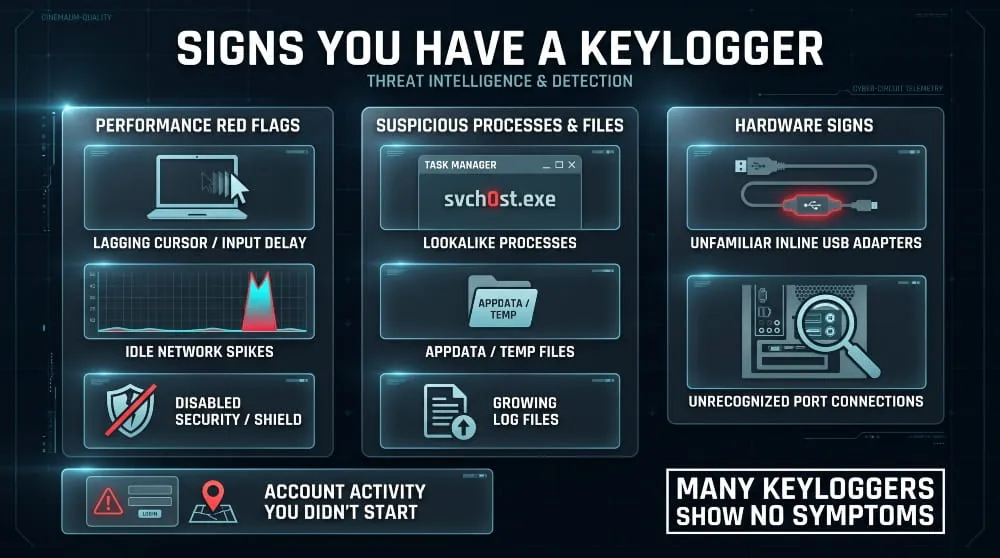
The most reliable signs of a keylogger are unexplained account activity, unfamiliar programs, and noticeable typing lag, but many keyloggers show no symptoms at all. Absence of symptoms is therefore not proof of safety.
Performance and Behavior Red Flags
Behavior that can point to a software keylogger includes delayed or missing characters while typing, unexplained slowdowns, and high network activity. At the same time, the device is idle, security software turns itself off, and browser extensions you don’t remember adding. The strongest signal is outside the device: login alerts, password-reset emails, or transactions you didn’t make.
Suspicious Processes and Files (Task Manager Names)
There is no single keylogger process name, because malware picks names that blend in. Warning signs in Task Manager include processes that imitate genuine Windows names with small spelling changes, programs with no publisher or description, and executables running from user-writable folders such as AppData, Temp, or ProgramData instead of the system folder. Hidden log files that grow steadily while you type are another clue.
Signs of a Hardware Keylogger
A hardware keylogger shows up physically, not in software. Look for an unfamiliar adapter or extension between the keyboard and the computer, a connector that looks bulkier than it should, a replaced keyboard cable, or an unrecognized USB device. On shared or public computers, check the ports at the back of the machine, where these devices are easiest to hide.
How to Detect a Keylogger
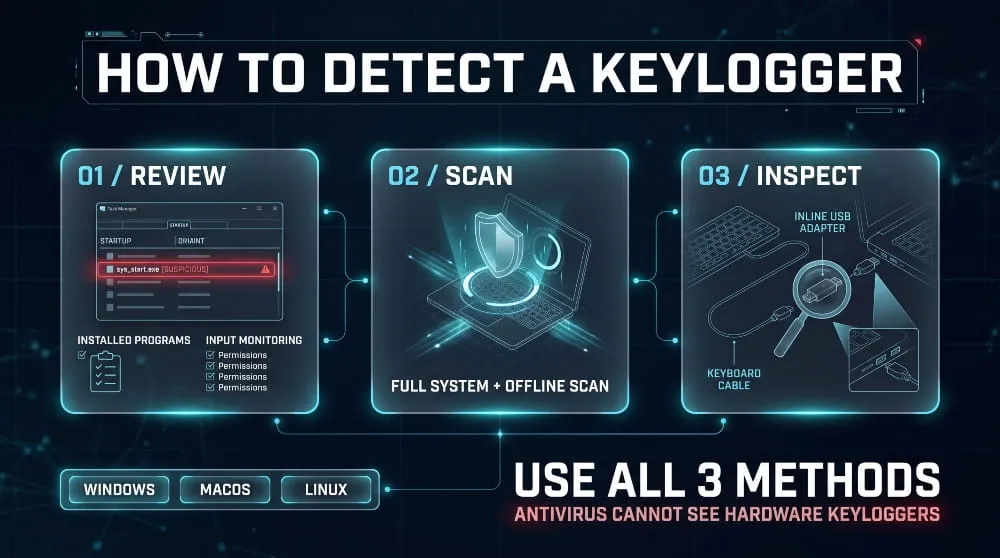
You can detect a keylogger by reviewing running processes and startup items, scanning with reputable security software, and physically inspecting cables and ports for hardware devices. Using all three methods gives much better coverage than any one alone.
Check Task Manager, Startup Items and Installed Programs
On Windows, open Task Manager and review the Processes and Startup apps tabs, then check Settings > Apps for recently installed programs you don’t recognize. Microsoft’s Autoruns tool shows a fuller list of what launches at startup. On a Mac, review Activity Monitor and Login Items, then open Privacy & Security and check the Input Monitoring and Accessibility lists, since a keylogger needs those permissions. Any unknown app with access is a red flag.
Run a Keylogger Scanner or Detector
A keylogger scanner or detector is an anti-malware tool that looks for known keylogger signatures and suspicious keyboard-hooking behavior. Run a full system scan with up-to-date security software, then use a second reputable scanner or an offline scan for a second opinion. Be careful with downloads that promise a free keylogger detector, because fake tools are a common way to spread malware. Stick to well-known vendors.
Can Antivirus Detect Keyloggers?
Antivirus can detect many keyloggers, particularly known malware families, through signatures and behavior monitoring. It is not foolproof. New or Custom builds, kernel-level keyloggers, and commercial monitoring tools classed as potentially unwanted software can slip through, and no antivirus can see a hardware keylogger. Treat antivirus as one layer of detection and pair it with manual checks.
How to Detect a Hardware Keylogger (Physical Inspection)
Detecting a hardware keylogger is a physical task. Follow the keyboard cable from the keyboard to the computer, look for any inline adapter, and check the back panel and any docking station. Some devices show up as an extra USB device in Device Manager, but many do not appear at all. If you suspect a keyboard with a built-in module, try a different keyboard on a different computer and compare behavior.
Detection on Windows, Mac and Linux, Briefly
On Windows, use Task Manager, Autoruns, and a full Microsoft Defender Offline scan. On macOS, review Activity Monitor, Login Items, and the Input Monitoring permission list. On Linux, list processes with ps or top, review systemd services, cron jobs and autostart entries, and check which processes are reading input devices. Rootkit scanners such as chkrootkit and rkhunter add another check for hidden kernel-level tools.
How to Remove a Keylogger
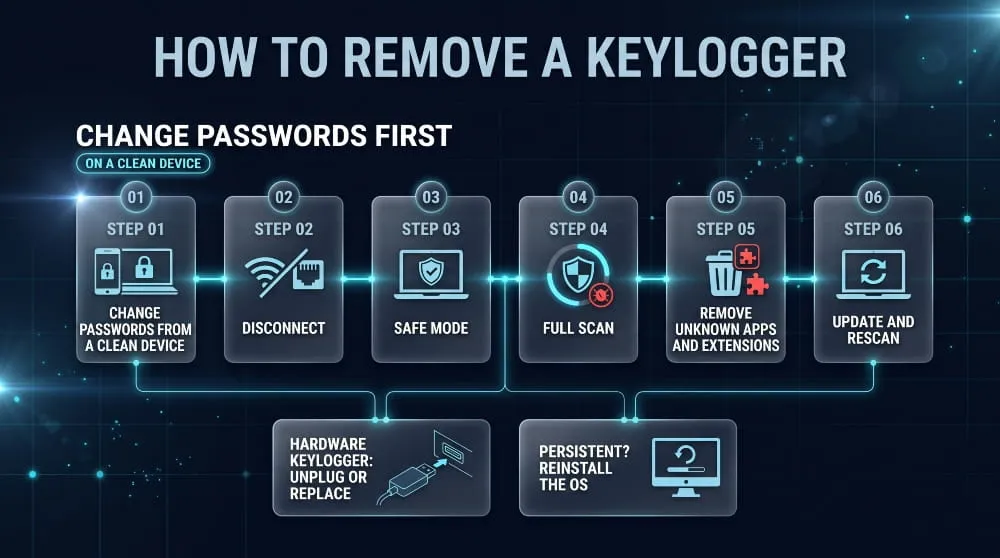
To remove a software keylogger, disconnect from the internet, run a full scan in Safe Mode, uninstall anything unfamiliar, then change your passwords from a clean device. To remove a hardware keylogger, unplug it or replace it.
Step-by-Step Software Keylogger Removal
- From a different, clean device, change the passwords for your email, bank, and other key accounts, because the keylogger would capture new passwords typed on the infected machine.
- Disconnect the infected device from Wi-Fi and Ethernet so it cannot send more data.
- Restart in Safe Mode, so most malware doesn’t load.
- Run a full scan with updated security software and quarantine everything it finds.
- Remove unknown programs, browser extensions, and startup entries, and revoke any Input Monitoring or Accessibility permissions you did not grant.
- Update the operating system and apps, restart, and scan again. If the keylogger keeps returning, back up personal files and reinstall the operating system.
Removing a Hardware Keylogger
Removing a hardware keylogger means unplugging the device or replacing the keyboard or cable it’s attached to. No software cleanup is needed, because the device is separate from the operating system. Treat everything typed through that connection as compromised, and if it happened on a work machine, report it to your IT or security team so they can check for other tampered devices.
Does a Factory Reset Remove a Keylogger?
A factory reset usually removes a software keylogger because it wipes the operating system and installed apps. It won’t remove a hardware keylogger, and restoring from a backup can bring back an infected file. After a reset, reinstall apps from official sources and avoid restoring files you do not trust. Rare firmware-level infections may survive a reset.
What to Do Immediately After Removal (Change Passwords, Enable MFA, Check Accounts)
After removal, assume everything typed on the device during the infection was exposed. Change passwords starting with email, banking, your password manager, and work accounts, using a clean device, and sign out of all active sessions. Turn on multi-factor authentication, preferably with passkeys or a hardware security key. Review email forwarding rules, account recovery options, and recent transactions, and tell your employer or bank if their accounts were involved.
How to Protect Yourself From Keyloggers
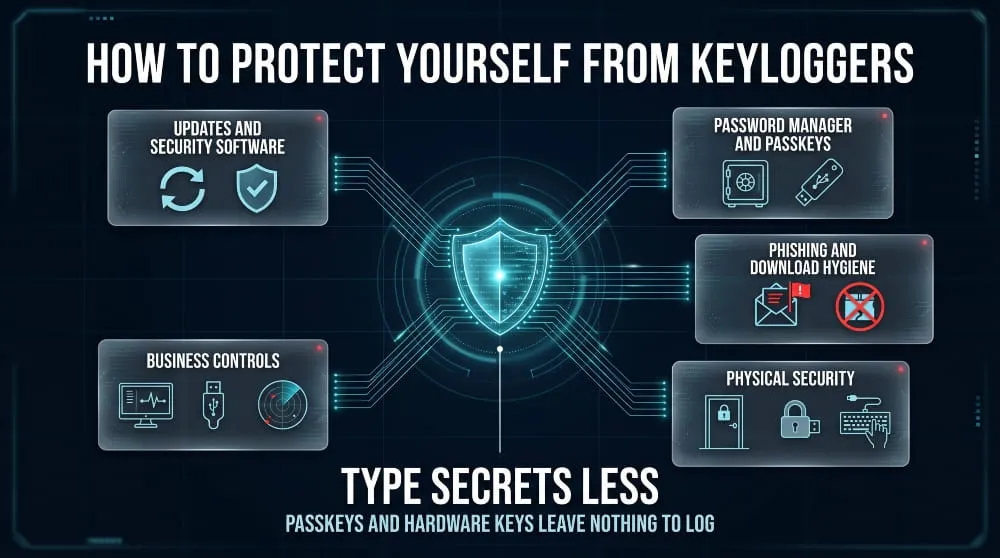
The best protection against keyloggers is to keep software updated, use reputable security software, type secrets less often, and avoid downloading or opening untrusted files. Each habit closes a different route in.
Security Software and Updates
Security software and updates block most software keyloggers. Install operating system and browser updates promptly, keep real-time protection on, and limit administrator rights to accounts that need them. Review browser extensions regularly and remove any you do not use, since extensions can read everything you type on a page.
Password Managers, MFA and Virtual Keyboards
A password manager reduces keylogging risk because it autofills credentials instead of making you type them. Multi-factor authentication helps, but a typed one-time code can still be captured, so passkeys and hardware security keys are stronger because there is nothing to type. On-screen keyboards offer limited protection, since many keyloggers also capture screenshots or mouse clicks.
Phishing and Download Hygiene
Most keylogger infections start when a user opens something. Don’t open unexpected attachments, avoid cracked or pirated software, check links before clicking, and download apps only from official stores and vendor sites. If an email pushes urgency around an invoice, delivery, or account problem, verify it through a separate channel before opening anything.
Physical Security Against Hardware Keyloggers
Physical keylogger defense is mostly about control of access. Lock offices and unattended workstations, avoid typing sensitive logins on public or shared computers, inspect cables and ports on machines you use often, and turn off unused USB ports where policy allows. Do not plug in unknown USB devices or cables, and buy keyboards from trusted sellers.
Best Practices for Businesses
Businesses should combine endpoint detection and response, application allowlisting, least-privilege access, and USB device controls with phishing-resistant MFA for administrators and other high-risk accounts. Regular awareness training helps staff spot lures. Because stolen credentials often surface outside the company network, continuous monitoring for exposed employee and customer credentials shortens the time between a leak and a response.
Already Hit by a Keylogger? Check If Your Credentials Leaked
If a keylogger ran on your device, assume the logins you typed were copied, and check whether they have already appeared in breach data or dark web sources. Speed matters, because stolen credentials are used quickly.
How Keylogger Logs End Up on the Dark Web
Keylogger and infostealer output is usually packaged into logs that list captured logins, the sites they belong to, and sometimes browser data. Operators sell or trade these logs in underground marketplaces and private channels, and buyers use them for account takeover, fraud, or to gain access to company networks. That is why a keylogger infection on one laptop can turn into a leaked credential on the dark web long after the malware has been removed. Our guide to infostealer malware explains how attackers collect and sell these logs.
How DeXpose Monitors for Exposed Credentials
DeXpose checks the places where keylogger and infostealer data ends up. The Free Darkweb Report gives an instant exposure report covering dark web markets, malware logs, and public breaches, and the Email Data Breach Scan shows whether an email address appears in known breaches and dark web sources. For organizations that want continuous coverage, breached credentials monitoring watches for exposed employee and customer credentials so your team can reset them before an attacker uses them. Run the free report today to see what has already leaked.
Frequently Asked Questions (FAQ)
Is a keylogger a virus?
No. A keylogger is spyware, not a virus, because it does not replicate itself by infecting other files. Malware such as a Trojan can still deliver it, and it can be just as damaging as a virus when it steals passwords and financial details.
Can antivirus detect keyloggers?
Often, but not always. Antivirus catches many known keyloggers through signatures and behavior analysis, but new, Custom, and kernel-level keyloggers can evade it, and hardware keyloggers are invisible to it. Combine antivirus scans with manual process review and physical inspection.
Are keyloggers illegal?
The software itself is legal to own or sell in many countries, but using one to record another person’s typing without consent is illegal in most places. Monitoring your own device, or a company device with clear notice, is generally allowed. Local law decides the details.
Do keyloggers detect copy and paste?
A basic keylogger records only keystrokes, so pasted text does not appear in its log. Many modern keyloggers add clipboard monitoring, which captures whatever you copy, including passwords pasted from a manager. Assume a full-featured keylogger can see both typed and pasted text.
How common are keyloggers?
Keylogging is very common, but it is rarely tracked as a standalone count. Many infostealers, remote access trojans, and banking trojans include it as a built-in feature, so it appears constantly in malware reporting. Hardware keyloggers are far rarer and are used mainly in targeted physical attacks.
What type of malware is a keylogger?
A keylogger is spyware. In multiple-choice questions asking which statement describes a keylogger, the correct answer describes software or hardware that records keystrokes to capture passwords and other sensitive data. In ‘which statement is not true’ questions, the false option is usually one claiming keyloggers are always software, always illegal, or always visible.

CVE 2026 | The Complete Guide to New, Critical & Actively Exploited Vulnerabilities (Updated Weekly)
CVE 2026 covers every publicly disclosed software flaw assigned a CVE-2026-NNNNN identifier this year, and it is already the largest annual list on record. This guide…
Read more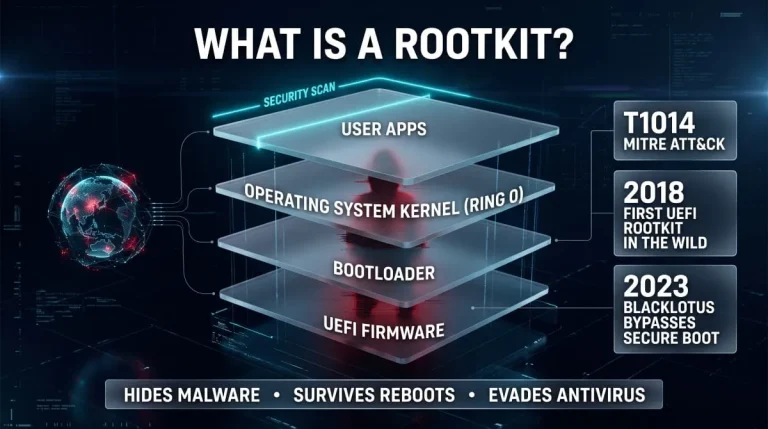
What Is a Rootkit? Definition, Types, Examples, Detection and Removal (Complete Guide)
A rootkit is malicious software that hides itself and the malware it protects by running with the highest privileges and tampering with what the operating system…
Read more
Trojan Horse Malware (Computer Trojan) | What It Is, How It Works, Types, and How to Remove It
A computer trojan is malware that disguises itself as legitimate software to trick you into running it, then quietly steals data, opens a backdoor, or installs…
Read more